NOTE: You must remove the
pedestal before wall mounting.
TV Overview
Rear Panel
Wall Mounting
It is recommended that you
consult a professional before
mounting this TV a wall.
Use VESA 400x400 wall
mount hardware.
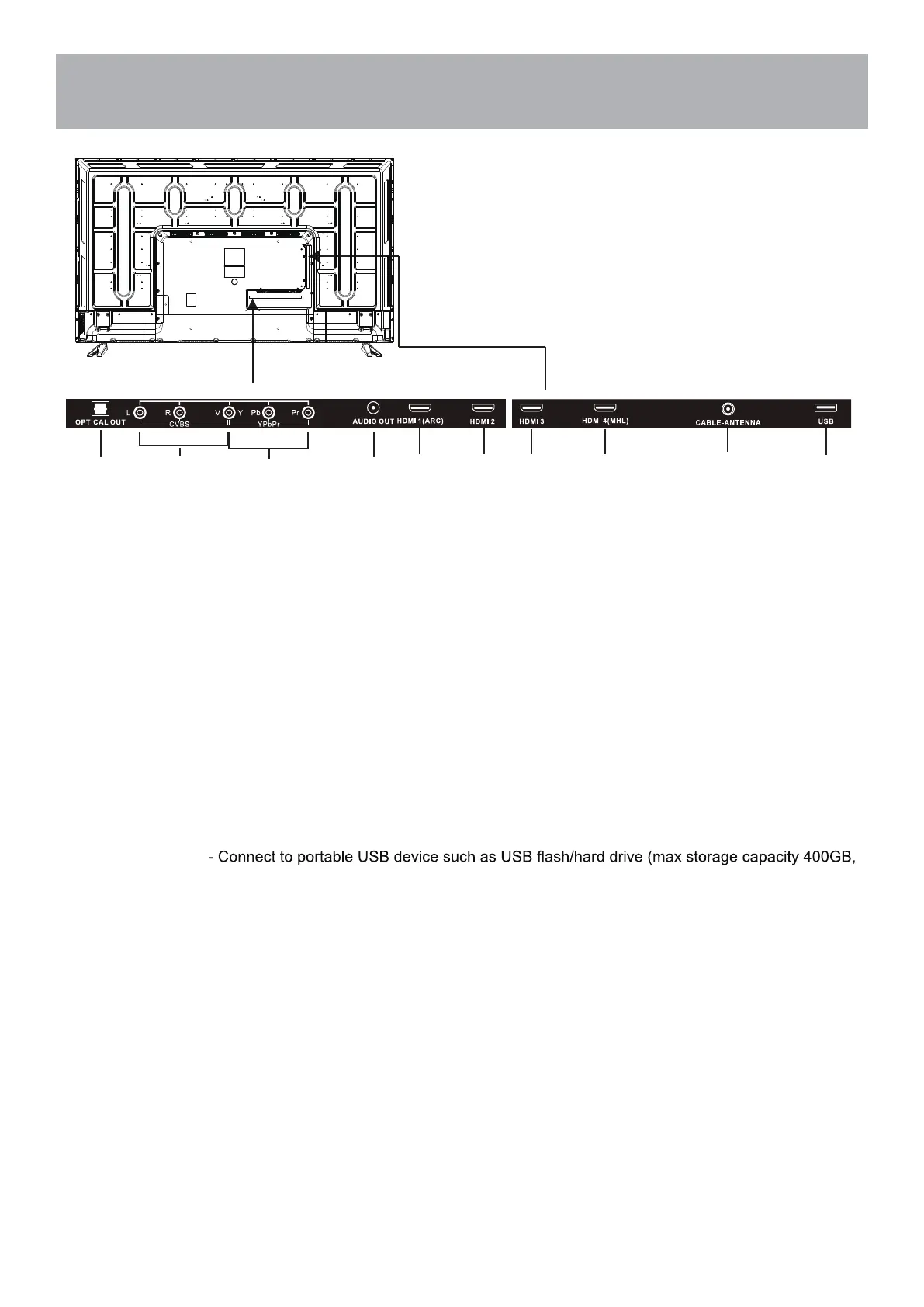
7. USB Input Port
supports MP3 and JPEG.
4. AUDIO OUT - Connect to audio receiver.
6. CABLE-ANTENNA
- Connect an antenna or cable connection for television reception.
Note: Use an outdoor antenna, cable or satellite for best reception.
1. OPTICAL OUT -
Connect to an AV Receiver for high quality digital audio.
2. AV - Connect an external device to the composite VIDEO (V) and AUDIO (L/R) out jacks found on most
equipment.
3. Component Y Pb Pr Input - Connect to an AV device that features component (Y Pb Pr) video and audio output
jacks.
5. HDMI1/2/3/4 IN
- To connect to a High Definition (HD) signal output device, such as a set top box, blu ray
disc player or AV receiver.
Note: HDMI 1 has ARC function.
Note: MHL compatible devices can be connected to HDMI 4 via a HDMI-to-MHL adapter (not included).
12


 To Next Page