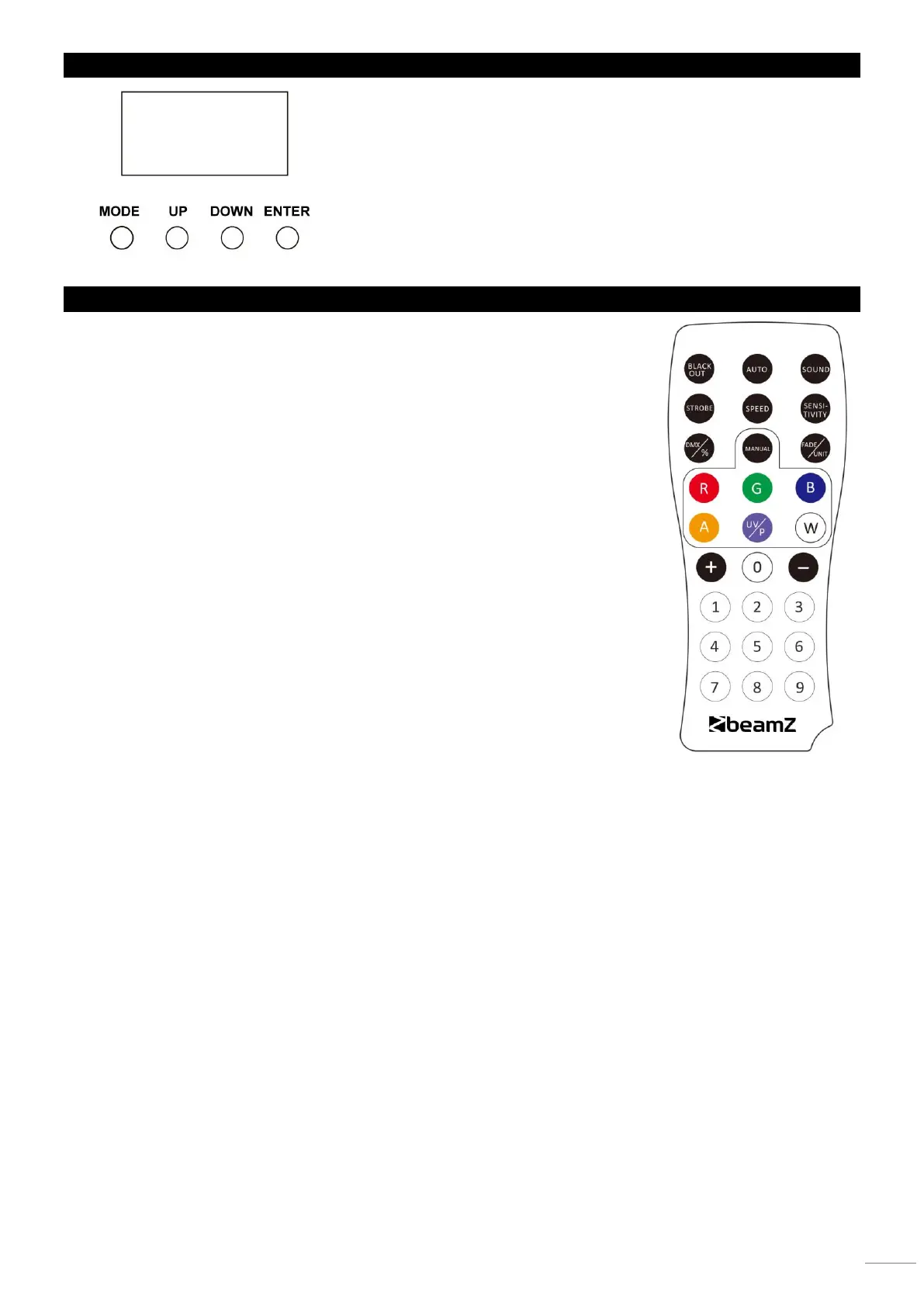
DISPLAY
The control board offer several features: you can simple set the starting address,
run the pre-programmed program or make a reset. The main menu is accessed
by pressing the Mode-button, browse through the submenu by pressing Up or
Down.
Press the Enter-button in order to select the desired menu.
You can change the selection by pressing Up or Down. Confirm every selection
by pressing the Enter-button.
You can leave every mode by pressing the Mode-button. The functions provided
are described later in this manual.
REMOTE CONTROLLER
BLACK OUT Mode
Press <BLACK OUT> off existing modes. Press <BLACK OUT> return the last modes.
AUTO Mode
Automatic mode will enable you to run the automatic programs on the product.
To turn on Automatic mode:
1. Press <AUTO> on the remote controller.
2. Press <+> or <–> to choose between the different auto programs.
SOUND Mode
Sound-Active mode will enable the product to respond to the music.
To turn on Sound-Active mode:
1. Press <SOUND> on the remote controller.
2. Press <+> or <–> to choose between the different sound programs.
STROBE Mode
To adjust the strobe speed of the automatic program and the sound active program.
1. Press <STROBE> on the remote controller.
2. Press <+> or <–> to either increase or decrease the speed of the program.
3. Press <STROBE> again to turn off the strobe.
SPEED Mode
To adjust the speed of the automatic program and the sound active program.
1. Press <SPEED> on the remote controller.
2. Press <+> or <–> to either increase or decrease the speed of the program.
SENSITIVITY Mode
To adjust sound sensitivity for in Sound-Active mode
1. Press <SENSITIVITY> on the remote controller.
2. Press <+> or <–> to either increase or decrease sound sensitivity.
DMX / % Mode
To enable DMX or disallow DMX on the product.
Press <DMX> on the remote controller, the product work on the DMX controlling modes.
MANUAL Mode
1. Press <MANUAL> on the remote controller.
2. Press <R>, <G>, <B> (red, green, blue) to choose your colour.
3. Press again <R>, <G>, <B> (red, green, blue) to close your colour.
4. Press <+> or <–> to either increase or decrease the percentage of each colour.
FADE/UNIT Mode
To adjust the FADE speed of the automatic program, the sound active program and the manual mode.
1. Press <FADE> on the remote controller.
2. Press <FADE> again to turn off the Fade mode.
NUMBER 1~9
To adjust the brightness value of the automatic program, the Sound active program and Manual Mode.
Press digit <1> to <9> to change different brightness on the device.


 To Next Page