35English
9. Switching on and o manually
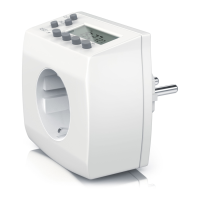
You can manually switch on and switch o the device connected to the mer
using the buon with hand symbol or enable the automac control according to
the congured mer programs again.
Press the buon to change between the dierent modes. The display changes
between "AUTO", "ON" and "OFF".
Please note that when changing from "ON" or "OFF" to "AUTO", the last mer
state is retained unl one of the congured mer programmes triggers a change.
10. Random funcon
The random funcon allows mer operaons to be delayed. The delay is random-
ly between 2 to 32 minutes.
Press the "WEEK" and "HOUR" buons simultaneously to enable or disable the
random funcon. When the funcon is enabled, this is indicated by an unlled
circle in the display.
11. Daylight saving me
Press the buon "HOUR" and "MIN" simultaneously to toggle between summer
and winter me. If summer me is set, then a clock symbol is shown in the mer
display. In this case, the clock is put forward by one hour.
12. Safety instrucons and disclaimer
Never try to open the device to carry out repairs or modicaons. Avoid contact
with the mains voltage. Do not short-circuit the product. The device is not ap-
proved for outdoor use. Therefore please use it only in dry surroundings. Protect
it from high humidity, water and snow. Do not expose the device to high temper-
atures. Do not expose the device to sudden changes in temperature or strong
vibraons, as this could damage the electronic components. Check the device for
any damage before using it.


 To Next Page