10 English
5 Buon funcons
6 Seng up
Take the device out of the package and remove all the packaging material. Open
the baery compartment on the back of the device and insert two 1.5V AAA
baeries. Make sure the polarity of the contacts is correct. Then close the baery
compartment.
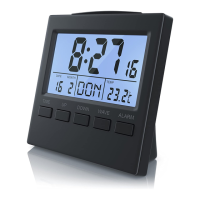
The radio alarm clock now automacally tries to receive a radio signal. Press the
"WAVE" buon if you want to cancel this step. The radio symbol in the display
disappears.
6.1 Manual me seng
Press and hold the "Time" buon for about 2 seconds in me mode. The value
to be congured starts ashing. The values can be congured using the "UP" and
"DOWN" buons and conrmed with the "Time" buon. The seng sequence is
as follows:
12 or 24 hour - Time zone (-12 to + 12 hours) - Hour - Minute - Year - Month
- Day - Language (in which the day has to be displayed) .
"Wave"
buon
Press to enable or disable the radio mode
"Alarm"
buon
• Press and hold to access the alarm sengs
• Press to turn the alarm on or o
• Press once in the alarm sengs to conrm the seng
"Up" buon Increase the desired value (e.g. alarm me, me)
"Down”
buon
Decrease the desired value (e.g. alarm me, me)
"Time"
buon
Press and hold to access the me sengs
"Snooze/
light" buon
• Enable the snooze funcon
• Enable the backlight


 To Next Page
 Loading...