30 English
Switching o the alarm
When the alarm is acvated at the congured me, the backlight also turns on
automacally. The alarm is acve for 2 minutes before it turns o automacally.
Press the "SNOOZE/Alarm" buon at the top of the device to switch the alarm o.
If a snooze symbol is shown on the display, this means that the snooze funcon is
acvated and the alarm will go o again in 5 minutes.
Press and hold the "SNOOZE/Alarm" buon or press the "Alarm" buon to turn o
the alarm. The alarm will go o again at the same me on the next day.
7.3 Temperature and humidity trends
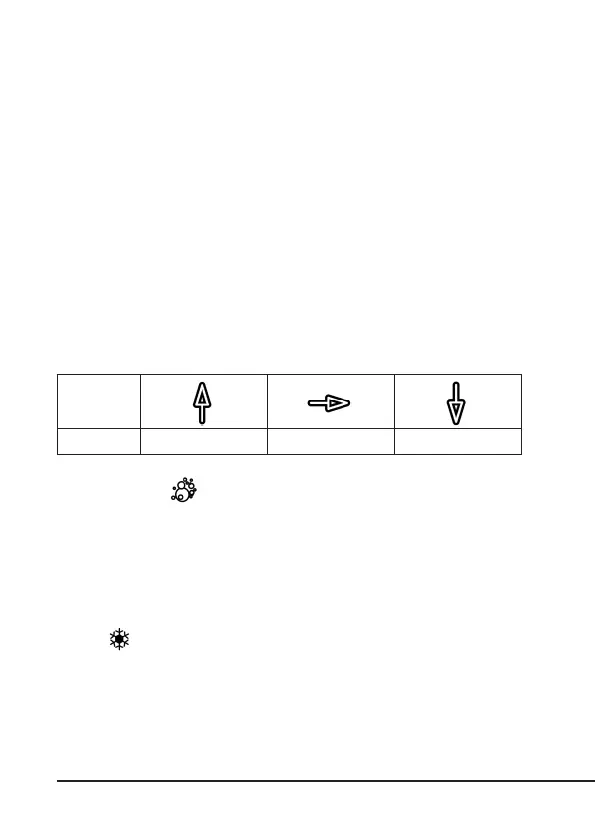
The temperature and humidity displays have a trend display. The meaning of the
trend display arrows are given in the table below:
7.4 Mould symbol
The mould symbol ( ) is a visual indicaon based on the temperature and hu-
midity of the indoor and outdoor air, and tries to determine the risk of mould for-
maon. This allows you to monitor some of the key factors at home that can lead to
mould formaon, dust mites and bacteria.
Note: The mould display is only an indicaon for you to check your home environ-
ment and to remind you of the risk of mould formaon.
7.5 Frost symbol
When the temperature of the current channel is 3 °C or less, the ice symbol starts
ashing ( ) in the temperature range.
Arrow sym-
bol
Trend Increasing Consistent Decreasing



 To Next Page