Steps for Calibration Using One Peak
1. Record a good spectrum with well defined known peaks.
spectrometry is a visual art recognising peaks takes some practice
2. Tick the box galled Gaussian in the DAA this will help you identify
peaks in your spectrum
3. Select a region of interest (ROI) by clicking a bin to the left of the
calibration peak and pressing "b" for beginning, then clicking a bin
immediately to the right of the peak and pressing "e" for end, the
ROI should now be highlighted in yellow.
note: The ROI should include the entire area of the peak
4. Select any bin inside the region of interest and note down the mean
arb.u as well as the standard deviation (SD).
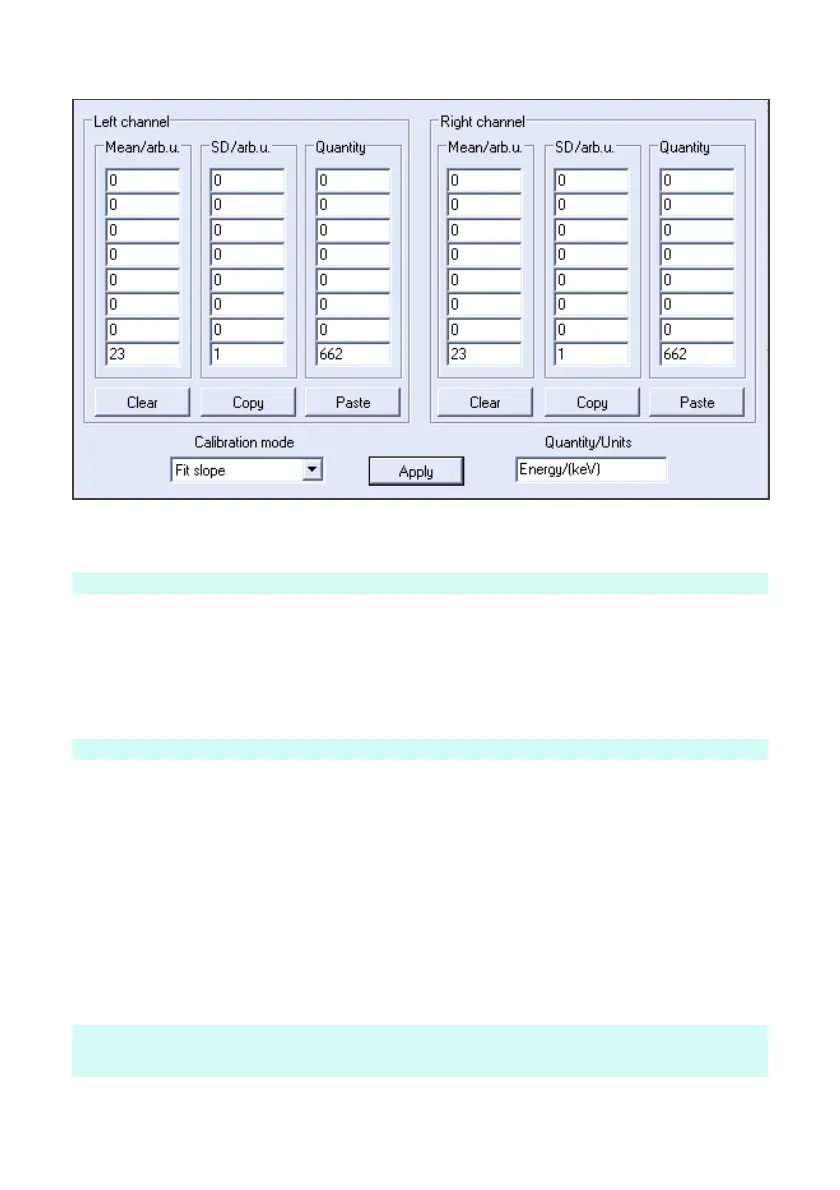
5. Open the Settings >> Energy calibration window, and enter the
recorded calibration point values into the left channel table. For
single point calibration only one row in the table is required and for
multipoint calibration you may enter up to 8 values.
6. Select best calibration mode;
Fit Slope - Linear fit through zero point
Fit Linear - Linear fit through two or more calibration points
Interpolate - Straight line fit between calibration points
Follow the same procedure for multi peak calibration by adding more points in
the table, and choose interpolate for more accurate readings between points.


 To Next Page
 Loading...