EasyManua.ls Logo

Beelink MINI S - Page 7

Beelink MINI S
32 pages
Print Icon
To Next Page IconTo Next Page
To Previous Page IconTo Previous Page
Loading...
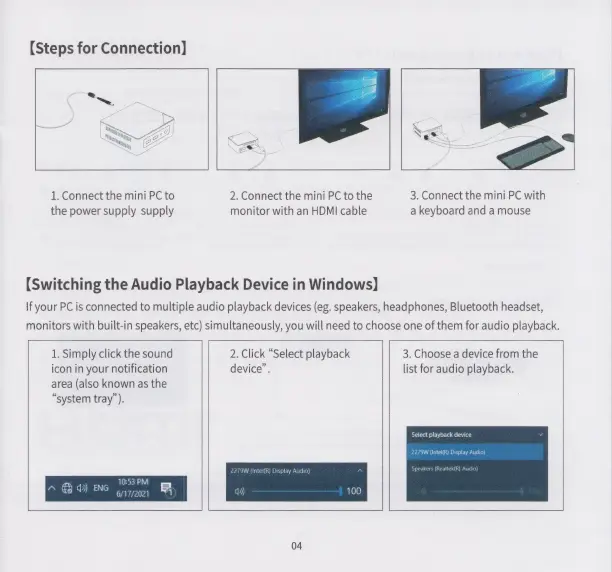
【Steps
for
Connection】
1.
Connect
the
mini
PC
to
2.
Connect
the
mini
PC
to
the
3.
Connect
the
mini
PC
with
the
power
supply supply
monitor
with
an
HDMI
cable
a
keyboard
and
a
mouse
[Switching
the
Audio
Playback
Device
in
Windows]
Ifyour
PC
is
connected
to
multiple
audio
playback
devices
(eg.
speakers,
headphones,
Bluetooth
headset,
monitors
with
built-in
speakers,
etc)
simultaneously,
you
will
need
to
choose
one
of
them
for
audio
playback.
1.
Simply
click
the
sound
2.
Click
“Select
playback
3.
Choose
a
device
from
the
icon
in
your
notification
device”.
list
for
audio
playback.
area
(also
known
as
the
“system
tray”).
Select
playback
devi
ек)
Display
Audio)
10:53
PM
6/17/2021
A
&
0)
ENG
<
04