Beetronics User Manual | Bedienungsanleitung | Manuel d’utilisation
14 EN
Supported operating systems
Installing the touchscreen
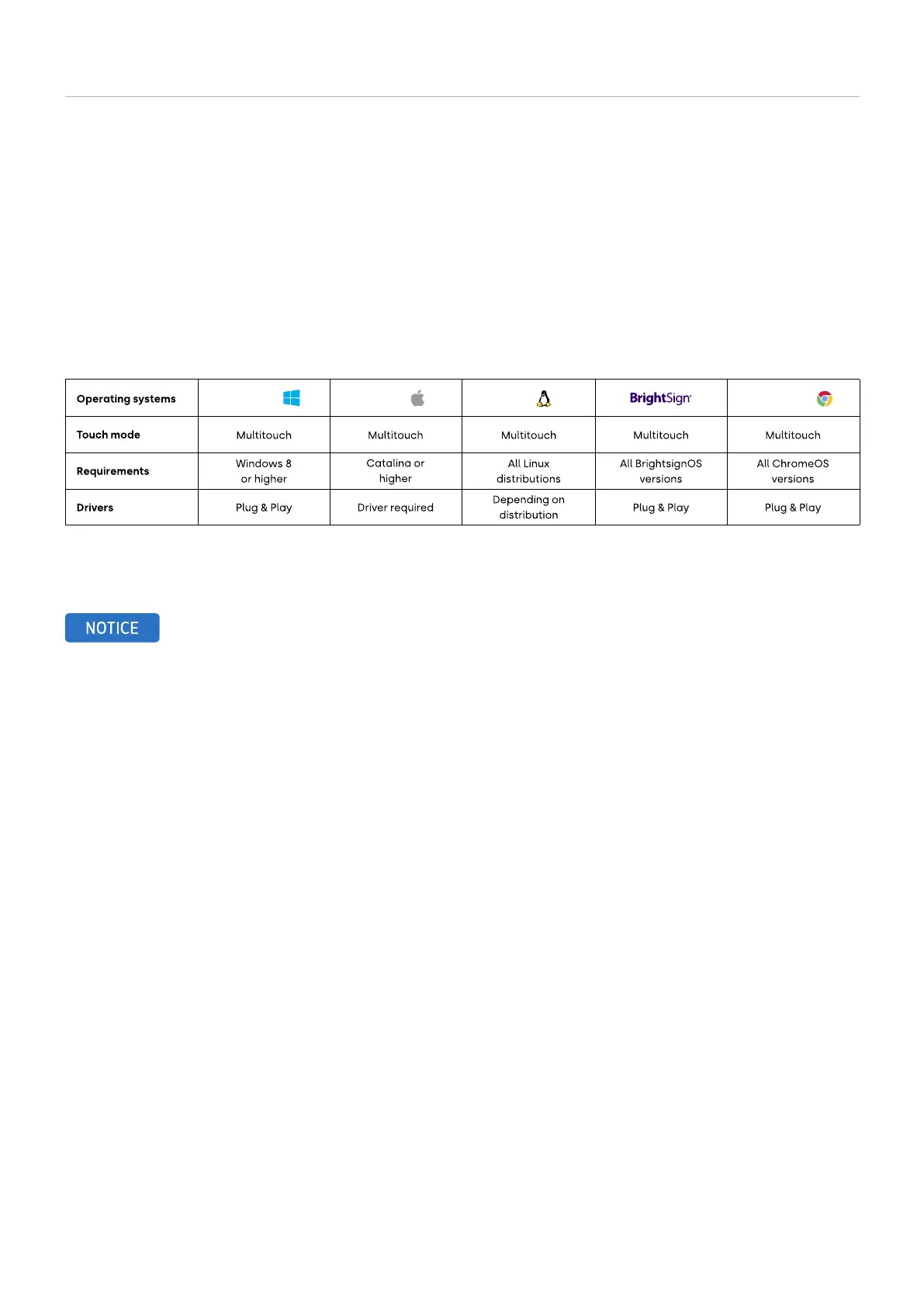
Most operating systems work plug and play with our touchscreen monitors. Installing a driver or performing a calibration is
usually not necessary as long as the monitor is used in its native resolution and with a compatible operating system. Below you
will find an overview of our supported operating systems, indicating whether a driver is required and whether the operating
system supports single or multi-touch.
NOTICE! Our touchscreens consist of a panel with a touch layer. The touch layer is controlled with a USB 2.0 cable which also
provides the touch layer with 5V of power. The loss of touch functionality almost always due to power interruption.
All our touchscreens are supplied with a 2 meter USB 2.0 cable. The maximum length of a USB 2.0 cable is 5 meters. If
you need to extend to a longer distance, an active USB extender must be used which does not convert the USB signal.
Windows macOS Linux ChromeOS


 To Next Page