5
ENGLISH
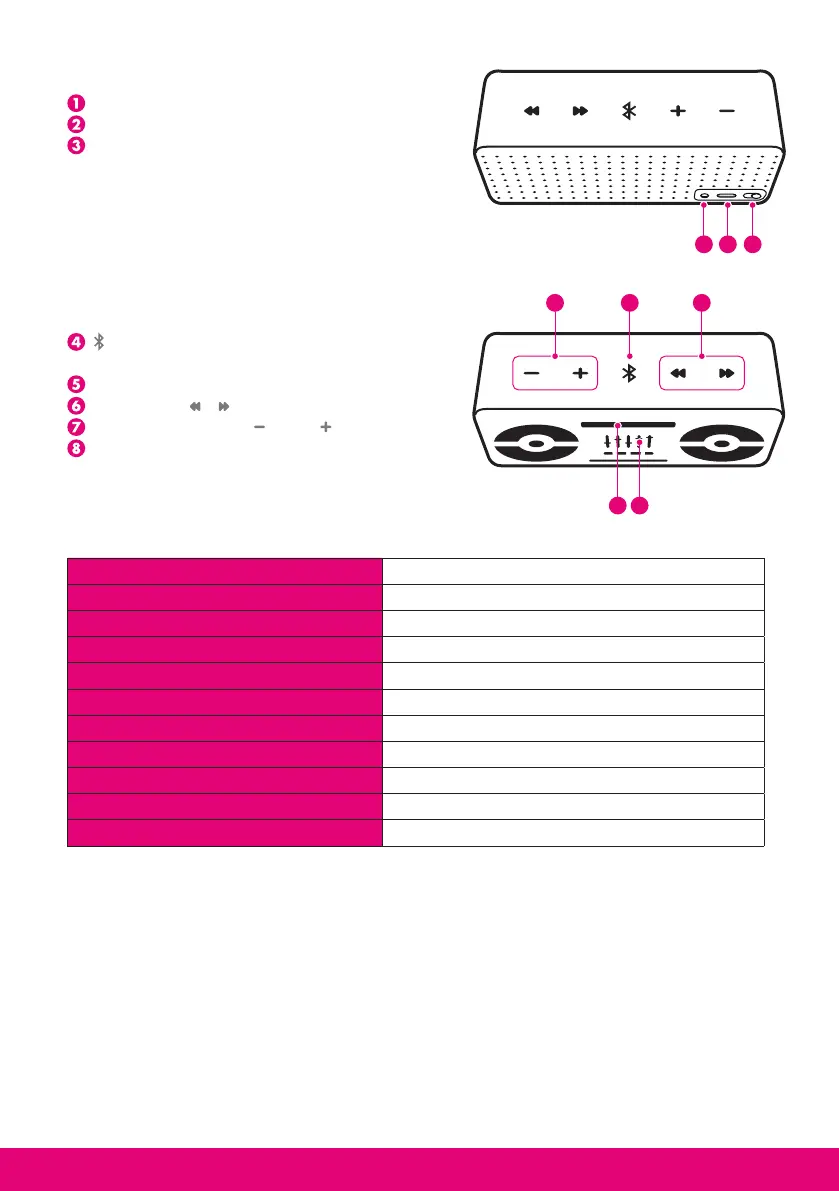
1.3. Product Overview
- On/Off: Power switch
- Charge connector (micro USB compliant)
- Jack 3.5mm connector : auxiliary audio input
- : Multifunction Button, Play/Pause
Music and Call functions
- Light indicator
- Track control &
- Volume Control VOL / VOL
- microphone
1.4. Product Specification
2. USINg THE PRODUCT
2.1. Power Supply and Charging
Fully charge the device using the included USB cable at least 4 hours before first time use
or after a long storage period. The red LED indicator will stay on while charging and will
be off as soon as it is completed. It takes approximately 4 hours to re-charge every time.
When battery is empty, during the last 15 minutes you will hear 3 bips every 3 minutes.
2.2. Power On / Power Off
Power On: slide the On/Off switch right, the blue LED indicator will blink 3 times.
123
4
5 8
67
Bluetooth Specification Bluetooth V2.1+EDR
Bluetooth Profiles HSP, HFP, A2DP, AVRCP
Frequency Band 2.4GHz~2.4835GHz ISM Band
Working Distance Class 2, Up to 10 meters
Audio Output Power 2 x 2.5W (1kHz, THD<3% )
Frequency Response 60 Hz to 20 000 Hz
Talking Time Up to 25 hours (15 hours at 100% volume)
Playing Time Up to 25 hours (15 hours at 100% volume)
Battery 2000mAH Li-Polymer rechargeable battery
Dimensions 156*56*51.5mm
Weight 380g



 To Next Page