8A
3. Lamp
Lamp :
ELC 24V 250W
1. Always switch off the main supply and never handle the lamp or luminaries when is
hot.
2. Do not touch the bulb with bare hands. If this happens, clean the lamp with denatured
alcohol and wipe it with a lint free cloth before installation.
3. Never operate the lamp without appropriate shielding.
4. Make sure the lamp is located in the center for the best spot.
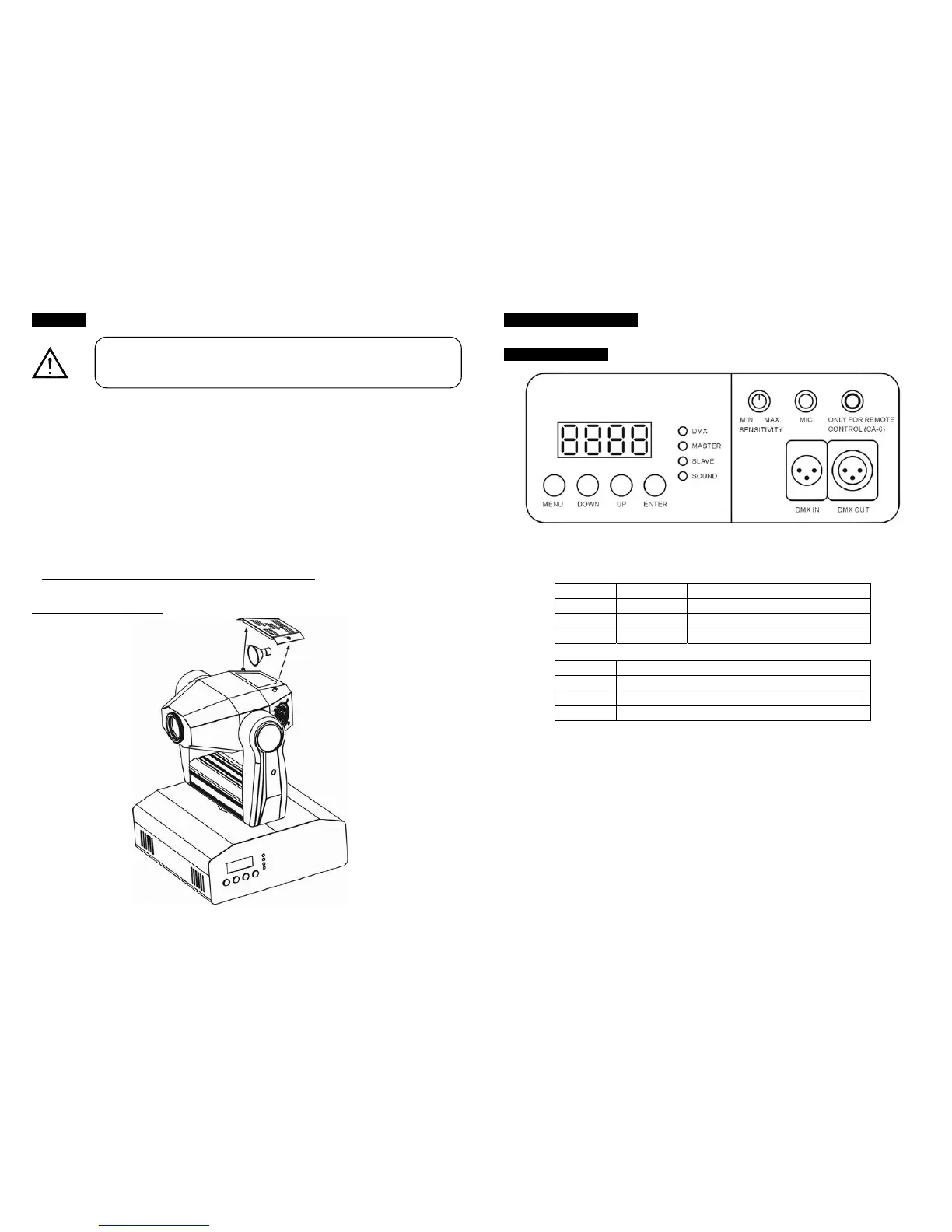
Diagram for Lamp changing
4. How To Set The Unit
4.1 Control Panel
Display
To show the various menus and the selected functions.
LED
DMX On DMX input present
MASTER On Master Mode
SLAVE On Slave Mode
SOUND Flashing Sound activation
Button
MENU To select the programming functions
DOWN To go backward in the selected functions
UP To go forward in the selected functions
ENTER To confirm the selected functions
Remote controller input
By connect to the 1/4” microphone jack to control the unit for stand by, function and mode
Sensitivity
To adjust the sound sensitivity.
Microphone
To receive audio signal for sound activation.
DMX input/output
For DMX512 link, use 3-pin XLR plug cable to link the unit together.
In case of replacement of the lamp or maintenance, do not open the
fixture within 15 minutes until the unit cools down after switching off.


 To Next Page