19
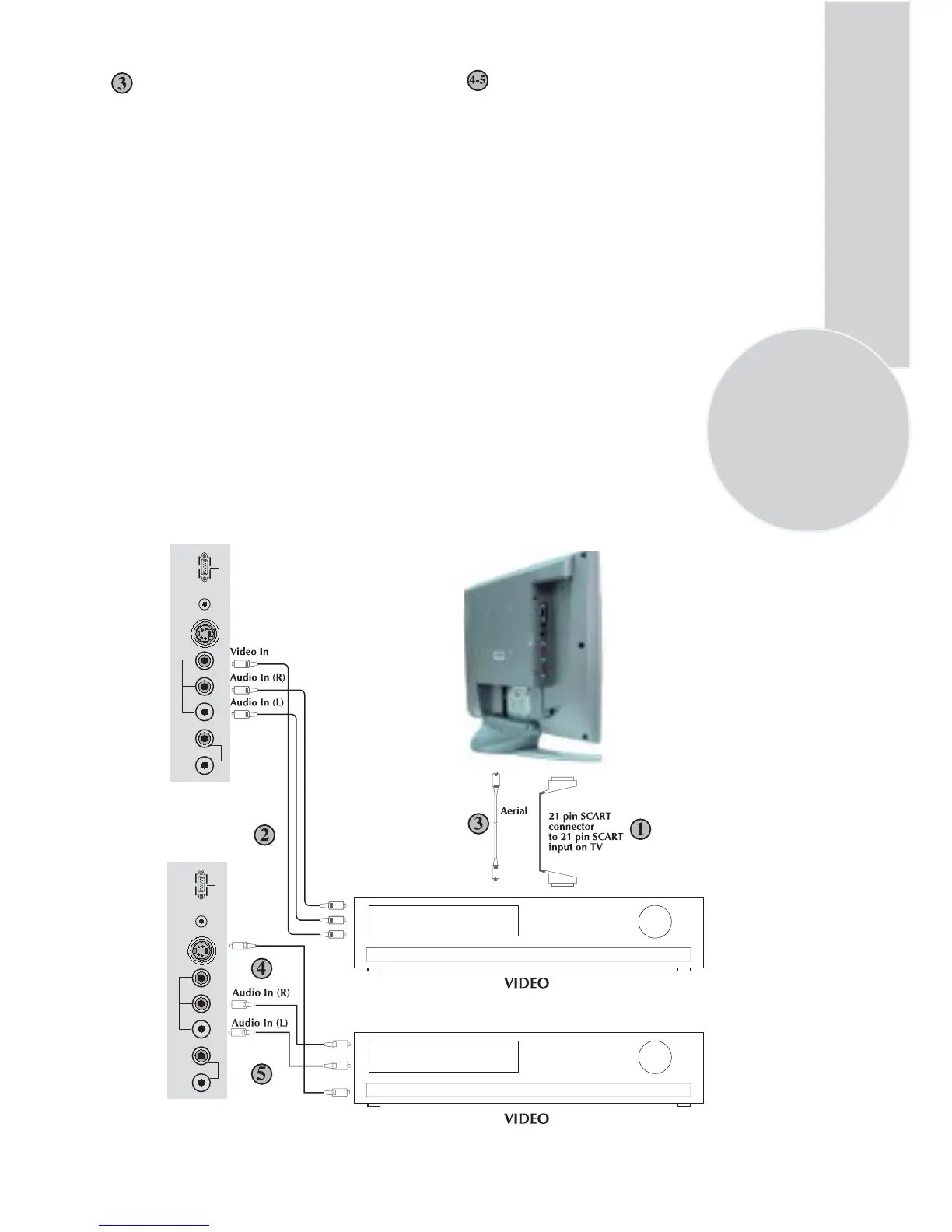
Plug a coaxial plug into the RF out socket on
the rear of the video recorder and plug the
other end into the aerial socket of the TV.
Switch on the video recorder and the TV.
If your video recorder has a test signal, switch
it on. (Refer to the video recorder user guide).
See ‘Tuning the TV’ and carry out the tuning
procedure for the video recorder test signal.
Select programme number 0.
Via aerial socket
Make sure the TV and video recorder are
both switched off.
Unplug the aerial lead form the TV and plug
it into the aerial socket on the video
recorder (if fitted).
S-Video In
AUDIO OUT
AV2
L R VIDEOL R S-VHS
AVS
DC 12V VGA
AUDIO OUT
AV2
L R VIDEOL R S-VHS
AVS
DC 12V VGA
Plug the S-Video plug into the S-Video
socket and the audio leads into the audio
sockets.
You can also connect it through the
S-Video socket of the TV.
Via PHONO lead and S-Video socket



 To Next Page