EN / 19
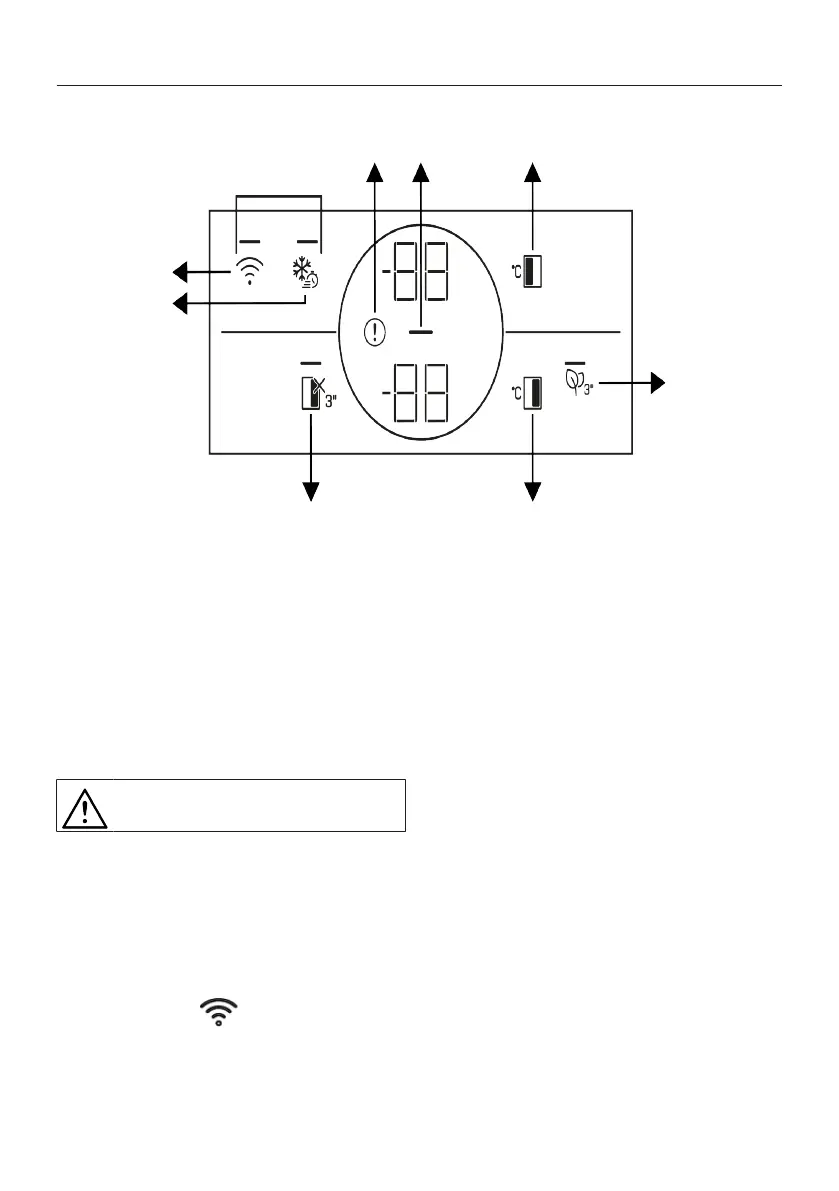
7 Control Panel of the Product
1 *Wireless 2 Quick Freezing
3 High Temperature/Fault Alert 4 Energy Saving (Display Off)
5 The Freezer Compartment Temperat-
ure Setting
6 Vacation Function
7 Cooler Compartment Temperature
Setting
8 *Key for Resetting Wireless Connec-
tion Settings
9 *Deodoriser Module Key
Read the “Safety Instructions” sec-
tion first.
*Optional: Shown functions are optional,
there may be differences of shape and loc-
ation in functions found on your appliance’s
indicator panel.
Auditory and visual functions on the indic-
ator panel will assist you in using the refri-
gerator.
1. *Wireless Key
You can use this key to make a wireless
connection with your product via Home-
Whiz mobile app.
When the key is pressed for a long period
(3 seconds), the wireless connection sym-
bol on the display/screen flashes slowly (at
0.5 second intervals). The home network is
introduced to the product firstly in this way.
After achieving wireless connection with
the product, wireless connection symbol il-
luminates continuously.
After completing the initial installation, you
can activate/deactivate it for pressing this
key. Wireless connection symbol illumin-
ates quickly (at 0.2 seconds intervals) until
the connection is made. When the connec-
tion is active, the wireless network symbol
will illuminate continuously.



 To Next Page