EasyManua.ls Logo

Beko RG10A/BGEF - User Manual

Beko RG10A/BGEF
80 pages
Print Icon
To Next Page IconTo Next Page
Loading...
10M-8504153200-4922-02
EN - PL - BG
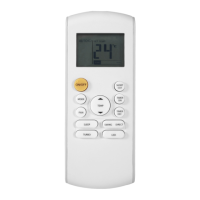
Remote control
User Manual

Table of Contents

Question and Answer IconNeed help?

Do you have a question about the Beko RG10A/BGEF and is the answer not in the manual?

Summary

Remote Controller Specifications

Quick Start Guide

Handling the Remote Controller

Inserting and Replacing Batteries

Step-by-step guide for inserting and replacing batteries in the remote control.

Notes for Using Remote Control

Important usage notes, compliance information, and tips for optimal remote control performance.

Buttons and Functions

Button Descriptions (1-8)

Detailed explanation of the functions for remote control buttons 1 through 8.

Button Descriptions (9-14)

Detailed explanation of the functions for remote control buttons 9 through 14.

Remote Screen Indicators

Display Indicators (1-6)

Explanation of the various indicators displayed on the remote control screen, including modes and features.

Display Indicators (7-10)

Further explanation of remote screen indicators for swing, fan speed, timer, and transmission.

How to Use Basic Functions

Basic Operation and AUTO Mode

General operation guidelines and instructions for using the AUTO mode.

COOL and DRY Modes

Instructions for operating the unit in COOL and DRY (dehumidifying) modes.

FAN and HEAT Modes

Instructions for operating the unit in FAN and HEAT modes.

Setting the Timer

TIMER ON and OFF Settings

Procedures for setting the timer to automatically turn the unit on or off.

TIMER ON & OFF Setting Example

An example illustrating how to set both ON and OFF timers for unit operation.

How to Use Advanced Functions

Swing and Airflow Direction

How to control louver swing and adjust airflow direction using the remote.

LED Display and ECO;GEAR Function

Managing the LED display and using ECO/GEAR modes for energy efficiency.

GoClean and Silence Functions

How to activate the GoClean self-cleaning and Silence quiet operation features.

FP, LOCK, and SET Functions

Using FP (Freezing Protection), LOCK, and SET functions for advanced control.

Additional Advanced Functions

Details on Sleep, ZoneFollow, AP Mode, and HygieneMax functions.

Summary

Remote Controller Specifications

Quick Start Guide

Handling the Remote Controller

Inserting and Replacing Batteries

Step-by-step guide for inserting and replacing batteries in the remote control.

Notes for Using Remote Control

Important usage notes, compliance information, and tips for optimal remote control performance.

Buttons and Functions

Button Descriptions (1-8)

Detailed explanation of the functions for remote control buttons 1 through 8.

Button Descriptions (9-14)

Detailed explanation of the functions for remote control buttons 9 through 14.

Remote Screen Indicators

Display Indicators (1-6)

Explanation of the various indicators displayed on the remote control screen, including modes and features.

Display Indicators (7-10)

Further explanation of remote screen indicators for swing, fan speed, timer, and transmission.

How to Use Basic Functions

Basic Operation and AUTO Mode

General operation guidelines and instructions for using the AUTO mode.

COOL and DRY Modes

Instructions for operating the unit in COOL and DRY (dehumidifying) modes.

FAN and HEAT Modes

Instructions for operating the unit in FAN and HEAT modes.

Setting the Timer

TIMER ON and OFF Settings

Procedures for setting the timer to automatically turn the unit on or off.

TIMER ON & OFF Setting Example

An example illustrating how to set both ON and OFF timers for unit operation.

How to Use Advanced Functions

Swing and Airflow Direction

How to control louver swing and adjust airflow direction using the remote.

LED Display and ECO;GEAR Function

Managing the LED display and using ECO/GEAR modes for energy efficiency.

GoClean and Silence Functions

How to activate the GoClean self-cleaning and Silence quiet operation features.

FP, LOCK, and SET Functions

Using FP (Freezing Protection), LOCK, and SET functions for advanced control.

Additional Advanced Functions

Details on Sleep, ZoneFollow, AP Mode, and HygieneMax functions.

Beko RG10A/BGEF Specifications

General IconGeneral
BrandBeko
ModelRG10A/BGEF
CategoryRemote Control
LanguageEnglish

Related product manuals