EasyManua.ls Logo

Belcat ACUS-3TN - User Manual

Belcat ACUS-3TN
2 pages
Print Icon
To Next Page IconTo Next Page
Loading...
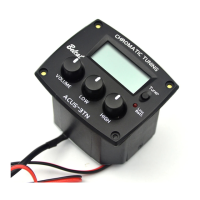
1. Tuner LCD Display
2. Tuner Button
3. Low Batt. (Low Battery LED Light)
4. High Knob
5. Low Knob
6. Volume Knob
Caution
- The jack should be pluged for proper Preamp working.
(TUNER will works regardless pluging jack)
- There is no output sound, please check if tuner or mute is turned on.
- When LCD screen is dim or no display, please check battery life.
- To prevent battery loss, please unplug jack when preamp is not in use.
- Do not disassemble for repair.
Return to your dealer for service or repair.
- Do not use too much force when operating the control.
Specification
3 4
1
2
Functions
ACUS-3TN PREAMP USERS MANUAL
Tuner Operation
Tuner Display
The tuner will work with or without a cable plugged into the output jack.
Pushing the tuner button turns ON the tuner. When the tuner is active
the output signal is muted. No sound will go to the amplifier or mixer
when the tuner is active.
Pushing the tuner button again turns the tuner OFF and the output
signal will be active and sound will go to the amplifier.
If the tuner is ON and the tuner button is not pushed within 2 minutes
the tuner will turn OFF automatically and sound returned to the output.
The tuner Note Readout FND Display shows the nearest note of one
plucked string's sound. The Note Read Display read out shows twelve
note possibilities in half steps in “sharps” (for example: A; A#; B; C; C#;
D; D# and so on). For “flat” notes, for example: Bb (B flat) use A#. For
Eb (E flat) use D#.
2.Tuner Button (for
The tuner will work with or without a cable plugged into the output jack.
3. Low Batt. (Low Battery LED Light)
The LED will light when the battery has lost power. Replace the
battery when this light is on.
This LED light will flash when a cable is connected to the output
jack of the pickup system. This shows the battery is good.
4. HIGH EQ TONE CONTROL
5. LOW EQ TONE CONTROL )
The HIGH and LOW controls are a 2-band equalizer for controlling tone .
The HIGH and LOW tone controls are normal boost / cut shelving controls .
The center detent on these tone controls yields a flat tone response. “+12”
boosts the tone; “-12” cuts the tone.
6. Volume Knob
The VOLUME controls the output volume. Turned fully counter-clockwise it is
completely OFF. Turned fully clockwise it is LOUD!
Battery
A 9-volt battery powers the ACUS-3TN preamp. Before connecting the
instrument to an amplifier or mixer please check that a fully charged 9-volt
battery is connected.
Power on/off Button)
2Band EQ with LCD Tuner
1
2
3
456
NOTE FLAT NOTE SHARPNOTE IN TUNE
Tuner LCD Display
Features : 2Band EQ with LCD Tuner
Input Impedance : 2.2MΩ
Frequency Response : 20Hz~20KHz
Control Range :
Bass :【±12dB at 100Hz
Treble :【±12dB at 10KHz
Battery Life : Pre-amp only,
Tuner off : 700Hours @ 0.7mA
Tuner on with signal : 40Hours @12mA
Power Supply : 9V Alkaline Battery
Function : For Slim Body Guitar
Auto Chromatic tuning mode
Pick-up : B-6900(Piezo Ceramic Pick-up)
Output Jack : 6.35mm (1/4”)
Dimension : W 58.5mm X H 50mm
(2.3” X 2.0”)
Question and Answer IconNeed help?

Do you have a question about the Belcat ACUS-3TN and is the answer not in the manual?

Overview

The ACUS-3TN Preamp EQ with LCD Tuner is a versatile device designed to enhance the sound of acoustic instruments, particularly guitars, by providing equalization, a built-in tuner, and amplification capabilities. This manual details its functions, specifications, usage, and maintenance.

Function Description

The ACUS-3TN features a 2-band EQ (Equalizer) with an LCD Tuner, allowing users to shape their instrument's tone and ensure accurate tuning.

Tuner Function: The device includes a chromatic tuner with an LCD display. To activate the tuner, press the "Tuner" button. The display will show the note being played. The tuner is active when the red light is on. If the tuner is active, the output signal is muted, preventing any sound from going to the amplifier or mixer. This allows for silent tuning. To deactivate the tuner and restore the output signal, press the "Tuner" button again. The tuner automatically detects the note being played and displays it. The LCD display will indicate if the note is sharp, flat, or in tune. For example, "Bb (B flat) use A#," "Eb (E flat) use D#."

Equalization (EQ) Control: The 2-band EQ allows for precise tone shaping.

  • LOW Control: This knob adjusts the bass frequencies. Turning it clockwise boosts the low frequencies, making the sound fuller, while turning it counter-clockwise cuts them, making the sound thinner.
  • HIGH Control: This knob adjusts the treble frequencies. Turning it clockwise boosts the high frequencies, adding brightness and clarity, while turning it counter-clockwise cuts them, making the sound mellower.

Volume Control: The "VOLUME" knob controls the overall output level of the preamp. Turning it clockwise increases the volume, and turning it counter-clockwise decreases it. It is important to adjust this to an appropriate level to avoid distortion.

Battery Function: The ACUS-3TN is powered by a 9-volt battery. A low battery indicator (LED) is included to alert the user when the battery needs to be replaced. When the LED lights up, it indicates that the battery voltage is low, and the battery should be exchanged promptly to ensure optimal performance and prevent noise or distortion.

Important Technical Specifications

Preamp:

  • Input Impedance: 2.2MΩ
  • Frequency Response: 20Hz~20KHz
  • Control Range:
    • Bass: ±12dB at 100Hz
    • Treble: ±12dB at 10KHz
  • Battery Life: Pre-amp only.
    • Tuner off: 1000 hours @12mA
    • Tuner with signal: 40hours @12mA
  • Power Supply: 9V Alkaline Battery
  • Function: 2-Band EQ, Body Guitar

Tuner:

  • Type: Chromatic tuning mode
  • Pick-up: Piezo ceramic pick-up (under saddle type)
  • Output Jack: 6.35mm (1/4")
  • Dimension: W 50mm (1.97") x H 50mm (1.97") x D 2.0" (0.79")

Usage Features

Installation: The installation process involves cutting holes in the instrument for the preamp and battery box, drilling holes for the output jack and pick-up, inserting the EQ and battery box, fastening screws, connecting plugs, and fixing wires with clips.

  1. Cut out the hole with template: Use the provided cutting template to mark and cut the hole for the preamp.
  2. Cut out the hole with Battery Box: Similarly, use a template to cut the hole for the battery box.
  3. Drilling hole for Jack: Drill a 12mm hole for the output jack.
  4. Drilling hole for pick-up: Drill a 3mm hole for the pick-up wire at a 30-45 degree angle.
  5. Insert EQ and battery box into hole of guitar: Carefully place the preamp and battery box into their respective cutouts.
  6. Fasten screws properly: Secure the preamp and battery box with screws.
  7. Installing the pick-up: Position the saddle pick-up under the saddle of the bridge.
  8. Fix wire with clip: Use clips to neatly secure the wiring inside the instrument, connecting the pick-up, battery box, and output jack to the EQ unit.

Operation:

  • Power On/Off: The preamp automatically turns on when a cable is plugged into the output jack and turns off when the cable is removed. This conserves battery life.
  • Tuner Activation: Press the "Tuner" button to activate the tuner. The red light will illuminate, and the output signal will be muted. Press the button again to deactivate.
  • EQ Adjustment: Use the "LOW" and "HIGH" knobs to adjust the bass and treble frequencies to achieve the desired tone.
  • Volume Adjustment: Use the "VOLUME" knob to set the overall output level.

Maintenance Features

Troubleshooting:

  • No sound or stopped sound:
    • Check the guitar cable, amplifier, or mixer connections.
    • Check if the battery is dead and replace it if necessary. A low battery can cause noise or distortion.
    • Ensure the pick-up and battery connectors are correctly connected.
    • Verify that the output jack is correctly connected.
  • Hum-noise:
    • Check if the pick-up is well connected.
    • Ensure all connectors are in their correct positions.
  • Balance problems (uneven sound from strings):
    • Check if the bottom of the saddle or the saddle groove is flat.
    • Ensure the saddle is not loose in its groove.
    • Verify good connection between the saddle bottom and the groove.
    • Check if the saddle is too short.
    • Inspect for grounds on the saddle groove.
    • Ensure the saddle is not tilted forward or backward.
    • Check if the guitar top is bent.
    • Verify that the pick-up is installed across the entire groove of the saddle.

General Care:

  • Battery Replacement: Replace the 9-volt battery when the "LOW BATT" LED illuminates to prevent performance issues.
  • Cleaning: Keep the device clean and free from dust. Use a soft, dry cloth for cleaning.
  • Storage: When not in use for extended periods, unplug the jack cable to conserve battery life.
  • Service: For repairs or service, contact your dealer or service representative. Do not attempt to repair the unit yourself, as this may void the warranty.

Caution:

  • Always plug in the jack cable before turning on the amplifier or mixer to avoid loud noise.
  • Do not attempt to disassemble or modify the unit, as this may cause damage or electric shock.
  • Keep the device away from water or excessive moisture.
  • Use only the specified 9-volt alkaline battery.

Belcat ACUS-3TN Specifications

General IconGeneral
BrandBelcat
ModelACUS-3TN
CategoryAmplifier
LanguageEnglish

Related product manuals