261
Kayenne/Karrera/GV Korona
User Manual
GV Switcher camera control provides the ability to place cameras into a usable but not fully
shaded setup/rehearsal mode using the menu buttons in the Live Ops menu tab:
• Camera Sources—Select from 1-99 defined camera sources for control.
• Color Bars—Enable/disable color bars to verify the camera as the associated source.
• Auto Iris—Enable/disable camera’s Auto Iris.
•Auto Black—Triggers a reset of camera’s black level.
• ND (Neutral Density) Filter— Changes the neutral density filter wheel setting.
Use back and forward arrow buttons to scroll through and enable 1/4, 1/16, 1/64 filter
wheel settings, or CLR to clear the filter wheel setting.
Ethernet Camera Tally Operations
When installed and configured, the GV Switcher sends tally over Ethernet to cameras. This is
described in the Installation & Service Manual for your switcher model. In addition, the Red,
Yellow, and Green buttons in the Source Ops, Cameras menu allow you to test the camera
tally colors and/or send a call to the camera operator.
About Scene Files
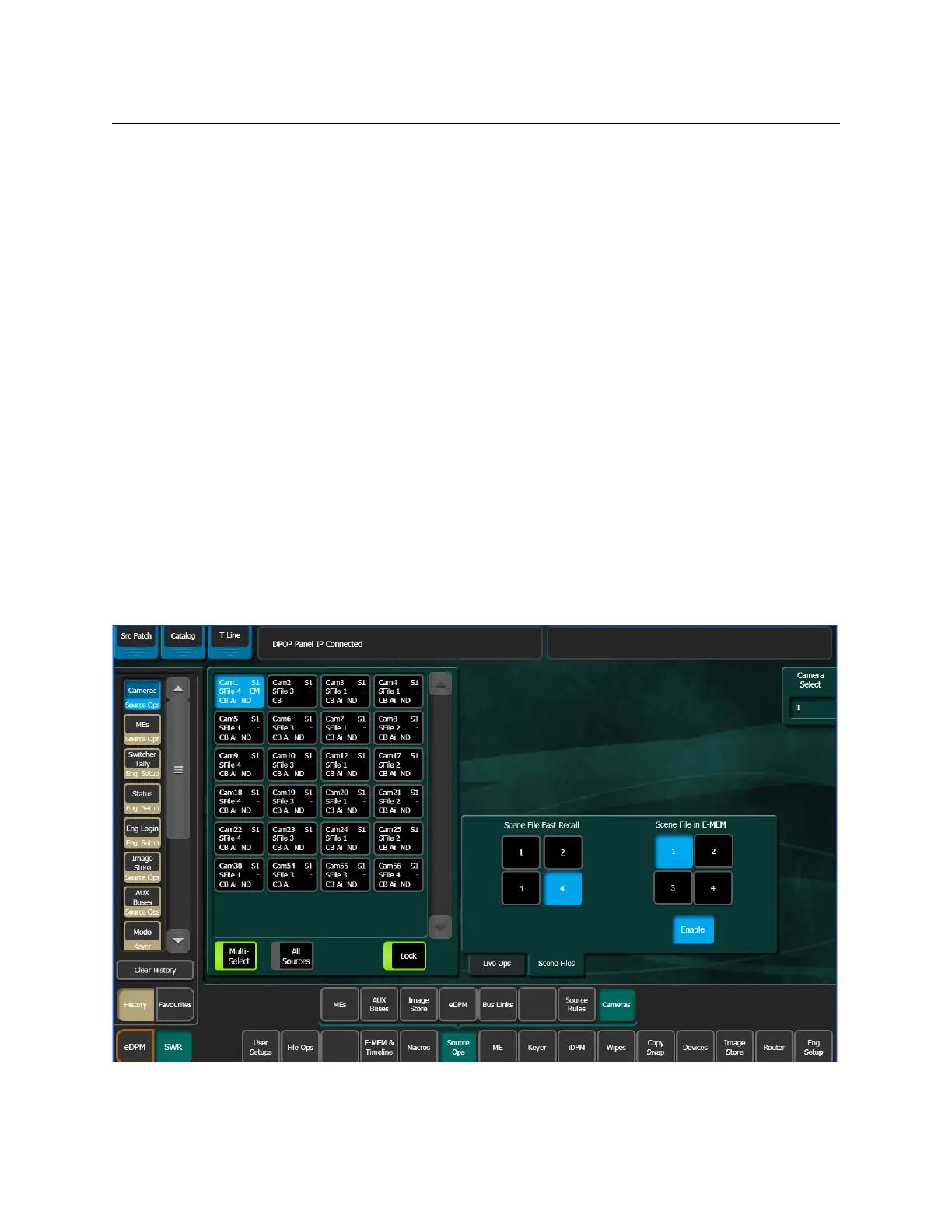
Up to four Scene Files can be saved and quickly loaded to selected cameras with the Fast
Recall (1-4) buttons or recalled as part of an E-MEM, using the Scene File in E-MEM (1-4)
buttons, in the Source Ops, Cameras, Scene Files menu tab.


 To Next Page