Need help?
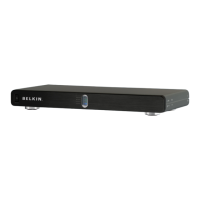
Do you have a question about the Belkin PureAV Power Console PF60 and is the answer not in the manual?
Ensures proper grounding, polarization, and protection from surges via antennas.
Recommends unplugging the unit during lightning storms for safety.
Avoids water use and specifies cleaning procedures to prevent shock or damage.
Advises against self-repair and safe routing of the power cord.
How to program outlet banks for "Always-On", "Switched", or "Switched On After Delay".
Connect digital components to the appropriate outlets for noise filtering.
Connect video components to the Video Filter outlets for cleaner power.
Connect audio components to Audio Filter outlets for optimal sound quality.
Connect high-current audio components to the High Current outlets with delay.
Steps to troubleshoot when the power console is not providing power.
Explains the "Ground Fault" indicator and necessary actions.
Explains the "Cross-Wired" indicator and how to resolve it.
 General
| Brand | Belkin |
|---|---|
| Model | PureAV Power Console PF60 |
| Category | Power distribution unit |
| Language | English |

 To Next Page