
 Need help?
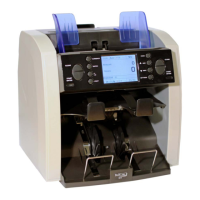
Do you have a question about the BellCon BellCount S515 and is the answer not in the manual?
List of abbreviations and acronyms used in the manual.
BellCon company contact information for support and inquiries.
Identification of components on the front panel of the S515.
Identification of components on the rear panel of the S515.
Details of the control buttons, display, and indicators on the operation panel.
Explanation of the primary screen and its layout in the main menu.
Instructions for turning the banknote counter on and off correctly.
How to choose the currency for counting via key or menu.
Steps to adjust the banknote counting speed settings.
Procedure for enabling and utilizing the serial number reading feature.
Configuration options for starting the counting process automatically or manually.
Guidelines for correctly loading banknotes to ensure smooth counting.
How to print the results of a counting job using an external printer.
Counting mixed denomination banknotes with rejection of suspicious notes.
Counting single denomination banknotes, ejecting deviating ones.
Sorting banknotes based on their face orientation (Up/Down).
Sorting banknotes by their orientation (Upright/Upside Down).
Sorting banknotes based on their issue and denomination.
Counting a predefined number of banknotes and stopping automatically.
Summarizing results from multiple counting operations.
Viewing detailed counting reports and lists of rejected notes.
Troubleshooting common error messages and their solutions.
Configuring sound alerts like key beep and alarm.
Enabling or disabling the Counterfeit Detection (CF) feature.
Setting detection sensitivity for non-currency specific tasks.
Adjusting the maximum capacity of the reject note pocket.
Setting and formatting the machine's date and time.
Viewing hardware and software details of the machine.
Configuring currency-specific banknote settings.
Limiting the number of currencies displayed in the main menu.
Configuring combinations of up to 4 currencies for mixed counting.
Setting an operator ID for inclusion in counting results.
Calibrating the touch screen interface for accurate input.
Adjusting idle time before the machine enters sleep mode.
Switching the ccTalk protocol serial data communication on or off.
Procedure for adjusting the gap to optimize banknote feeding.
Steps to open the upper and lower note paths for access.
Instructions for cleaning the machine's exterior and interior components.
 General
| Brand | BellCon |
|---|---|
| Model | BellCount S515 |
| Category | Banknote Counter |
| Language | English |

 To Next Page