Need help?
Do you have a question about the Bellhowell WP10 Splash Blue and is the answer not in the manual?
Highlights the camera's waterproof capabilities and dimensions, up to 10 ft. / 3 meters.
Describes the camera's still photography features, with a maximum resolution.
Details the camera's video recording capabilities.
Details the integrated flash functionality for illumination.
Explains the digital zoom feature for magnification.
Mentions the display screen size and type for viewing.
Covers the memory card compatibility for storage.
Specifies the power source required for operation.
Describes the smile detection feature for automatic capture.
Describes the face detection feature for focusing.
Explains the image stabilization feature for reducing blur.
Button to take photos or start/stop video recording.
Button to turn the camera on or off.
Attachment point for a wrist strap.
Built-in flash for lighting dark situations.
Optical input for recording video and images.
Indicates camera activity when blinking.
Selects macro or normal shooting distance.
Displays photos, videos, settings, and menus.
Controls for menu navigation and zoom.
Enters playback mode for photos/videos.
Indicates Photo or Video mode.
Shows flash settings (On, Auto, Off).
Displays current self-timer setting.
Shows the current ISO sensitivity setting.
Shows remaining shots or video time.
Indicates image quality setting (Super Fine, Fine, Standard).
Shows if a Micro SD card is inserted.
Indicates if Anti-Shaking is ON or OFF.
Shows normal or macro shooting mode.
Selects single shot or 10s timer.
Sets image resolution for photos and videos.
Adjusts for different lighting conditions.
Optimizes settings for various shooting scenarios.
Controls light sensitivity.
Enables automatic photo capture on smile.
Activates image stabilization.
Sets the camera's date and time.
Configures automatic power-down.
Adjusts camera beep volume.
Sets the display language.
Adds date to photos.
Sets power frequency for lights.
Formats the Micro SD card.
Resets camera to factory defaults.
Displays firmware version.
Instructions for inserting batteries into the camera.
Guide on inserting and handling Micro SD cards.
Steps to format the memory card for optimal use.
How to adjust image resolution for quality or space.
Detailed steps for capturing still images.
Instructions on using the zoom feature.
How to use the self-timer for delayed shots.
Guide on capturing video footage.
How to view, zoom, and manage photos.
How to play, pause, and navigate video clips.
Steps for deleting single or all media files.
Instructions for transferring files to a computer.
Details the camera's sensor, resolution, lens, and zoom.
Lists the necessary PC specifications for software compatibility.
Addresses issues related to low battery or improper battery installation.
Troubleshoots problems with saving photos, possibly due to memory card issues.
Resolves connection issues when linking the camera to a computer.
Addresses problems with the flash functionality.
Provides solutions for rapid battery depletion.
Offers solutions for blurry images, including camera stability and lens cleaning.
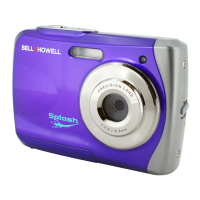
The Bell Howell WP10 Splash is an ultra-slim, waterproof digital camera designed for capturing still images and video clips. Its robust design allows it to be submerged in water up to 10 feet (3 meters), making it suitable for various outdoor and aquatic activities.
The WP10 Splash functions as both a digital still camera and a digital video camcorder. It captures high-resolution photographs and records video clips, storing them on a Micro SD/SDHC card. The camera features an 8X digital zoom for bringing distant subjects closer and a built-in flash for illuminating dark scenes. It also incorporates advanced features like Smile Detection, Face Detection, and Anti-Shaking Image Stabilization to enhance photo quality. The camera's 2.4-inch LCD color display serves as a viewfinder for framing shots and reviewing captured content, as well as for navigating the camera's settings and menus.
Power and Basic Operation: To power on the camera, users simply press the POWER button. After inserting two AAA alkaline batteries and closing the battery door securely, the camera is ready for use. The SHUTTER button is used to take photographs or to start and stop video recording.
Mode Selection: The camera offers distinct PHOTO and MOVIE modes, accessible via the MODE button. Users can switch between these to capture either still images or video clips. A separate Playback mode allows for reviewing captured photos and videos.
Navigation and Menu: The camera's settings and menus are accessed via the MENU button. Directional buttons (UP, DOWN, LEFT, RIGHT) are used for navigating through menu options and making selections. The SHUTTER button confirms choices within the menu.
Zooming: The WP10 Splash features an 8-step digital zoom. Users can zoom in or out by pressing the UP or DOWN directional buttons, with an 8x maximum zoom capability.
Self-Timer: For self-portraits or situations requiring a steady camera, the self-timer feature can be activated. In PHOTO mode, users can access the Capture Mode setting via the MENU button, select the 10-second timer delay, and then press the SHUTTER button to confirm. The camera will beep during the countdown before taking the photo.
Flash Control: The built-in flash can be controlled via the LEFT directional button in PHOTO mode. Options include Flash On (flash fires in every situation), Auto Flash (flash fires when needed), and Flash Off (flash is disabled). The flash is effective within a distance of 5 feet (1.5 meters).
Macro Mode: For close-up photography (subjects between 11cm and 18cm), the MACRO switch should be set to the flower symbol. For subjects further away (0.5m to infinity), the switch should be set to the Normal mode (mountain symbol).
Image and Video Resolution: Users can adjust the resolution for both photos and videos to manage file size and quality. In PHOTO mode, resolution options range from 12 Mega Pixels (4032x3024) down to VGA (640x480). For video, options include VGA (640x480) and QVGA (320x240). These settings are accessed through the MENU button.
White Balance and ISO: The camera offers various white balance settings (Auto, Daylight, Cloudy, Tungsten, Fluorescent) to ensure accurate color reproduction under different lighting conditions. ISO sensitivity can also be adjusted (Auto, 50, 100, 200) to control the camera's sensitivity to light.
Scene Modes: Several scene modes (Auto, Landscape, Backlight, Night Scene, Portrait, Sports) are available to optimize camera settings for specific shooting environments.
Playback and Review: In Playback mode, users can scroll through photos and videos using the LEFT and RIGHT directional buttons. The UP button allows zooming into photos, while the DOWN button can be used to stop video playback. A slide show feature is also available for automatic viewing of all saved pictures.
Deleting Content: Individual photos or videos, or all content, can be deleted from the memory card in Playback mode by pressing the MENU/delete button and confirming the selection.
Connecting to a PC: The camera can be connected to a computer via a USB cable. It functions as a Mass Storage Device, allowing users to easily download photos and videos to their PC.
Battery Installation: The camera uses two AAA alkaline batteries. It is crucial to open the battery door, insert the batteries correctly, and then securely close the door.
Micro SD Card Management: The camera supports Micro SD/SDHC cards up to 16GB for storage. It is essential to insert the card correctly, avoiding force, and to format the card before initial use. Formatting can be done through the camera's SETUP menu.
Waterproof Seal: For optimal water-tightness, ensure the battery door is properly closed and the latch is securely fastened.
Cleaning: After use, especially after being submerged in water, the camera should be rinsed with clean water. The lens should be kept clean with a soft, dry cloth to prevent dirt and fingerprints from affecting picture quality.
Troubleshooting: The manual provides guidance for common issues such as the camera not powering on (check battery), photos not saving (check memory card), connection failures with a PC (check cable), and blurry photos (hold camera steadily, clean lens, check focus mode).
 General
| Brand | Bell+Howell |
|---|---|
| Model | WP10 Splash Blue |
| Category | Digital Camera |
| Color | Blue |
| Image Sensor | CMOS |
| Waterproof Depth | 10 feet |
| Display | LCD |
| Battery | Rechargeable Lithium-ion |
| Video Resolution | 720p |
| Waterproof Rating | Waterproof |
| Screen Size | 2.7 inches |
| Memory | Micro SD card |

 To Next Page