11
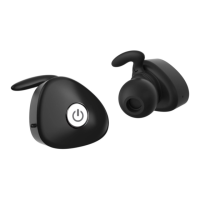
· Ensure both ear pieces are off
· To activate the pairing mode, press and hold the
multi-function button (MFB) of both Right and Left
ear pieces for 8 seconds without releasing your
ngers until their status indicators ash blue and
red alternately.
· Right and Left ear pieces will pair to each other in
around 10 seconds
· Once the ear pieces pairing was successful, the ear
pieces will be ready to pair with phone.
· Activate your mobile phone’s Bluetooth → search
bluetooth devices → select “Bem NKD 100”. When
the pairing is completed, the ear pieces indicators
will ash blue every 5 seconds.
Note:
If the right and left ear pieces pairing is not complete within
2 minutes, the ear pieces will turn to standby mode. If this
happens, please turn off the ear pieces and repeat the
pairing steps.
It is recommended that you put the left and right earpieces
in while you pair them.


 To Next Page