The Bematech KitchenGo Premium is a comprehensive Kitchen Display System (KDS) designed to streamline kitchen operations and enhance efficiency in food service environments. At its core, the system is built around the LS8000 KDS Station Controller, which runs on an Android operating system, providing a flexible and user-friendly platform for managing orders.
Function Description
The primary function of the KitchenGo Premium KDS is to display orders transmitted from Point of Sale (POS) stations directly to the kitchen staff. This eliminates the need for paper tickets, reducing errors, improving order accuracy, and speeding up food preparation and dispatch. The system facilitates real-time communication within the kitchen, allowing staff to view, manage, and track orders as they progress through different stages of preparation.
The KDS software package consists of two main applications: the KitchenGo Premium KDS app and the KitchenGo Premium Router app. The KDS app is responsible for displaying orders and enabling kitchen staff to interact with them, while the Router app provides advanced order routing capabilities. If the POS software already includes order routing functionality, the KitchenGo Premium Router may not be necessary. However, for POS systems lacking this feature, the Router app can be enabled to manage complex order flows across multiple kitchen stations.
Orders are transmitted to the KitchenGo Premium system via an Ethernet network connection. Once received, they are displayed on a VGA monitor, which can be a standard display or a touch monitor for interactive control. The system supports various input methods, including dedicated bump bars (KB9000/KB1700 series) or touch monitors (LE1015/LE1015W), allowing kitchen staff to "bump" orders, mark items as complete, or perform other actions with ease.
The KitchenGo Premium KDS also integrates with printers (e.g., Bematech LR2000) to print out tickets in the kitchen. This feature is particularly useful for dispatching food items, ensuring that the correct order is sent out with the corresponding food.
Usage Features
The KitchenGo Premium system is designed for intuitive use, offering several features that enhance kitchen workflow:
- Order Display and Management: Orders are clearly displayed on the monitor, often categorized or color-coded to indicate status (e.g., new, in progress, completed, delayed). Kitchen staff can easily view individual items within an order, special instructions, and preparation times.
- Bump Bar and Touch Monitor Control: The system supports both physical bump bars and touch monitors for interaction. Bump bars provide tactile feedback and quick access to common functions like "bump" (marking an order as complete), "recall" (bringing back a bumped order), "scroll," "mode," "home," and "summary." Touch monitors offer a more visual and direct way to interact with orders, allowing users to tap on items or orders to perform actions.
- Station ID Configuration: Each LS8000 station requires a unique Station ID within the network. This ensures that orders are routed and displayed correctly to the intended kitchen station. The setup process involves booting up each station and entering a unique ID.
- Order Routing (with Router App): When the KitchenGo Premium Router app is enabled, it provides sophisticated order routing capabilities. This allows for orders to be directed to specific kitchen stations based on item type, preparation area, or other criteria. The router can be configured to use either TCP/IP or a "Remote Folder" as the order source.
- TCP/IP Source: With TCP/IP, the POS software communicates with the Router app via a TCP/IP socket, sending orders to a specified port. This method offers real-time communication and is ideal for integrated POS systems.
- Remote Folder Source: The "Remote Folder" option allows the POS software to drop order files into a shared network folder. The Router app then monitors this folder, retrieves the order files, and processes them. This method provides flexibility for POS systems that may not have direct TCP/IP integration capabilities.
- Stations Relations Setup: The system allows for the configuration of "Stations relations," which defines how different kitchen stations interact and how orders flow between them. This includes setting up functions (e.g., Normal, Expo), mirroring stations, and defining back-up stations. This table can be updated and synchronized across all online stations.
- Filtering and Sorting: The KDS likely includes features to filter and sort orders based on various criteria, such as order time, item type, or priority, helping kitchen staff manage their workload effectively.
- Summary Views: A summary feature provides an overview of current orders, potentially showing statistics like the number of open orders, average preparation times, or items waiting.
Maintenance Features
While the manual primarily focuses on setup and usage, several aspects touch upon maintenance and system integrity:
- Pre-installed Software: The KitchenGo Premium KDS and Router apps are pre-installed on the LS8000 hardware, simplifying initial deployment. This reduces the need for manual software installation, minimizing potential errors.
- Software Updates: The system supports software updates, ensuring that the KDS remains current with the latest features, bug fixes, and performance improvements. Users are directed to the "update" section in the user manual for detailed instructions, indicating a structured process for maintaining software currency.
- Troubleshooting Guides: The manual frequently refers to "troubleshooting" sections for issues related to setting up remote folders or stations relationships. This suggests that the system is designed with common problem-solving in mind, providing resources for users to diagnose and resolve issues independently.
- Hardware Connectivity: The system relies on robust hardware connections (Ethernet, USB, VGA, PS/2) for reliable operation. The guide emphasizes proper connection procedures, which are crucial for stable performance and minimizing downtime.
- Printer Compatibility: The system specifies compatibility with Bematech LR2000 printers for USB connections, ensuring that users select supported peripherals for optimal functionality and ease of integration.
- Network Stability: The system's reliance on Ethernet for order transmission highlights the importance of a stable network environment. Messages like "Network lost" and "Network restored" indicate built-in monitoring for network connectivity, which is essential for continuous operation.
In summary, the Bematech KitchenGo Premium KDS is a robust and adaptable system designed to modernize kitchen operations. It offers comprehensive order display and management, flexible input options, advanced routing capabilities, and features that support efficient workflow and system maintenance, ultimately contributing to faster service and improved customer satisfaction.

 Need help?
 General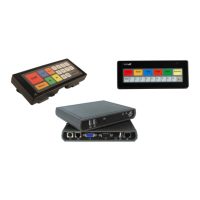

 To Next Page