EasyManua.ls Logo

Benchmark Scientific H3710-H - User Manual

Benchmark Scientific H3710-H
2 pages
Print Icon
To Next Page IconTo Next Page
Loading...
Operations Manual
Items: H3710-H, H3710-S,
And H3710-HS
Introduction:
This manual covers the Benchmark Scientific line of
digital Hotplates, Stirrers, and Hotplate/Stirrers
(Series H3710). In order to ensure the safe
operation of the equipment enclosed, please read
this manual prior to use.
Specifications
Speed:
150-1500 rpm*
Temperature:
Ambient +5°C – 400°C*
Platform Dimensions:
10” x 10”
Electrical:
Power Consumption:
115V/60Hz or
230V/50Hz
Max: 1500W
Warranty:
2 Years
*Speed and Temperature control are not available with all
models.
Installation:
Place your new Hotplate/Stirrer on a flat, level service with at
least 4 inches (10 cm) clearance on all sides. If desired,
attach the optional support rod to the rear of the unit by
screwing the threaded end into its designated hole. Attach
the included power cord to the rear of the unit and plug into
a grounded outlet of appropriate voltage.
Outlet voltage must match voltage listed on
power rating label on the rear of instrument.
Failure to supply appropriate power may
damage instrument and void warranty!
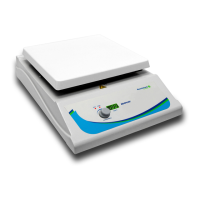
Control Panel - Hotplate/Stirrer Combination:
A) Hot surface indicator light – Safety Warning
B) Digital Display
C) Temperature selection knob Press to
Start/Stop
D) Speed control knob – Press to Start/Stop
Operation (Hotplate/Stirrer Combination):
- Turn power switch (rear of instrument) to ON position
(“I”).
- Set the stir speed by turning the dial (“D”). The set stir
speed will appear on the digital display. To operate
without stirring, set stir speed to zero.
- Set the temperature by turning the dial (“C”). The set
temperature will appear on the digital display.
- When the desired temperature appears on the display
PRESS the selection knob to begin heating. The
temperature will begin to rise to the set parameters.
HOT surface indicator light turns on at 50°C. HEAT
indicator light blinks while heating.
Caution: HOT surface! Once temperature selection
knob has been pressed the surface of the instrument
will begin to heat. Avoid bodily contact or personal
injury may occur.
Operation (Hot Plate):
- Turn power switch (rear of instrument) to ON position
(“I”).
- Set the temperature by turning the dial on the left.
- When the desired temperature appears on the display
PRESS the selection knob to begin heating. HOT
surface indicator light turns on at 50°C. HEAT indicator
light blinks while heating.
Caution: HOT surface! Once temperature selection
knob has been pressed the surface of the instrument
will begin to heat. Avoid bodily contact or personal
injury may occur.
Operation (Stirrer):
- Turn power switch (rear of instrument) to on position
(“I”).
- Set the stir speed by turning the dial on the right.
- Stir speed will rise until selected stirring speed is
achieved. While operating, stir speed can be adjusted
by turning the knob. PRESS the selection knob to stop
stirring.
Maintenance:
- To ensure performance and longevity of the
instrument please keep the outer body and surface
plate clean. To clean the instrument, disconnect from
Question and Answer IconNeed help?

Do you have a question about the Benchmark Scientific H3710-H and is the answer not in the manual?

Summary

Introduction to Benchmark Scientific H3710 Series

Product Specifications

Speed and Temperature Range

Specifies the operating speed range (150-1500 rpm) and temperature range (Ambient +5°C - 400°C).

Platform Dimensions and Electrical

Details platform size (10"x10") and electrical requirements (115V/60Hz or 230V/50Hz).

Power Consumption and Warranty

Covers maximum power consumption (1500W) and the 2-year warranty period.

Installation and Setup

Placement and Power Connection

Instructions for unit placement, support rod attachment, and power cord connection to a grounded outlet.

Voltage Requirement Warning

Emphasizes matching outlet voltage to the instrument's rating to prevent damage and voiding warranty.

Control Panel and Operation

Control Panel Overview

Identifies control panel elements: Hot surface light, digital display, temperature knob, and stir speed knob.

Hotplate;Stirrer Combination Operation

Guides on turning on, setting stir speed and temperature, and initiating heating with safety indicators.

Hot Plate Operation

Instructions for operating the hot plate function, including temperature setting and heating activation.

Stirrer Operation

Details on operating the stirring function, adjusting speed, and stopping stirring.

Safety Precautions During Heating

Warns about hot surfaces and potential injury when the instrument is heating.

Maintenance and Troubleshooting

Instrument Cleaning and Care

Guidelines for cleaning the instrument using a lint-free rag and avoiding immersion or direct spray.

Troubleshooting Common Issues

Provides solutions for 'Not heating or Not stirring' by checking power supply and fuses.

Accessories and External Probes

Available Accessories

Lists optional accessories like support rods, temperature probes, and clamp assemblies.

External Temperature Probe Operation

Instructions for connecting and using external temperature probes for accurate measurements.

Overview

The Benchmark Scientific H3710 Series comprises digital hotplates, stirrers, and hotplate/stirrers, designed for laboratory use. These devices are intended to provide controlled heating and/or stirring for various applications. To ensure safe operation, users are advised to read the manual thoroughly before use.

Function Description:

The H3710 series offers three primary functions: hotplate, stirrer, and a combination hotplate/stirrer.

  • Hotplate Function: This feature allows for precise temperature control of samples. Users can set a desired temperature, and the device will heat its surface accordingly. An indicator light illuminates when the surface temperature reaches 50°C, serving as a safety warning. While heating, a "HEAT" indicator light blinks.
  • Stirrer Function: This function enables the stirring of liquids at a controlled speed. Users can set a desired stir speed, and the device will maintain it. The stir speed can be adjusted during operation, and the stirring can be stopped by pressing the control knob.
  • Hotplate/Stirrer Combination Function: This combines both heating and stirring capabilities, allowing users to simultaneously heat and stir samples. Both temperature and stir speed can be independently set and controlled.

Usage Features:

The H3710 series is designed for ease of use with a clear control panel and safety features.

  • Installation: For proper operation, the unit should be placed on a flat, level surface with at least 4 inches (10 cm) of clearance on all sides to ensure adequate ventilation. An optional support rod can be attached to the rear of the unit for holding accessories. The device requires connection to a grounded electrical outlet, and the outlet voltage must match the voltage specified on the instrument's power rating label to prevent damage and void the warranty.
  • Control Panel (Hotplate/Stirrer Combination): The control panel features a digital display that shows the set temperature or stir speed. It includes a temperature selection knob (C) and a speed control knob (D). Both knobs can be pressed to start or stop their respective functions. A hot surface indicator light (A) provides a safety warning, and a digital display (B) shows operational parameters.
  • Operation (General): To begin, the power switch located at the rear of the instrument must be turned to the "ON" position ("1").
  • Setting Stir Speed: The stir speed is set by turning the speed control knob (D). The set speed is displayed digitally. To operate without stirring, the stir speed should be set to zero. Stirring can be stopped by pressing the speed control knob.
  • Setting Temperature: The temperature is set by turning the temperature selection knob (C). The set temperature is displayed digitally. Once the desired temperature is shown, pressing the selection knob initiates heating. The surface temperature will then rise to the set parameters.
  • Safety Warnings: A "HOT surface" indicator light illuminates when the surface temperature reaches 50°C. This serves as a crucial safety warning, reminding users to avoid bodily contact with the hot surface to prevent personal injury. The "HEAT" indicator light blinks while the device is actively heating.
  • External Temperature Probes: For more precise temperature control, an optional external temperature probe (H3770-TP) can be used. To utilize this feature, the power switch must first be turned OFF. The probe is then connected to a dedicated port on the backside of the hotplate/hotplate-stirrer. After connecting, the power switch is turned ON. The device will then display the temperature measured by the external probe. The probe should be placed inside the vessel on the top plate. A support rod (H3770-ROD) and clamp (H3770-CS or H3770-CSTF) can be used to properly position and submerge the probe within the vessel. It is critical to NEVER start heating without a vessel on the top plate or before the probe is properly submerged, as this could lead to inaccurate readings or damage.

Maintenance Features:

Proper maintenance ensures the longevity and optimal performance of the H3710 series.

  • Cleaning: To clean the instrument, it must first be disconnected from the power source and allowed to cool completely. The outer body and surface plate should be wiped down with a lint-free rag. It is crucial not to immerse the instrument in water or spray cleaner directly onto the unit, as this can cause damage.
  • Warranty: The instrument is covered by a 2-year warranty. In the event of a failure or defect, users should disconnect the unit from the power source and contact the manufacturer for assistance.
  • Troubleshooting: The manual provides basic troubleshooting steps. If the device is not heating or stirring, users should first check the power supply cord to ensure it is firmly plugged into the socket. If the issue persists, the fuse should be checked and replaced if necessary.

Benchmark Scientific H3710-H Specifications

General IconGeneral
Weight4.4 lbs (2 kg)
Temperature RangeAmbient +5°C to 100°C
Temperature Accuracy±0.3°C
Power Requirements100-240V~, 50/60 Hz, 100W
Timer1 minute to 99 hours, 59 minutes