The ONE.2WB-MS is a 433.92MHz two-channel radio receiver, compatible with the Advantouch system and capable of multiple decoding. It is designed to work with both standard rolling-code transmitters and the newer ARC (Advanced Rolling Code) transmitters, offering enhanced copy-security due to 128-bit encryption.
Function Description:
The device serves as a central receiver for remote controls, allowing the activation of up to two independent channels. It supports various operating modes for each channel: impulsive (default 1-second switching), bistable, and timed (from 1 second to 10 minutes). The receiver can store up to 512 standard rolling-code transmitters in its internal memory. An expansion memory (Art. 9570001-MEM 2048) is available, increasing the capacity to 2048 codes. A full memory is indicated by 10 orange blinks.
Important Technical Specifications:
- Frequency: 433.92 MHz
- Power Supply: 21÷28 Vac or 12÷28 Vdc
- Range: 30m (without antenna) - 100m (with antenna)
- Channels: 2
- Relay Contact: 1A/24 Vdc
- Working Temperature: -20°C to +50°C
- Consumption in Standby: 10 mA
- Consumption with 1 channel actuated: 42 mA
- Consumption with 2 channels actuated: 66 mA
Usage Features:
The ONE.2WB-MS offers several programming methods for transmitters:
-
Simplified Procedure (for Channel 1):
- Press and release the "P" button on the receiver.
- The red LED will light for 3 seconds, turn off for 1 second, then light again for 5 seconds.
- While the red LED is on, press the button on the transmitter to be associated with channel 1.
- Additional transmitters can be added by pressing a button within 5 seconds of the previous transmitter's recording.
- After 5 seconds of inactivity, the receiver exits programming mode.
-
Remote Self-Learning:
- Requires at least one transmitter already memorized in the receiver.
- Press the hidden button on the memorized transmitter.
- Within 5 seconds, press the button on the memorized transmitter corresponding to the channel to be associated with the new transmitter.
- Within 5 seconds, press the button on the new transmitter to be associated with the selected channel.
- The receiver will memorize the new transmitter and exit programming.
-
Programming Modes (using "P" button):
- Channel 1 Memorization (Red LED): Press "P" (within 3s of previous press) to enter this mode. The red LED lights for 3s, off for 1s, then on for 5s. Press the transmitter button within these 5s to associate it with channel 1.
- Channel 2 Memorization (Green LED): Press "P" (within 3s) to enter. Green LED sequence as above. Associate transmitter button with channel 2.
- Automatic Channels 1 & 2 Memorization (Orange LED): Press "P" (within 3s) to enter. Orange LED sequence as above. Press any transmitter button; button 1 will be associated with channel 1, button 2 with channel 2.
- Channel 1 Time Setting (Red Blinking LED): Press "P" (within 3s) to enter. The LED blinks 5 times rapidly. Press "P" during these blinks to move to the next phase. After 5 blinks, the Times menu is entered (see Table 2 for options: impulsive, bistable, continuous, and various timed durations).
- Channel 2 Time Setting (Green Blinking LED): Press "P" (within 3s) to enter. Similar to Channel 1 Time Setting, but for channel 2.
-
Master Transmitter (Key Transmitter) Creation (ARC mode only):
- Requires at least one transmitter already memorized.
- Press and hold the "P" button for at least 10 seconds until the RED LED flashes quickly, then release "P".
- Press the button of the already saved remote control.
- The RED LED stays on for 5 seconds, then turns off. The transmitter is now a key transmitter.
- A key transmitter does not activate any output; its sole function is to protect the receiver. Up to 3 key transmitters can be created per receiver.
- Manual Entry using Key Transmitter: Press "P". The ORANGE LED flashes quickly for ~10s, awaiting the KEY transmitter's signal. If received, the receiver unlocks, allowing standard programming.
Maintenance Features:
- Resetting the Memory (Complete Erasure):
- Disconnect power to the receiver.
- Press and hold the "P" button.
- Restore power while keeping "P" pressed.
- The LED will light red, then after 5 seconds, it will blink rapidly alternating green-red. Release "P".
- Wait for the LED to go out. The memory is now completely erased, including time settings and Advantouch password.
- Deleting a Key Transmitter:
- Requires a key transmitter to be present.
- Press and hold the "P" button for at least 15 seconds until the GREEN LED flashes quickly.
- Press the button on the "key" transmitter.
- The GREEN LED stays on for 5 seconds, then turns off. The remote control will no longer be a "key" remote control but will act as a normally stored remote control.
- Antenna Installation: For optimal reception, install the antenna away from metal objects and avoid placing multiple receivers close to each other. Reception is significantly reduced without an antenna.
Important Notes:
- ARC transmitters and Rolling Code HCS transmitters cannot be stored in the same receiver simultaneously.
- The first memorized transmitter determines the type of transmitters that can be used subsequently. To change transmitter type, a receiver reset is required.
- Once a programming mode is entered, other modes cannot be accessed until the current programming sequence is complete (indicated by the LED turning off).
- If the master transmitter is lost, new transmitters cannot be memorized without a total receiver reset, which erases all stored transmitters.
- Cloned transmitters (cloned prior to key transmitter creation) only work if used at least once; otherwise, the receiver will not recognize them.
- In receivers protected by a master transmitter, changing the channel operating mode (impulsive, bistable, timed) is prevented.
- The Advantouch palm programmer and its software allow for advanced functions not covered in this manual.

 Need help?
 General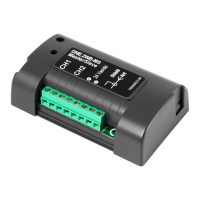

 To Next Page