EasyManua.ls Logo

Bennett & Ross Blackmore Junior - User Manual

Bennett & Ross Blackmore Junior
4 pages
Print Icon
To Next Page IconTo Next Page
Loading...
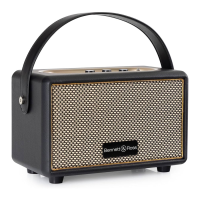
Blackmore Junior
BB-820
Bluetooth Speaker
Article: 00059253 (black)
Article: 00067458 (beige/cream white)
Article: 00067459 (red)
Please read these instructions carefully
before using the device and retain for
future reference.
Important Safety Instructions
Keep the unit away from heat sources, direct sunlight,
humidity, water and any other liquids. Do not operate
the unit if it has been exposed to water, moisture or
any other liquids to prevent against electric shock,
explosion and/or injury to yourself and damage to the
unit. Do not use the unit if it has been dropped or
damaged in any way. Repairs to electrical equipment
should only be performed by qualified staff. Improper
repairs may place the user to serious risk. Do not use
the unit with wet hands. Do not put objects into any
of the openings. Keep the unit free from dust, lint etc.
Do not use this unit for anything other than its
intended use. Keep the unit out of reach of small
children. This product is not a toy. Do not use
chemical cleaning solvents to clean. Do not open the
device. For cleaning only use soft and dry cloth.
Getting Started
Unpack the Bluetooth speaker & accessories. Remove
all packaging from the Bluetooth speaker. Check if the
box and accessories is not damaged.
Package contents
Blackmore Junior BB-820 Bluetooth Speaker, with
rechargeable Battery Instruction Manual, USB
charging cable, 3.5mm Aux cable.
Display/Functions Panel
1. TF/MicroSD Card input port
2. Bluetooth indicator LED (blue)
3. Charging LED indicator light (red)
4. DC input plug for charging cable
5. AUX IN input port
6. Button I<< Previous song
7. Mode button (M): Toggle between the
different functions / Pause a song
8. Button >>I : Next song /Bluetooth
disconnection by longer pressing (2-3sec)
9. Treble control knob
10. Bass control knob
11. Volume control knob
12. Lever /Switch (ON/OFF)
Power Supply /Charging
Insert the DC plug into the DC jack at the function
panel on top of the unit. Plug the USB end of the cable
to the USB input of your computer or notebook.
Alternatively you can use an Adapter (not included) to
connect with a power plug and put into power wall
socket. Make sure that you only use the included
charging cable. Please charge the battery approx. 4-6
hours before first use. The red LED indicator will be
on while charging. Then put the ON/OFF switch to ON
position. When you have finished using the system,
turn off the unit by putting the ON/OFF switch to OFF
position. The Power LED will go off. Unplug the AC
adapter from the mains when not in use.
General operations
Bluetooth operation (BT):
Put the ON/OFF SWITCH lever to ON position. The
blue Bluetooth LED indicator at the left side of the
AUX input will start flashing. Press button “Pairing
for 2-3 sec.
Set up the Bluetooth function at your external device
(e.g. your smartphone). Your external device should
show you a list of available Bluetooth Transmitters in
your close surrounding. Please select the pairing
name “Blackmore junior BB-820” and confirm in your
list.
Once the pairing is successful, you will hear a signal
sound, which confirms the connection.
To disconnect the BT pairing, please press Button
“pair for 2-3 sec. or use the disconnect function on
your external device (smartphone)
The next time you turn on the Blackmore BB-820, it
will automatically connect to the last Bluetooth
playback device connected. If your Bluetooth does
not automatically reconnect to the device, you will
have to re-establish the connection to your Bluetooth
device manually.
If you use a smart-phone as your Bluetooth playback
device, the audio file will be muted when
there is an incoming call. Acceptance/termination of
the call is carried out via the smartphone.
After finishing the call, the playback will be
automatically continued.
Make sure the AUX-IN jack is unplugged while you
intend to use the Bluetooth function.
AUX input operation (plug in cable):
This unit provides an auxiliary audio signal input jack
for connecting via cable your external audio devices
like MP3 players, smartphones and CD players, so
you can listen to your external source through the
speakers of this system.
Please use an audio cable with one 3.5 mm stereo
connection on each end of the cable. Plug one end
into the AUX-IN jack on the main unit and the other
end to the lineout jack of audio device. Once the
audio cable is plugged into AUX-IN jack, please press
for 2-3 Seconds the button “M”. The blue LED
indicator will be on constantly. Switch ON the AUX
unit (e.g. your smartphone). The volume level can be
controlled through the main unit. Operate all the
functions on the auxiliary device as usual. If you wish
to end the AUX cable connection/function, please
make sure to press button Magain for 2-3
seconds to leave the AUX Modus. Then the
Bluetooth transmitter is again on standby and the
Bluetooth Function can be used.
.
TF/microSD Operation
Switch on the BB-820.Make sure the Aux-In jack
cable is unplugged. Insert the microSD card into the
TF/SD port. The player will start automatically
playing the tracks of the SD device. Press the I<< or
>>I buttons to choose your desired track. Press the
>II button to pause or play the track. Switch the
Power lever to OFF to turn off the unit when you are
done.
Bass & Treble adjustments:
In order to adjust the Audio quality to your personal
audiophile taste, the BB-820 is equipped with 2
rotary buttons located at the function panel.
.
Turn the TREBLE knob clockwise to increase the high
frequencies, or counter-clockwise to reduce them.
Turn the BASS control knob clockwise to increase the
bass sounds, or counter-clockwise to decrease the
bass.
Technical data
Musikhaus Kirstein GmbH
Bernbeurenerstre 11
86956 Schongau/Germany
www.kirstein.de
CE conformity
SIMPLIFIED EU DECLARATION OF CONFORMITY
Herewith Musikhaus Kirstein GmbH declares that the
device/radio unit [Bennet & Ross Blackmore Junior
BB-820] complies with the EU directive 2014/53/EU.
You can download the EC declaration of conformity
for this item under download link:
http://www.kirstein.de/docs/Konformitaetserklaeru
ng/CE_Konformitaetserklaerung_00059253.pdf
Bluetooth specification
V4.2+BR+EDR+BLE
Rechargeable Battery/Akku
7.4V 5200mAh.
Speaker power
2*10 Watts (RMS)
Bluetooth transmission Power and
Frequency
<20mW , 2,402-
2,480Ghz
DC Input
DC 5V/2.5A
Question and Answer IconNeed help?

Do you have a question about the Bennett & Ross Blackmore Junior and is the answer not in the manual?

Summary

Important Safety Instructions

Getting Started

Package Contents

Display and Functions Panel

Power Supply and Charging

General Operations

Bluetooth Operation

Instructions for pairing and connecting the speaker to external Bluetooth devices.

AUX Input Operation

How to connect audio sources using a 3.5mm stereo cable via the AUX IN port.

TF;microSD Operation

Guidance on playing audio files from a microSD card inserted into the TF/SD port.

Bass and Treble Adjustments

Technical Data

CE Conformity

Overview

The Blackmore Junior BB-820 is a versatile Bluetooth speaker designed for portable audio enjoyment, offering multiple connectivity options and sound customization features. It is suitable for use with various external audio devices, including smartphones, MP3 players, and CD players, making it a flexible solution for personal audio playback.

Function Description

The primary function of the BB-820 is to act as a Bluetooth speaker, allowing wireless audio streaming from compatible devices. It supports Bluetooth operation, enabling users to pair their smartphones or other Bluetooth-enabled devices to play music wirelessly. The speaker also features an AUX input, providing a wired connection option for external audio sources that may not have Bluetooth capabilities. Additionally, it includes a TF/MicroSD card input port, allowing direct playback of audio tracks stored on a microSD card, offering a standalone music playback solution without the need for an external device.

The device is equipped with a rechargeable battery, providing portability and allowing for use without a constant power connection. Charging is facilitated via a USB charging cable, which can be connected to a computer, notebook, or a power wall socket using an adapter (not included).

For sound customization, the BB-820 incorporates dedicated Treble and Bass control knobs. These allow users to adjust the high and low frequencies of the audio output to suit their personal preferences, enhancing the listening experience. A Volume control knob is also present for easy adjustment of the overall sound level.

The speaker's control panel includes several buttons for media playback and mode selection. These include buttons for navigating between previous and next songs, a mode button to toggle between different functions (Bluetooth, AUX, TF/MicroSD), and a pause/play function. The mode button also serves to disconnect Bluetooth by a longer press. An ON/OFF lever/switch controls the power to the unit.

Usage Features

To begin using the BB-820, users must first charge the internal battery for approximately 4-6 hours before initial use. During charging, a red LED indicator will be illuminated. Once charged, the ON/OFF switch can be moved to the "ON" position to power on the device.

For Bluetooth operation, after turning on the unit, the blue Bluetooth LED indicator will start flashing. Users then need to activate the Bluetooth function on their external device (e.g., smartphone) and select "Blackmore junior BB-820" from the list of available Bluetooth transmitters to pair. A signal sound will confirm successful pairing. The device is designed to automatically reconnect to the last paired Bluetooth playback device when turned on again. If automatic reconnection fails, users may need to manually re-establish the connection. When using a smartphone as the playback device, incoming calls will mute the audio, and playback will resume automatically after the call is finished. It is important to ensure the AUX-IN jack is unplugged when using the Bluetooth function.

For AUX input operation, a 3.5 mm stereo audio cable is required. One end of the cable should be plugged into the AUX-IN jack on the main unit, and the other end into the lineout jack of the external audio device. After plugging in the cable, pressing the "M" button for 2-3 seconds will activate the AUX mode, indicated by a constantly lit blue LED. The volume can be controlled via the main unit, while other functions are managed on the auxiliary device. To exit AUX mode, the "M" button must be pressed again for 2-3 seconds, returning the Bluetooth transmitter to standby.

For TF/MicroSD card operation, the BB-820 should be switched on, and the Aux-In jack cable must be unplugged. Inserting a microSD card into the TF/SD port will automatically start playing tracks from the card. The "<<" and ">>|" buttons can be used to select desired tracks, and the ">>|" button also functions as a pause/play control.

The Treble and Bass control knobs allow for fine-tuning of the audio output. Turning the TREBLE knob clockwise increases high frequencies, while turning it counter-clockwise reduces them. Similarly, turning the BASS control knob clockwise increases bass sounds, and counter-clockwise reduces them.

When finished using the system, the ON/OFF switch should be moved to the "OFF" position to turn off the unit, and the AC adapter should be unplugged from the mains if charging.

Maintenance Features

The BB-820 is designed with several safety and maintenance guidelines to ensure its longevity and safe operation. Users are advised to keep the unit away from heat sources, direct sunlight, humidity, water, and any other liquids. Operating the unit when it has been exposed to water, moisture, or other liquids is strictly prohibited to prevent electric shock, explosion, injury, and damage to the unit. The device should not be used if it has been dropped or damaged in any way.

Repairs to electrical equipment should only be performed by qualified staff, as improper repairs can pose serious risks to the user. Users should avoid handling the unit with wet hands and should not insert objects into any of its openings. To maintain optimal performance, the unit should be kept free from dust, lint, and other debris.

The BB-820 is intended for its specified use only and should not be used for any other purpose. It is not a toy and should be kept out of reach of small children. For cleaning, chemical cleaning solvents should not be used. Instead, the device should only be cleaned with a soft and dry cloth. Users are also advised not to open the device.

Upon unpacking, users should ensure that the Bluetooth speaker and all accessories are present and undamaged. This includes the rechargeable battery, instruction manual, USB charging cable, and 3.5mm Aux cable.

Bennett & Ross Blackmore Junior Specifications

General IconGeneral
BrandBennett & Ross
ModelBlackmore Junior
Configuration2-way
Tweeter Size1 inch
Impedance8 Ohms
Crossover Frequency3 kHz
Enclosure TypeBass Reflex
Cabinet MaterialMDF
FinishBlack