Need help?
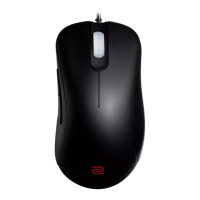
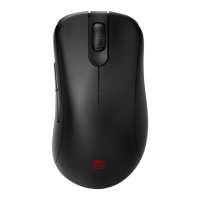
Do you have a question about the BenQ EC1-CW and is the answer not in the manual?
Diagram showing the top layout of the mouse with numbered components.
Diagram showing the bottom layout of the mouse with numbered components.
Button to select report rate (125, 500, 1000 Hz).
Button to adjust DPI settings (400, 800, 1600, 3200 dpi).
Instructions for wireless connection via enhanced receiver.
Instructions for wireless connection via USB receiver.
This document serves as a user guide for a BenQ ZOWIE gaming mouse, designed for e-sports. It provides comprehensive instructions on its operation, charging, and maintenance, along with regulatory information.
The mouse offers versatile connectivity options, supporting both wired and wireless modes. For wireless operation, users can choose between an Enhanced Wireless Receiver or a standard USB Wireless Receiver. The Enhanced Wireless Receiver provides a greater range, allowing the mouse to operate effectively at distances greater than 50 cm from the receiver. This setup typically involves connecting the Enhanced Wireless Receiver to a USB-A port on the computer via a supplied USB cable, with the receiver itself being a small, distinct unit. The USB Wireless Receiver, on the other hand, is designed for closer proximity, with an effective range of over 2 meters when used with a USB adapter and a supplied USB cable connected to a USB-A port. Both wireless configurations emphasize ease of setup and provide flexibility for different gaming environments.
When it comes to charging, the mouse supports two methods: charging via the Enhanced Wireless Receiver or directly via a USB-C cable. Charging through the Enhanced Wireless Receiver involves connecting the receiver to a USB-C port on the mouse using a supplied USB cable, while the receiver itself is connected to a USB-A port on the computer. Alternatively, for direct charging, a supplied USB-C cable can be connected directly from the mouse's USB-C port to a USB-A port on the computer. This dual charging capability ensures that the mouse can be powered up conveniently, regardless of the user's preferred wireless setup.
The mouse features several user-adjustable settings to optimize performance. On the top view, there are indicators for the USB-C port, an enhanced antenna, and pogo pins for charging. The bottom view reveals a mode switch, a report rate switch button, and a DPI switch button. The report rate switch allows users to cycle through different polling rates: 125 Hz, 500 Hz, and 1000 Hz. A higher report rate generally means more frequent updates to the computer, resulting in smoother and more responsive cursor movement, which is crucial for competitive gaming. The DPI switch button offers four sensitivity settings: 400 dpi, 800 dpi, 1600 dpi, and 3200 dpi. DPI (dots per inch) determines how far the cursor moves on the screen relative to the physical movement of the mouse. Users can select a lower DPI for precise movements, such as aiming in first-person shooters, or a higher DPI for faster cursor navigation across large displays. The mode switch likely allows users to toggle between different profiles or operational modes, although specific details are not provided in this excerpt.
LED indicators provide visual feedback on the mouse's battery status and operational state. When charging, the LED will indicate the battery level, progressing from 0-10% (flashing), 26-50%, 51-99%, to 100% (solid). This allows users to quickly ascertain how much charge the mouse has accumulated. When the mouse is in use, the LED will indicate the current battery level, with different patterns or colors representing various charge percentages. A specific indicator for 0-10% battery suggests a low battery warning, prompting the user to recharge. The mouse also incorporates a power-saving feature, which likely involves automatically powering off or entering a low-power state after a period of inactivity to conserve battery life.
For maintenance and support, the user guide directs users to the official ZOWIE BenQ website (zowie.benq.com) for downloads and FAQs. This online resource would provide access to updated drivers, firmware, and troubleshooting guides, ensuring users can keep their device optimized. The document also includes a Taiwan RoHS declaration, detailing the presence of restricted substances in various components of the mouse, such as the top/bottom cover, scroll wheel, steel ball, screws, cables, power lines, printed circuit board, USB wireless receiver, and enhanced wireless receiver. This declaration confirms compliance with environmental regulations.
Furthermore, an E-Waste Declaration for India is included, emphasizing the importance of proper disposal of the product. The symbol on the product or packaging indicates that it should not be disposed of with regular household waste. Instead, users are instructed to hand it over to a designated collection point for the recycling of waste electrical and electronic equipment. This commitment to responsible recycling helps conserve natural resources and protects human health and the environment. The declaration provides a link to BenQ's global recycling information page for more details on E-waste and recycling locations in India.
In summary, the BenQ ZOWIE gaming mouse is a feature-rich device designed for competitive gaming, offering flexible wireless connectivity, multiple charging options, customizable performance settings (report rate and DPI), clear battery status indicators, and robust support for maintenance and environmental responsibility. Its design focuses on user convenience, performance optimization, and adherence to environmental standards.
 General
| DPI | 400 / 800 / 1600 / 3200 |
|---|---|
| Polling Rate | 125 / 500 / 1000 Hz |
| Buttons | 5 |
| Compatibility | Windows, Mac |
| IPS | 400 |
| Connectivity | Wireless |
| Weight | 77g |

 To Next Page