Positioning your projector16
Positioning your projector
Choosing a location
Your room layout or personal preference will dictate which installation location you select.
Take into consideration the size and position of your screen, the location of a suitable power
outlet, as well as the location and distance between the projector and the rest of your
equipment.
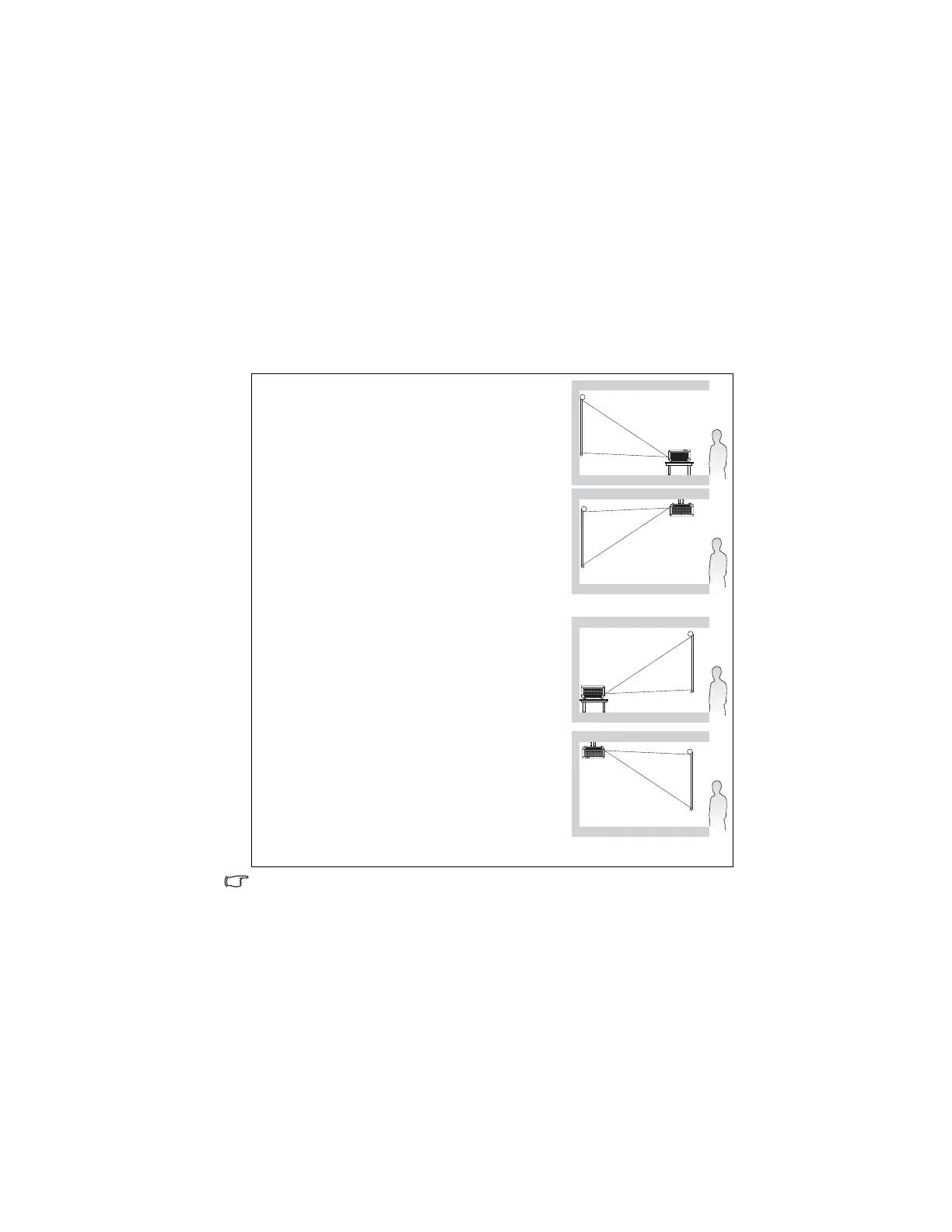
Your projector is designed to be installed in one of four possible installation locations:
Your room layout or personal preference will dictate which installation location you select.
Take into consideration the size and position of your screen, the location of a suitable power
outlet, as well as the location and distance between the projector and the rest of your
equipment.
Select this location with the projector placed near the
floor in front of the screen. This is the most common way
to position the projector for quick setup and portability.
Select this location with the projector suspended upside-
down from the ceiling in front of the screen.
Purchase the BenQ Projector Ceiling Mounting Kit from
your dealer to mount your projector on the ceiling.
Set F
in the S
>
menu after you turn the projector on.
Select this location with the projector placed near the
floor behind the screen.
Note that a special rear projection screen is required.
Set R
in the S
> P
menu after you turn the projector on.
Select this location with the projector suspended upside-
down from the ceiling behind the screen.
Note that a special rear projection screen and the BenQ
Projector Ceiling Mounting Kit are required for this
installation location.
Set R
in the S
>
menu after you turn the projector on.



 To Next Page