Introduction 11
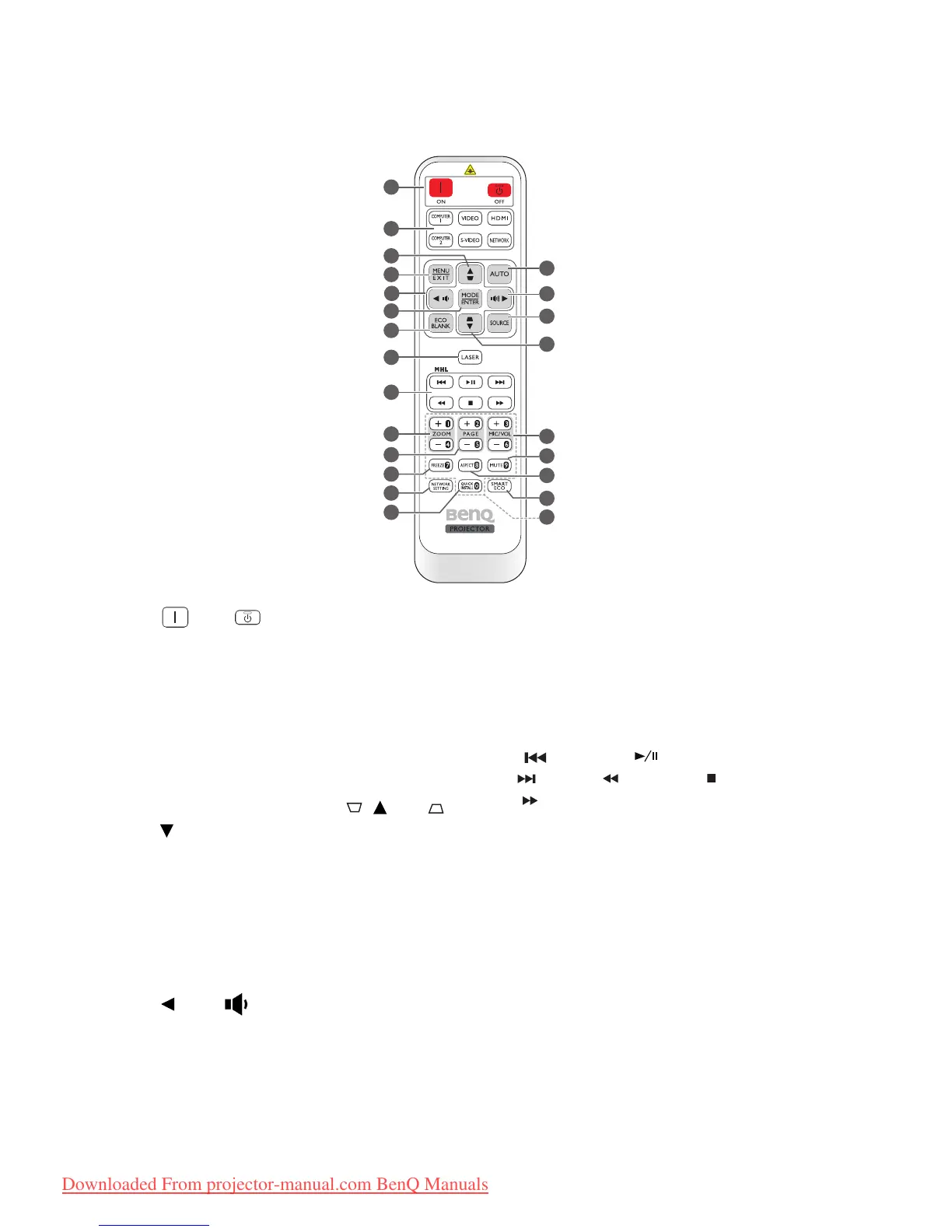
Remote control (MX666)
1. ON/ OFF
Toggles the projector between standby
mode and on.
2. Source selection buttons
(COMPUTER 1, COMPUTER 2,
VIDEO, S-VIDEO, HDMI,
NETWORK
)
Selects an input source for display.
3. Keystone/Arrow keys ( / Up, /
Down)
Manually corrects distorted images
resulting from an angled projection.
4. MENU/EXIT
Turns on the On-Screen Display (OSD)
menu. Goes back to previous OSD menu,
exits and saves menu settings.
5. Left/
Decreases the projector volume.
6. MODE/ENTER
Selects an available picture setup mode.
Activates the selected On-Screen Display
(OSD) menu item.
7. ECO BLANK
Used to hide the screen picture.
8. LASER
Emits visible laser pointer light for
presentation purposes.
9. MHL control buttons
(Previous, Play/Pause,
Next, Rewind, Stop,
Fast-forward)
Goes to the previous file/Plays/Pauses/
Goes to the next file/Rewinds/Stops/Fast-
forwards during media playback.
Only available when controlling your smart
device in MHL mode.
10. ZOOM+/ZOOM-
Magnifies or reduces the projected picture
size.



 To Next Page