Use the 2.4G Remote Controller (IF EQUIPPED) │ 16
ADULT OPERATING REQUIRED!
WARNING:
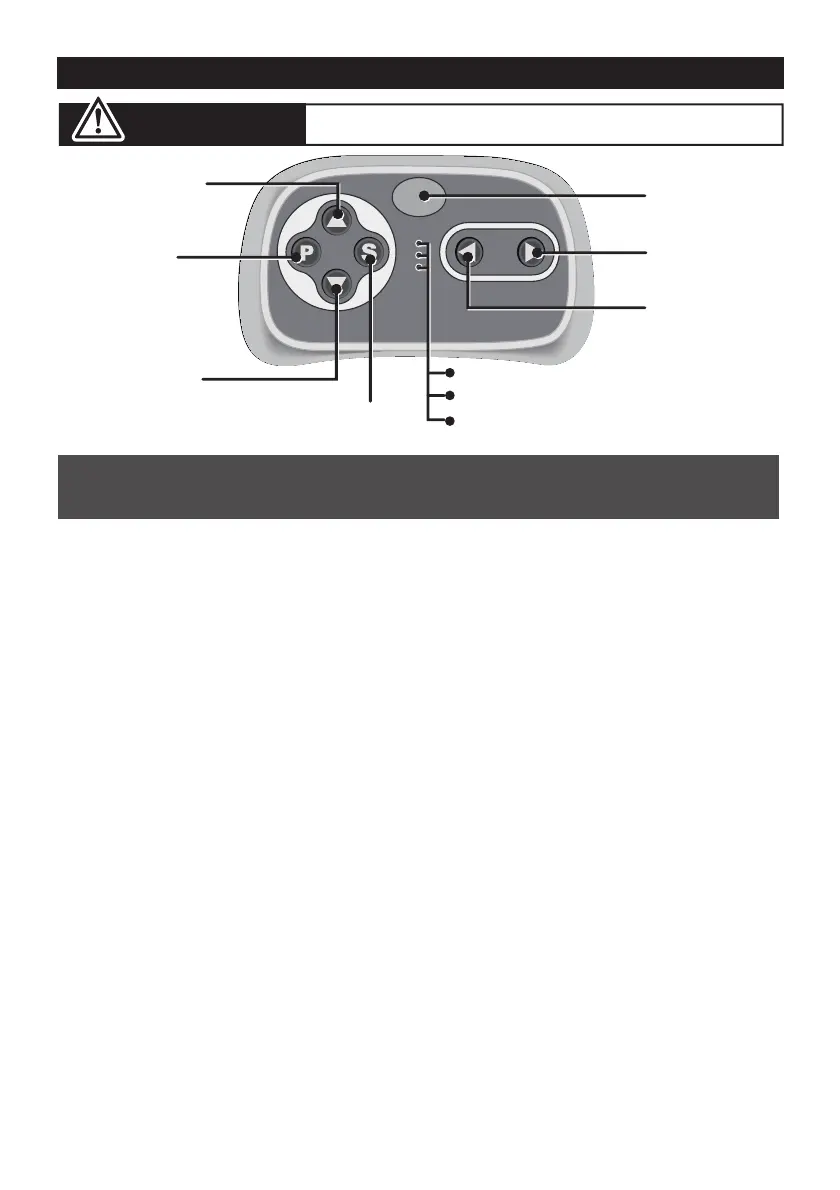
1. Connection button (build connection)
Long press the Connection button for 2~4 seconds first, then turn on the
power button located on the vehicle dashboard console, when the low speed
indicator goes from flashes into long bright, means the connection successful.
If the low speed indicator only flashes, means the connection failed. Replace
the batteries and repeat the steps above.
2. Brake button
Press the button to stop the vehicle, press it again to release the brake.
3. Speed select button
The switch operates the vehicle to move in low, normal or high speed.
HINT: The vehicle is designed to operate in low speed only in reverse.
• Leave the remote controller idling for about 10 seconds, it will shut down
automatically.
• Repeat step 1 when you replace the batteries of the remote controller.
INSERT THE BATTERIES
Lift the battery compartment door on the back of the controller and insert
two AAA(LR03) batteries.
NOTE: Batteries not included.
Refer to the battery information on page 4.
NOTE:
The remote control has precedence over foot pedal operation.
(The foot pedal won’t work while you operate the Remote Controller)
Connection
button
Forward button
Left turning
button
Right turning
button
Brake button
Speed select button
High speed indicator
Normal speed indicator
Low speed indicator
Reverse button


 To Next Page