EasyManua.ls Logo

Berker 2044 Series - User Manual

Berker 2044 Series
15 pages
Print Icon
To Next Page IconTo Next Page
Loading...
Thermostat NO contact with centre plate, time-controlled
Order no.: 2044 xx
Operation and installation instructions
1 Safety instructions
Electrical equipment must only be installed and assembled by qualified electricians.
Always follow the relevant accident prevention regulations.
The device is compliant with the guidelines of the EN 60730 and works according to the
mode of operation 1C.
Failure to comply with these instructions may result in damage to the device, fire or other
hazards.
These operating instructions are an integral component of the product, and must be
retained by the end user.
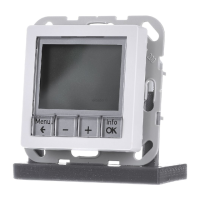
2 Design and layout of the device
(1)
(2)
(3)
(4)
(5)
(6)
(7)
Figure 1: Device overview
(1) Display
(2) Operating keys
(3) Operating unit
(4) Plug-in contacts for insertion
(5) Frame (not included in delivery)
(6) Socket for plug-in contacts
(7) Insert
97-09920-000
Page 1/15
10/2011

Questions and Answers

Summary

Safety and Device Overview

Safety Instructions

Essential safety precautions for electrical equipment installation and operation.

Device Design and Layout

Overview of the thermostat's physical components and their arrangement.

Thermostat Functionality

Core Functions

Explanation of automatic and manual temperature control based on internal and external sensors.

Operator Control

Control Interface Overview

Description of the user interface, buttons, and basic display elements for device operation.

Operating the Thermostat

Detailed steps for navigating menus, setting functions, and adjusting parameters.

Manual Temperature Adjustment

Manual adjustment of the desired room temperature in AUTO and MAN modes.

Controller Power Off

Procedure to turn off the thermostat, indicated by 'OFF' on the display.

Time Program Management

Program 1 & 2 Schedules

Details of the first two preset time temperature programs, including weekday and weekend schedules.

Program 3 & Selection

Details of the third program and instructions for choosing among the three presets.

Program Customization

Guidance on personalizing preset time temperature programs with custom events and temperatures.

Setting Program Events

Detailed steps for setting specific events, temperatures, and times within a program.

Function Mode Activation

How to access and activate different operating modes like AUTO and MAN.

Available Operating Modes

Description of modes: MAN, TIMER, HOLIDAY, AT HOME, USER SETTING, INSTALLER SETTINGS.

Default Value Configuration

Procedure for setting default times and temperatures for various functions.

User Settings Configuration

Program & Event Settings (G1-G2)

Selection of programs and adjustment of weekday, temperature, and event times.

Clock, Time Change & Security (G3-G6)

Setting clock, time changeover, and activating key lock for security.

Temperature Limits & Cost Tracking (G7-G8)

Setting temperature limits and inputting energy costs for consumption tracking.

Consumption, Display & Language (G9-G14)

Consumption display, temperature settings, backlight, and language selection.

Information & Reset Options (G15-G16)

Viewing controller info and resetting user settings.

Accessing Settings Menus

Steps to access and navigate through the various user settings menus.

Electrician Information

Assembly & Electrical Connection

Instructions for physical installation and wiring of the thermostat unit.

Optimal Installation Location

Guidelines for choosing an optimal location for the thermostat's internal sensor.

External Sensor Connection

Procedure for connecting an external sensor for floor or room temperature measurement.

Initial Commissioning

Crucial steps for initial setup and configuration by a skilled specialist.

Heating Type Configuration

Configuration of the thermostat's operating mode: ROOM, FLOOR, or LIMITER.

Control Mode Settings

Selection of control type (PWM/ON-OFF), cycle time, and hysteresis.

Floor Temperature & Heating Modes (H3-H4)

Setting floor temp limits and configuring heating/cooling modes.

Valve Protection & Frost Control (H5-H6)

Ensuring valve operation and setting frost protection parameters.

Start-up & Actuator Settings (H7-H8)

Optimizing start times and configuring actuator switching behaviour.

Counter Reset & Floor Display (H9-H10)

Resetting energy counters and enabling floor temperature display.

Resetting All Settings (H11)

Resetting all installer and user settings to factory defaults.

Error Handling

Error Codes and Solutions

Common error codes, their descriptions, and recommended measures for removal.

Appendix and Support

Technical Specifications

Technical data and specifications of the thermostat, including electrical and environmental parameters.

Troubleshooting and Warranty

Common issues, their causes, solutions, and product warranty information.

Berker 2044 Series Specifications

General IconGeneral
BrandBerker
Model2044 Series
CategoryThermostat
LanguageEnglish

Related product manuals