EasyManua.ls Logo

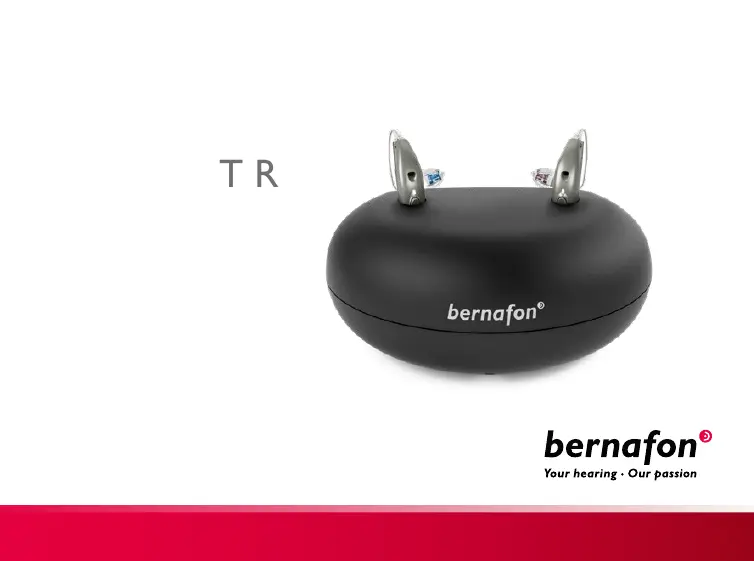
Bernafon miniRITE T R - User Manual

Bernafon miniRITE T R
28 pages
Print Icon
To Next Page IconTo Next Page
Loading...
I Charger
miniRITE T R
Instructions for use

Other manuals for Bernafon miniRITE T R

Questions and Answers

Summary

Intended use

Product Usage Information

Details the charger's intended purpose, user age, and use environment.

Indications and Contraindications

States there are no specific indications or contraindications for the charger itself.

Charger Components

Charger Parts Identification

Identifies and explains the function of the charger's USB plug, charging ports, power cable, and LED light.

Temperature Conditions

Charging Performance by Temperature

Details how temperature affects charging performance, including optimal and non-charging ranges.

Prepare Charger

Connecting to Power Source

Provides step-by-step instructions for connecting the charger to a power source via USB plug and power plug.

Power On Indicator

Explains that the green LED turns on when the charger is connected to power.

Charge Hearing Aids

Placing Hearing Aids Correctly

Instructs to place hearing aids in charging ports, matching left/right indicators.

Charging Status Indicators

Explains the meaning of ORANGE/RED (charging) and GREEN (fully charged) LED indicators on hearing aids.

Charging Time

Charging Frequency and Best Practices

Recommends charging hearing aids nightly and notes that charging time may vary.

Charging Duration Details

Charging Time Estimates

Provides estimated charging times for fully charged, 50% charged, and 25% charged hearing aid batteries.

Alternative Power Sources

Using USB Power Sources

Explains powering the charger from USB 2.0 compliant sources with a minimum 500mA output.

Charger Care and Storage

Cleaning and Maintenance

Advises to keep the charger dry and clean, using a dry cloth for charging ports.

Storage Environment

Recommends storing the charger in a dry location within specified temperature limits.

General Safety Warnings

Usage and Physical Hazards

Covers warnings about correct usage, risks of burns from ports, and choking hazards for children.

Heat Exposure Warnings

Warns against exposing the charger to extreme heat or drying it in microwave/other ovens.

Connection Safety

External Equipment Compliance

States that safety of connection to external equipment via USB is determined by the signal source.

Fire Hazard Information

Notes that the power source has insufficient energy to cause fire under normal usage conditions.

Charger Troubleshooting: Symptoms and Causes

Charger LED Error Diagnosis

Details symptoms like LED OFF, long ORANGE blinks, or three short ORANGE blinks, and their causes.

Charger Troubleshooting: Solutions

Resolving Charger LED Problems

Offers solutions such as checking connections, ensuring charging has started, and adjusting temperature.

Hearing Aid Troubleshooting: Symptoms and Causes

Hearing Aid LED Error Diagnosis

Details symptoms like GREEN blinks, LED OFF, or ORANGE/RED blinks, and their possible causes.

Hearing Aid Troubleshooting: Solutions

Resolving Hearing Aid LED Problems

Provides solutions such as checking connections, temperature, seating, and contacting a professional.

Conditions of Use

Operational Environment

Defines operational conditions: temperature +5°C to +40°C, humidity 5-93%, pressure 700-1060 hPa.

Transportation and Storage Limits

Outlines temperature and humidity limits for transportation and storage to ensure product integrity.

Compliance Statements

USA and Canada Compliance

Declares compliance with FCC rules and RF radiation exposure limits for uncontrolled environments.

User Information on Interference

Informs users about potential radio frequency energy and interference with radio communications.

Interference Mitigation

Handling Radio Interference

Suggests reorienting, relocating equipment, or increasing separation to correct interference.

Modification Disclaimer

Warns that unauthorized modifications can void the user's authority to operate the equipment.

Declaration of Conformity

EU Compliance Declarations

Declares charger compliance with EU EMC and LVD directives and Medical Device Regulation.

Manufacturer Information

Provides Bernafon AG contact details, headquarters address, and website for conformity declarations.

Symbol and Abbreviation Guide

General Symbols Explained

Explains symbols for warnings, manufacturer identification, CE mark, electronic waste, and RCM.

Additional Symbol Explanations

Label Symbols Explained

Explains symbols for moisture protection, catalogue/serial numbers, medical device status, and power supply.

International Warranty

Warranty Coverage Details

Covers manufacturing/material defects for 12 months, excluding accessories and misuse.

Service and Support Information

Advises taking the device to a hearing care professional for minor adjustments and warranty service.

Warranty Certificate

Owner Information Fields

Provides fields to record owner, hearing care professional, purchase date, model, and serial number.

Summary

Intended use

Product Usage Information

Details the charger's intended purpose, user age, and use environment.

Indications and Contraindications

States there are no specific indications or contraindications for the charger itself.

Charger Components

Charger Parts Identification

Identifies and explains the function of the charger's USB plug, charging ports, power cable, and LED light.

Temperature Conditions

Charging Performance by Temperature

Details how temperature affects charging performance, including optimal and non-charging ranges.

Prepare Charger

Connecting to Power Source

Provides step-by-step instructions for connecting the charger to a power source via USB plug and power plug.

Power On Indicator

Explains that the green LED turns on when the charger is connected to power.

Charge Hearing Aids

Placing Hearing Aids Correctly

Instructs to place hearing aids in charging ports, matching left/right indicators.

Charging Status Indicators

Explains the meaning of ORANGE/RED (charging) and GREEN (fully charged) LED indicators on hearing aids.

Charging Time

Charging Frequency and Best Practices

Recommends charging hearing aids nightly and notes that charging time may vary.

Charging Duration Details

Charging Time Estimates

Provides estimated charging times for fully charged, 50% charged, and 25% charged hearing aid batteries.

Alternative Power Sources

Using USB Power Sources

Explains powering the charger from USB 2.0 compliant sources with a minimum 500mA output.

Charger Care and Storage

Cleaning and Maintenance

Advises to keep the charger dry and clean, using a dry cloth for charging ports.

Storage Environment

Recommends storing the charger in a dry location within specified temperature limits.

General Safety Warnings

Usage and Physical Hazards

Covers warnings about correct usage, risks of burns from ports, and choking hazards for children.

Heat Exposure Warnings

Warns against exposing the charger to extreme heat or drying it in microwave/other ovens.

Connection Safety

External Equipment Compliance

States that safety of connection to external equipment via USB is determined by the signal source.

Fire Hazard Information

Notes that the power source has insufficient energy to cause fire under normal usage conditions.

Charger Troubleshooting: Symptoms and Causes

Charger LED Error Diagnosis

Details symptoms like LED OFF, long ORANGE blinks, or three short ORANGE blinks, and their causes.

Charger Troubleshooting: Solutions

Resolving Charger LED Problems

Offers solutions such as checking connections, ensuring charging has started, and adjusting temperature.

Hearing Aid Troubleshooting: Symptoms and Causes

Hearing Aid LED Error Diagnosis

Details symptoms like GREEN blinks, LED OFF, or ORANGE/RED blinks, and their possible causes.

Hearing Aid Troubleshooting: Solutions

Resolving Hearing Aid LED Problems

Provides solutions such as checking connections, temperature, seating, and contacting a professional.

Conditions of Use

Operational Environment

Defines operational conditions: temperature +5°C to +40°C, humidity 5-93%, pressure 700-1060 hPa.

Transportation and Storage Limits

Outlines temperature and humidity limits for transportation and storage to ensure product integrity.

Compliance Statements

USA and Canada Compliance

Declares compliance with FCC rules and RF radiation exposure limits for uncontrolled environments.

User Information on Interference

Informs users about potential radio frequency energy and interference with radio communications.

Interference Mitigation

Handling Radio Interference

Suggests reorienting, relocating equipment, or increasing separation to correct interference.

Modification Disclaimer

Warns that unauthorized modifications can void the user's authority to operate the equipment.

Declaration of Conformity

EU Compliance Declarations

Declares charger compliance with EU EMC and LVD directives and Medical Device Regulation.

Manufacturer Information

Provides Bernafon AG contact details, headquarters address, and website for conformity declarations.

Symbol and Abbreviation Guide

General Symbols Explained

Explains symbols for warnings, manufacturer identification, CE mark, electronic waste, and RCM.

Additional Symbol Explanations

Label Symbols Explained

Explains symbols for moisture protection, catalogue/serial numbers, medical device status, and power supply.

International Warranty

Warranty Coverage Details

Covers manufacturing/material defects for 12 months, excluding accessories and misuse.

Service and Support Information

Advises taking the device to a hearing care professional for minor adjustments and warranty service.

Warranty Certificate

Owner Information Fields

Provides fields to record owner, hearing care professional, purchase date, model, and serial number.

Bernafon miniRITE T R Specifications

General IconGeneral
BrandBernafon
ModelminiRITE T R
CategoryBattery Charger
LanguageEnglish