EasyManua.ls Logo

BERNELL EYEPORT II - User Manual

BERNELL EYEPORT II
28 pages
Print Icon
To Next Page IconTo Next Page
Loading...
EYEPORT
II
Portable Vision Training System
Users Guide
Exercise Your Eyes
®
®
Question and Answer IconNeed help?

Do you have a question about the BERNELL EYEPORT II and is the answer not in the manual?

Summary

Measuring Success

SECTION 1: EXPANDING YOUR VISION

Theres More To Vision Than Meets The Eye

Explains that vision is more than eyesight, involving the brain's processing of visual information.

How Your Eyes Are Meant To Be Used

Discusses natural eye exercise and the strain from modern activities, leading to vision fitness.

What Makes The EYEPORT II Unique?

Highlights the innovative use of alternating red and blue lights for vision training.

Exercise Your Eye Power

SECTION 2: CONTENTS AND FEATURES

What Comes With Your EYEPORT II?

Lists the essential components included in the EYEPORT® II kit.

Features of Your EYEPORT II

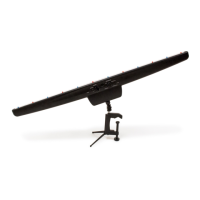
Details the portable, hand-held or table-mounted unit with 12 alternating lights and programs.

Factory-Set Exercises

Describes the 3 factory-set programs that increase in difficulty as skill improves.

Factory Set Speed Settings

Explains the 10 speed settings and the changeable speed option, including 'Random'.

Auditory Feedback Option

Describes the audible stimulus that beeps to reinforce eye location and training progress.

Control Panel

Details the 4 controls: Program dial, Speed dial, Start button, and Mute button.

Reversible Glasses with Custom Red and Blue Filters

Explains the function of the red and blue filters for cancellation effect and training each eye.

SECTION 3: BEFORE YOU BEGIN YOUR TRAINING PROGRAM

SECTION 4: HOW TO USE YOUR NEW EYEPORT II

Setting up your unit:

Provides step-by-step instructions for assembling and positioning the EYEPORT® II unit.

Setting up your unit (Continued):

Details further setup options for LED orientation, hand-held use, and optimal seating.

Using the Weekly Training Schedule:

Explains how to use the 12 weekly schedules for program, speed, and auditory settings.

Programming your unit

Guides users through setting up the EYEPORT® II unit with specific programs and settings.

Performing the Exercises

Instructs on performing specific exercises (1-3) using the EYEPORT® II unit and glasses.

Exercise 4 (→)

Details instructions for performing the diagonal tracking exercise with specific glass orientation.

Exercise 5 (土)

Provides instructions for the far-near tracking exercise, including positioning and focus observation.

How To Use Your EYEPORT II

Explains how to interpret visual cues like 'X' and 'V' shapes during exercises.

Storing Your Unit

Offers guidance on storing the EYEPORT® II unit safely in its original box.

Suggestions After Week 12

Designing your own training.

Provides an example of creating custom training programs based on individual needs.

Expanding Peripheral Awareness

Details a specific exercise for improving peripheral visual awareness in different orientations.

SECTION 5: HEALTHY VISION HABITS

Throughout The Day

Offers tips for maintaining eye health and vision breaks throughout the day.

While Working, Reading And Studying

Provides recommendations for good posture, lighting, and breaks during visual tasks.

When Traveling

Suggests how to relax eyes and take breaks while traveling, especially in a car.

During Leisure Time

Recommends activities and practices for eye relaxation during leisure time.

Additional Resources

Lists organizations for further information on vision care and behavioral optometry.

TROUBLESHOOTING YOUR EYEPORT II

Key Notes for Use:

Provides important usage notes regarding beeps, program changes, speed adjustments, and session completion.

Troubleshooting FAQs:

Addresses common issues like the unit not starting, not turning off, tripod problems, and standing stability.

Overview

The EYEPORT® II is a portable vision training system designed to improve visual performance by training the eyes to work faster, more accurately, and more efficiently. It is patented, clinically proven, and FDA cleared as a medical device.

Function Description:

The EYEPORT® II system is designed to enhance visual attention, aiming, tracking, focusing, teaming, reading efficiency and comprehension, and athletic performance. It achieves this through a unique method involving alternating red and blue lights. The system utilizes the scientifically documented phenomenon of chromatic aberration, where the eyes naturally increase their focus when looking at red light and decrease it when looking at blue light. By alternately presenting red and blue lights, the EYEPORT® II creates a "rocking action" that stimulates and relaxes the eye's aiming and focusing mechanisms, effectively training the eyes in a novel way.

The device offers three factory-set exercise programs that gradually increase in difficulty:

  • Sequential (beginner): Lights turn on and off in order from left to right and back again for approximately 90 seconds.
  • Alternating (intermediate): Lights turn on and off in an alternating sequence from left to right, then move inward, and once in the center, alternate going outward for about 90 seconds.
  • Random (advanced): The twelve lights turn off and on in a random order for about 90 seconds.

The EYEPORT® II is indicated for the treatment of poor accommodative and vergence facility, convergence insufficiency, and large accommodative lag in non-presbyopic subjects. It is not evaluated for dyslexia or other specific reading disorders, and non-medical claims refer to the improvement of visual capabilities in normal, non-pathological eyes.

Important Technical Specifications:

  • Lights: Displays 12 alternating red and blue lights connected by a white stripe.
  • Speed Settings: 10 different speed settings (1-9, plus a "Random" speed option).
    • Speed 1: Slowest (each light stays on for 2.5 seconds).
    • Speed 9: Fastest (each light stays on for 0.20 seconds).
    • Random Speed: Randomly changes speeds between settings 3 through 6.
  • Power Source: Operates on 4 AA batteries (not included).
  • Dimensions: The unit is a long, slender bar with lights, mounted on a base.
  • Control Panel: Located on the front of the unit, featuring:
    • Right dial: Selector for the three programs (Sequential, Alternating, Random) and an "Off" mark.
    • Left dial: Changes speeds from 1-9 and "Random."
    • "Start" button: Initiates the program.
    • "Mute" button: Toggles auditory feedback on or off.

Usage Features:

  • Portability: The unit is portable and can be used hand-held or table-mounted.
  • Mounting Options:
    • Tripod: Includes a tripod with a vice clamp for attaching to a solid surface (desk/table). The tripod neck can be loosened to adjust the unit's orientation (horizontal, diagonal, mostly vertical).
    • Hand-held: Can be held by the base, with or without the tripod attached.
  • Special Red/Blue Filter Glasses: A pair of reversible, non-corrective red and blue filter glasses are included.
    • Cancellation Effect: When used with the EYEPORT® II, the red filter allows only red light to be seen by one eye, and the blue filter allows only blue light to be seen by the other eye. This trains each eye's ability to aim, track, and focus independently while promoting teamwork.
    • Wearing Instructions: The user guide specifies when to wear the glasses and which eye should be behind the red filter for different exercises and orientations.
  • Auditory Feedback Option:
    • Provides an audible beep each time a light turns on, reinforcing the eye's ability to locate the target.
    • Can be turned off by pressing the mute button.
    • Beep Signals:
      • 3 beeps: Exercise is about to begin.
      • 1 beep: Exercise is over, followed by a 30-second rest period.
      • 2 beeps: Time to begin the next exercise.
  • Training Schedule: A 12-week weekly training schedule is provided, outlining specific program, speed, and auditory settings for each session, as well as the required unit orientation and glasses configuration.
  • Exercise Positions: Exercises involve positioning the unit horizontally, vertically, and diagonally.
  • Far-Near Exercise (Exercise 5): This exercise involves positioning the unit with LEDs pointing upward, with the end closest to the audio button away from the user, and the unit resting against the nose or upper lip. This exercise helps observe eye aiming and focusing by showing two white lines converging at the light being looked at.
    • Interpretation of White Lines:
      • "X" intersection at the light: Eyes working together, relaxed.
      • Lines cross in front of the light: Tendency to perceive things closer (eyes turning too much).
      • Lines cross behind the light: Tendency to perceive things further away (eyes not turning enough).
      • Light appears doubled: Difficulty with eyes working together.
      • Only one line visible: Under certain conditions, only one eye is being used.
  • Recommendations for Use:
    • Remove glasses or contact lenses if comfortable.
    • Keep head steady, allowing eyes to move effortlessly.
    • Follow suggested speed settings, but adjust to a slower pace if feeling stressed or holding breath.
    • Spend more time on the sequential program for children or those preferring a slower pace.
    • Record any changes in speed or observations in the training schedule.
    • Repeat difficult exercises if needed.
    • Follow the program for six days straight, rest on the seventh.
    • Maintain a comfortable distance (24-30 inches) from the unit, sitting slightly down at the center point.
    • Ensure comfortable, not too bright, room lighting.
  • Post-Exercise: After an exercise, close eyes, breathe, and relax. Gaze into the distance when opening eyes, and if possible, leave prescription glasses off.
  • Troubleshooting: The manual includes a troubleshooting section for common issues like the unit not starting, not turning off, tripod not rotating, or difficulty setting up the tripod.

Maintenance Features:

  • Storage: The original packaging box is designed for safe storage of the unit when not in use.
  • Battery Replacement: Requires 4 AA batteries. The battery compartment is on the back of the unit and requires a Phillips Head screwdriver to open. Instructions for correct battery orientation are provided.

Additional Information:

  • The EYEPORT® II was released in early 2016, with a redesign in 2018 that added a "Start" button and battery power for ease and portability.
  • The manufacturer is Bernell, a division of Vision Training Products, Inc.
  • Contact information for additional resources on preventative and remediative vision care, and behavioral optometrists, is provided (College of Optometrists in Vision Development, Optometric Extension Program, College of Syntonic Optometry).

BERNELL EYEPORT II Specifications

General IconGeneral
BrandBERNELL
ModelEYEPORT II
CategoryMedical Equipment
LanguageEnglish