ENGLISH
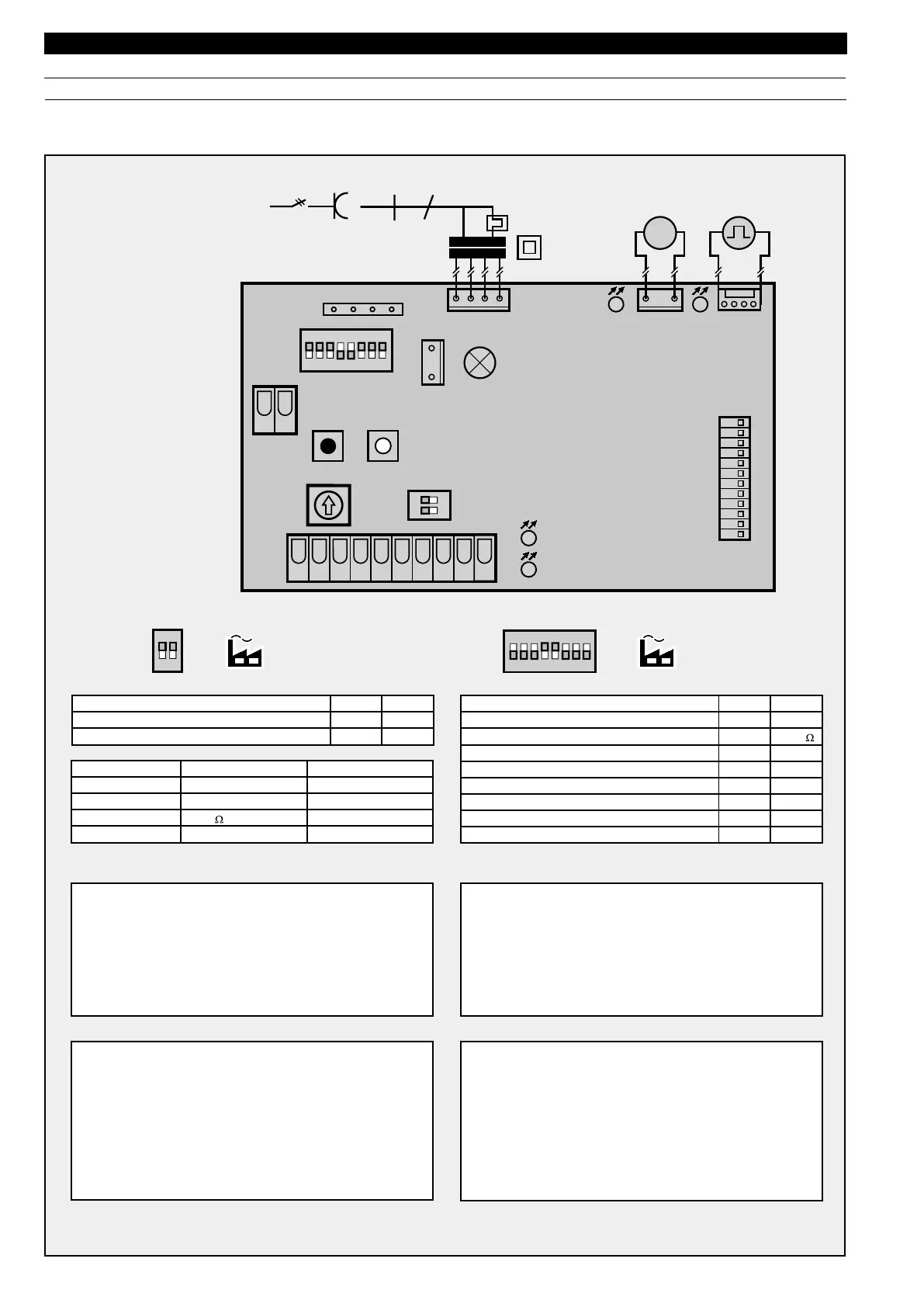
$)0switchesfUNcTIONs3#(
3TOPbutton
,Ight barrier
/.
No
No
/&&
yes
yes
$)0switchesfUncTIONs3#(
,Ight barrier
Evaluationprotection of closing borders
/.
wire
/3
/&&
CONTAcT
K
Quickopening
3OFTstop
,%$Display
,%$Red
,%$GReen
glows flashes
,%$
,%$
3#(3#(
/.
/.
factory settingfactory setting
/3barthactivated
,Ight barrier activated
-OTORgoes to "CLOSE"
-OTORgoes to "OPEN"
K
barthactivated
3TOP circuitinterrupted
8
83
.^6
(Z
0
-
,$
,$
).)
,+
4%34
67
3OCKEt'
,$,$
+,
34 3434
43
3#(
3#(
./
/.
$EFIned direction instructions
Light at "CLOSED"
yes
yes
No
yes No
No
Short return to the position "door CLOSED"
External light: light function (1), warning function (2)
LoNG
1
short
2
Circuit board overviewaNDshort instructions of programming
Brief instructions learning procedure
Press the black button until the lamp starts flashing. Allow
to flash twice, then release the "learn" button
Press white operating button until door travels to its "OPEN"
pOSITION (permanent contact)
Briefly press black button
Door closes, opens and closes twice automatically
The operator is now programmed
0ROGRAMMing operator light at door closed,
durationsEc
Unplug from the mains
Press black buttonDRàCKENpermanent contact
Plug back into the mains while keeping "learn" button pressed
After the operator lamp has switched on, release the "learn"
buttonOn repeating the procedure the factory settings
doorclosedsEcare active again
Brief instructions second opening position
Press the black button until the lamp starts flashing
twice
Additonally press the white button until the lamp flashes
more quickly, the release both buttons
Open the door with the white buttonpermanent contact
until the desired "second opening" position is reached
Briefly press the black button
The "second opening" position is programmed
0ROGRAMMINGautomatic timer / early warning phase
Briefly press black buttonLamp flashes times
Wait till the desired open phase is overMAXsEcthen
briefly press black button
Wati for early warning phase to be setsEcThe lamp
flashes beyondXThen again press black button
Automatic timer / early warning phase has now been
programmed
To switch out the automatic closure briefly press black button
consecutively


 To Next Page