EN
26
10 12 15
Attention:
Turn power switch to "O" before carrying out
any of the operations below.
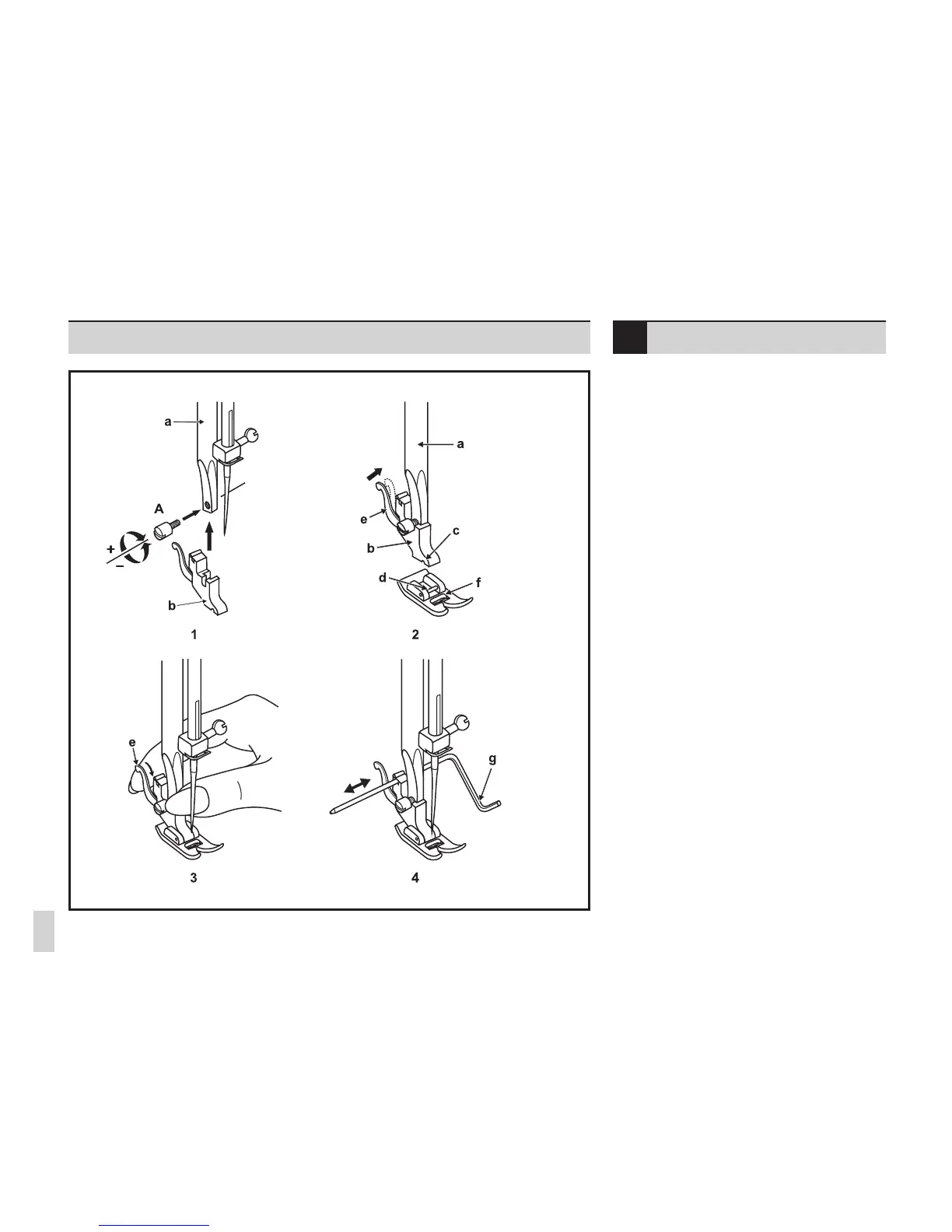
Raise the needle to its highest position
and raise the presser foot lever. Attach the
presser foot holder (b) to the presser foot bar
(a). (1) Tighten the xation screw. (A)
Attaching the presser foot:
Lower the presser foot holder (b) until the
cut-out (c) is directly above the pin (d). (2)
Lower the presser foot holder (b) and the
presser foot (f) will engage automatically.
Removing the presser foot:
Raise the presser foot.
Release the pressure foot by raising lever (e)
located at the back of the foot holder. (3)
Attaching the seam guide:
Attach the seam guide (g) in the slot as
illustrated.
Adjust the distance as required for hems,
pleats, etc....(4)
Attaching the presser foot
holder











 To Next Page