EN
54
EN
For straight stitch, select pattern " " or " "
with pattern selector dial. Adjust the stitch
length with the stitch length dial.
For zigzag stitch, select pattern " " or " "
with pattern selector dial. Adjust the stitch
length and stitch width according to the
fabric being used.
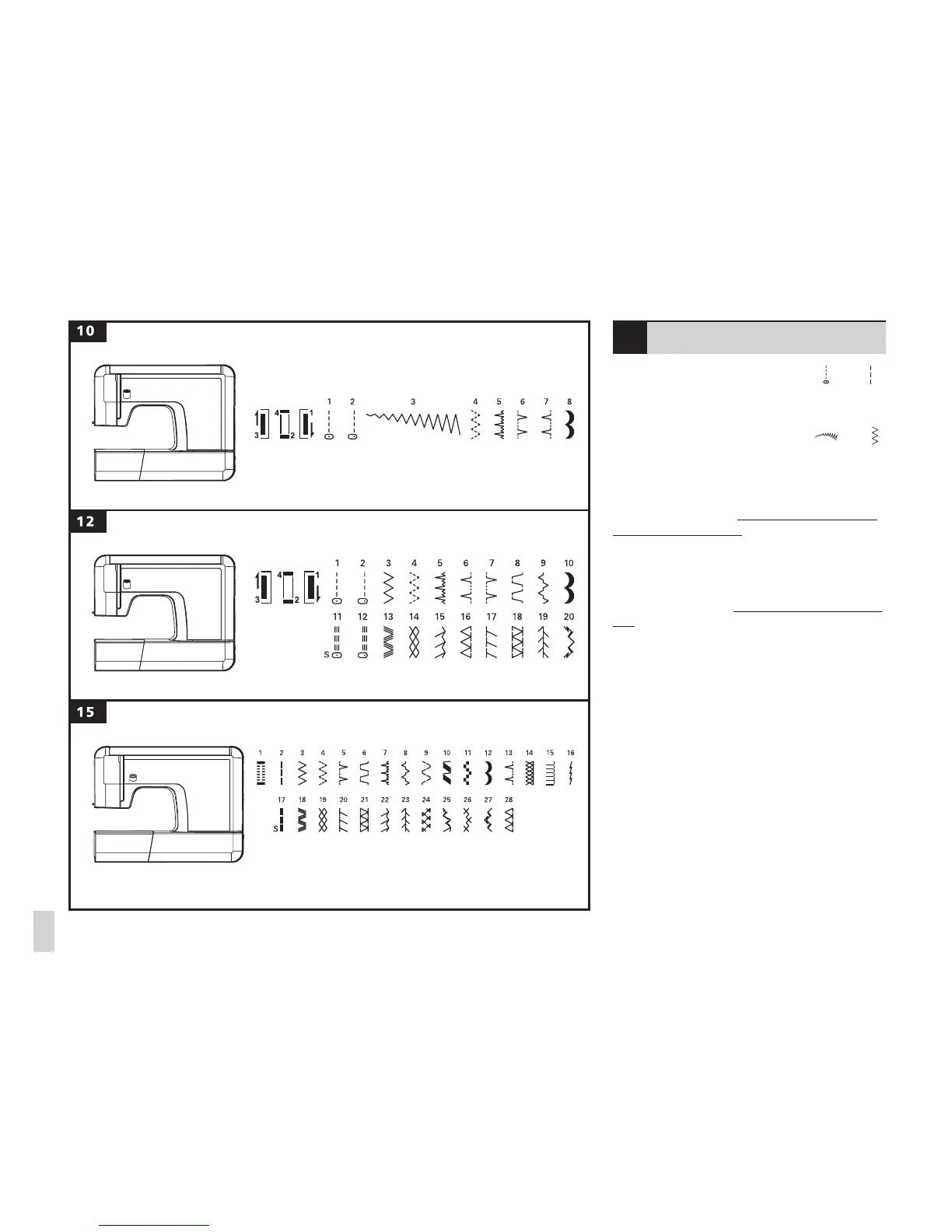
To obtain any of the patterns shown on the
stitch selection panel, select the pattern
with the stitch selector dial. Adjust the stitch
length with the control dials according to the
result desired.
To obtain any of the patterns on the second
row, turn the stitch length dial to "S", select
the pattern desired with pattern selector dial,
and adjust the stitch width with the stitch
width dial. To switch to "Position S", turn the
stitch length knob to the 0, continue turning
the knob in the same direction.
Note: Between the positions "0" and "S", a
bit of resistance is to be expected.
Green numbered stitch patterns come with
default stitch length. (model 12/15)
Stitch selection











 To Next Page