

EasyManua.ls Logo

BerryBak CJL BRU5 - User Manual

BerryBak CJL BRU5
6 pages
Print Icon
To Next Page IconTo Next Page
Loading...
Specifications are subjected to change without any further notice. Copyright © 2023 by BerryBak Sdn. Bhd. All rights reserved.
For more information please contact us info@berrybak.com
Designed
by:
2 x 300W Bluetooth v5.0 Enabled Audio Amplifier -
TPA3255
The BRU5 audio amplifier module combines high-power output, Bluetooth v5.0
connectivity, user-friendly features like a volume control potentiometer and
Bluetooth unpair button, along with LED indicators, utilizing the TPA3255
Amplifier IC and BP1048 Bluetooth IC to create a versatile audio amplification
system suitable for a range of applications.
Features:
Bluetooth v5.0 Connectivity
Built-in Bluetooth module with external antenna for reliable
connectivity.
Integrated with Bluetooth v5.0 module.
RCA Audio Input
Connect external audio sources, such as CD players, MP3 players, or other
devices.
PC UI Programming Port
Conveniently connect the BRU5 to a computer for real-time tuning and
adjustments.
Multi-Function Potentiometer
Turn the potentiometer clockwise to turn on the BRU5.
Turn the potentiometer anti-clockwise to turn off the BRU5.
Knob Volume Adjustment: Rotate the potentiometer to adjust the volume.
DC Power Input
DC18V - 48V power input for flexible power supply options.
Mechanical Drawing
(Nominal Dimensions, mm / inch)
Specifications
Bluetooth Version
Bluetooth Pairing Name
Supply Voltage
Audio Input Source
Output Channel
Output Power
Product Size (mm)
Weight
: CJL BRU5
: v5.0
: DC 18V - 48V
: Bluetooth/ Line Input (RCA
Connectors)
: 2.0 Channel
: 2x300W
: 47.50 x 120.00 x 45.00
: 500g
*The product size does not include the Bluetooth antenna on the rear panel and the
potentiometer knob on the front panel.
165mm / 6 3/8”
120mm / 4 3/4”
50mm / 2”
50mm / 2”
70mm / 2 3/4”
45mm / 1 3/4”
BRU5
User Guideline
Page 1 / 6
BRU5
POWER
BT PAIRING
VOLUME
Question and Answer IconNeed help?

Do you have a question about the BerryBak CJL BRU5 and is the answer not in the manual?

Overview

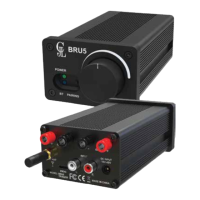
The BRU5 is a 2 x 300W Bluetooth v5.0 Enabled Audio Amplifier, model TPA3255, designed for high-power output and versatile audio amplification. It features a user-friendly interface with a volume control potentiometer and Bluetooth pairing button, along with LED indicators. The amplifier is built around the TPA3255 IC, a high-performance Class-D audio amplifier, and the QCC3048 Bluetooth IC, creating a versatile audio amplification system suitable for a range of applications.

Function Description:

The BRU5 serves as a stereo audio amplifier, capable of delivering 2x300W of power into a 4Ω load. It supports Bluetooth v5.0 connectivity, allowing for wireless audio streaming from compatible devices. Additionally, it offers RCA input for connecting external audio sources such as CD players, MP3 players, or other devices. The amplifier includes a PC UI Programming Port, which connects the BRU5 to a computer for real-time tuning and adjustments, enabling users to customize sound settings. A multi-function potentiometer controls the volume and also serves as a power switch.
Important Technical Specifications:

  • Bluetooth Version: v5.0
  • Bluetooth Pairing Name: CJL BRU5
  • Output Power: 2x300W
  • Number of Channels: 2
  • Minimum Load Impedance: 4 Ω
  • Nominal Power Requirement: @4Ω, 48V
  • Operating Voltage: @1kHz, 4Ω: 48V
  • Idle Power: 3.0W
  • Signal Detected @ 24V: <5W
  • Efficiency: 90%
  • Switching Frequency: @24V: 450 kHz
  • Amp Gain: 31 dB
  • SNR: 101.05 dB (L&R, 2x300W @ 4Ω, 48V, A-weighting)
  • THD + N: 0.053 % (L&R, 1W @ 4Ω, 1kHz)
  • Output Noise Level: 230 µV (L&R, Line In @ 12V, A-weighting, Input Connect GND)
  • Input Impedance: 10 kΩ (Line In @ 4Ω, 1kHz)
  • Input Sensitivity: 1 Vrms
  • Bandwidth ±3dB: 20 kHz (2x5W @ 4Ω, 24V)
  • DC Offset: 10 mV (4Ω, 24V)
  • Supply Voltage: DC 18V - 48V
  • Audio Input Source: Bluetooth/ Line Input (RCA Connectors)
  • Product Size (mm): 47.50 x 120.00 x 45.00
  • Weight: 500g

Usage Features:

  • Bluetooth v5.0 Connectivity: The BRU5 is built with Bluetooth v5.0 module for reliable connectivity, ensuring stable wireless audio streaming.
  • Integrated with Bluetooth v5.0 module: The amplifier seamlessly integrates Bluetooth functionality for ease of use.
  • RCA Audio Input: Users can connect external audio sources via RCA inputs, expanding the range of compatible devices.
  • PC UI Programming Port: This port allows for advanced tuning and adjustments through a computer interface, enabling customization of audio settings.
  • Multi-Function Potentiometer: The potentiometer serves multiple roles:
    • Turn the potentiometer clockwise to turn on the BRU5.
    • Turn the potentiometer anti-clockwise to turn off the BRU5.
    • Rotate the potentiometer to adjust the volume.
  • DC Power Input: The amplifier accepts DC18V - 48V power input, providing flexibility for various power supply options.
  • LED Indicator: A green LED indicates power status. When lit, it signifies that the unit is powered on. A blue LED represents Bluetooth connectivity. If it is steadily on, Bluetooth is connected. If it blinks, it's searching for Bluetooth devices, and when it stops blinking, it means Bluetooth is successfully connected.
  • Bluetooth Pairing Button: The Bluetooth pairing button on BRU5 serves two functions: a long press of 5 seconds can cancel Bluetooth pairing, and it provides a way to switch input methods. For specific instructions on how to switch methods, please refer to the 'Connections Layout' section below.
  • Multi-function Potentiometer: This single potentiometer serves as both a power switch and a volume control knob, streamlining the user experience and providing effortless access to essential functions.
  • Input Method Switching: The BRU5 has two input methods: Bluetooth and RCA. By clicking the button once, you can switch between these two input methods. However, when you restart BRU5, the input method will be restored to the default input method. If you want to modify the default input method, follow these steps:
    1. Power off (by rotating the knob).
    2. Press and hold the 'PAIRING' button without releasing it.
    3. After holding the 'PAIRING' button, power on the device (by rotating the knob) and continue holding the button for 10 seconds.
    4. Release the 'PAIRING' button, power off the device again, and then power it on.
    5. The default input method will be successfully changed upon startup.
  • Speaker Output: The BRU5 is equipped with a powerful speaker output, harnessing the impressive capabilities of the TPA3255 AMP IC, which delivers a total power of 2 x 300 Watts.
  • Bluetooth Antenna: The Bluetooth Antenna ensures an extended operating range, allowing you to enjoy uninterrupted audio streaming even from a distance, thereby extending the Bluetooth connection range.
  • PC UI Programming Port: With the PC UI Programming port, the BRU5 offers a personalized and tailored audio experience, delivering exceptional sound quality for any application, be it entertainment, professional audio or gaming.
  • Line Input: RCA Audio Input provides a versatile and reliable connection for various external audio devices. With this input, you can easily connect audio sources that do not have Bluetooth capabilities, such as CD players, MP3 players, audio interfaces, and more.
  • DC Power Input 18V - 48V: The BRU5 features a flexible and wide-ranging power input option, accepting direct current (DC) power supply within the voltage range of 18 Volts to 48 Volts and a minimum current requirement of 5 Amps.

Maintenance Features:

  • Launch ACP Workbench: The BRU5 can be connected to a personal computer or laptop and ensure that you have installed the ACP Workbench software. When ACPWorkbench.exe is launched, it will automatically find and connect the BRU5 audio amplifier via the connected UART (serial) or USB (HID) port. Once connected, ACPWorkbench.exe will read all the configurations in the amp and update its GUI controls accordingly. Please ensure the BRU5 audio amplifier is connected to the PC and powered on. Whenever the BRU5 audio amplifier is powered on/off, ACPWorkbench will always try to re-connect it.
  • Audio Effect Page: The audio effect page features four distinct Effect Lists, catering to various sound: Effect List 0 for Microphone, Effect List 1 for Music Pre EQ, Effect List 2 for Guitar Amplifier, and Effect List 3 for recorded audio.
  • Visualization (Pre-EQ): Serves the purpose of shaping the overall frequency response of the music input.
  • Frequency Response Details: To see more details about shaping the overall frequency response, click on the right arrow button.
  • Preset EQ: Users have the option to select from a range of Preset EQ lists, including Classical, Jazz, Vocal Booster, and more, allowing for convenient customization of the audio experience.
  • Save Configurations: To save your configurations, click on "Downloader" and then select "Save Configurations to Flash". This action ensures that your settings are stored for future use.
  • "OK" in Pop-up Window: Click "OK" in the pop-up window. This action ensures that the program will continue to run even if the device is powered off.
  • Warranty Terms and Product Usage Restrictions: CJL products come with a one-year warranty starting from the date of purchase. Customers are responsible for the cost of returning the goods to the seller, and by making a purchase, you agree to this condition. Due to the risk of PCB damage, damage caused by the soldering of solder pads directly invalidates the warranty. Damage caused by the use of incorrect power sources, such as exceeding the specified voltage range or reverse polarity, is not covered under warranty. All CJL products undergo thorough testing before shipment. We do not accept bulk returns after a bulk purchase. If you are unsure of the quantity you need, please purchase the appropriate quantity as needed. All CJL products are intended for DIY use only and do not support for industrial equipment. The ideal operating temperature range is 0-40°C. Please refrain from using CJL products in industrial equipment or industrial environments. If you require products tested for industrial operating temperature ranges, we recommend seeking products clearly labeled to support operating ranges such as 20-65°C or 20-85°C.

BerryBak CJL BRU5 Specifications

General IconGeneral
BrandBerryBak
ModelCJL BRU5
CategoryAmplifier
LanguageEnglish