EasyManua.ls Logo

Besenzoni BUC - User Manual

Besenzoni BUC
4 pages
Print Icon
To Next Page IconTo Next Page
Loading...
Download
Besenzoni Control Device
from the APP Store
With Besenzoni Unit Control you can use your smartphone to manage the handling of
hydraulic combined ladder/gangway Besenzoni installed on board through bluetooth technology.
It takes two simple steps:
1
Download the App - Besenzoni Control Device from the Appstore and check if the App is
compatible with the device’s operating system: IOS10.0 or later / Android 8.0 or latere
2
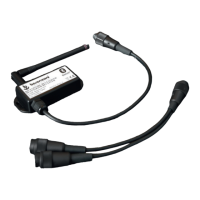
Purchase - Besenzoni Unit Control (receiver/adaptor Bluetooth)
To identify which bluetooth receiver/adaptor is compatible with the combined
ladder/gangway being used it is essential to provide some information:
State the combined ladder/gangway serial number indicated
in a plaque under the ladder.
If possible state the circuit board Code:
eg. C608SB these codes correspond
to the 7FF99619 WHITE VERSION
interface for combined ladder/gangway
eg. RSP this acronym corresponds
to the 7FF99618 BLACK VERSION
for combined ladder/gangway.
BLACK VERSION N

Other manuals for Besenzoni BUC

Question and Answer IconNeed help?

Do you have a question about the Besenzoni BUC and is the answer not in the manual?

Summary

Instructions for Installation and Use

Important Information

General safety and operational advice before installing and commissioning the device.

Box Contents

Lists the components included in the BUC Besenzoni Unit Control package.

Installation Procedure

Connecting the BUC Unit

Steps for connecting the BUC receiver/adaptor to the electronic control unit.

Adding Multiple BUC Units

Instructions for managing a second device with the BUC system.

Activation Procedure

Bluetooth and App Setup

Steps to activate Bluetooth, locate BUC, and configure the app settings.

Command Execution

How to correctly operate commands via the app, including press-and-hold.

Reset Function

Resetting Memorized Devices

Procedure for clearing stored device pairings by resetting the BUC.

Besenzoni BUC Specifications

General IconGeneral
BrandBesenzoni
ModelBUC
CategoryControl Unit
LanguageEnglish