EasyManua.ls Logo

Best HBC1 - User Manual

Best HBC1
6 pages
Print Icon
To Next Page IconTo Next Page
Loading...
1106531F
MODEL HBC1
Pairing the remote control:
A new remote control must initially be paired with the range hood. Follow these steps to pair the remote control:
1 - With the hood turned off, press and hold (approx. 3 sec) the LIGHT Button on the hood until the light button icon indicator starts flashing.
2 - Press once on any button on the remote control. Pairing is completed. Light icon on the hood will stop flashing.
Using the remote control:
ON/OFF button: Press this button to turn the range hood on or off. The blower will operate at last speed in memory. This button
does not operate light.
Light button: Press this button once to turn light on at low intensity.
Press this button twice to turn light on at medium intensity.
Press this button three times to turn light on at high intensity.
To turn light off, press this button four times.
Delay off button: When a blower speed is selected, press this button to activate the delay function. The blower will continue to operate
for 10 minutes and will stop automatically. This button does not operate light. To deactivate delay function, press
button Delay off button.
Blower button: Press this button to turn the blower on. The blower will operate at last speed in memory. There are 4 blower speeds
available. Press another time on Blower button to access next blower speed and so on. To turn blower off, press
ON/OFF button.
How to Pair and Use tHe remote Control
warninG
CHemiCal BUrn Hazard
Keep batteries away from children.
The remote control requires a type A23 12 V battery.
To replace the battery, use a small flat head screwdriver to raise the cover
of the battery compartment.
Remove the battery and replace it by a new one.
Re-install the cover.
The battery shall be disposed of properly
ON/OFF Button
LIGHT Button
DELAY OFF Button
BLOWER Button
A
-
+
-
+
Clean the remote control using non-abrasive detergents.
The remote control is equipped with a magnet on the back for easy
storage. The remote may be placed on any magnetic surface such as a
refrigerator or the Best remote holder. The remote holder can be inserted
into a standard electrical outlet for easy storage. Please note that the
remote holder does not charge the remote control.
The maximum remote control communication distance is 15 feet from
the liner.

Question and Answer IconNeed help?

Do you have a question about the Best HBC1 and is the answer not in the manual?

Overview

This document describes the Best Model HBC1 remote control, designed for use with a range hood. It provides instructions for pairing, usage, and maintenance, along with warranty information and regulatory compliance statements.

Function Description

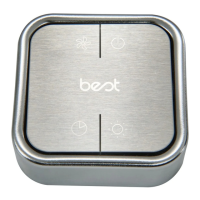
The Best Model HBC1 is a wireless remote control for a range hood, allowing users to operate various functions from a distance of up to 15 feet. It features four primary buttons:

  • ON/OFF Button: This button turns the range hood on or off. When turned on, the blower will operate at the last speed in memory. This button does not control the light.
  • Light Button: This button controls the range hood's lighting with multiple intensity levels. Pressing it once turns the light on at low intensity, twice for medium intensity, and three times for high intensity. Pressing it a fourth time turns the light off.
  • Delay Off Button: This button activates a 10-minute delay function for the blower. Once a blower speed is selected, pressing this button will keep the blower running for 10 minutes before automatically shutting off. This function does not control the light. Pressing it again deactivates the delay function.
  • Blower Button: This button turns the blower on. The blower will start at the last speed in memory. There are four available blower speeds. Each subsequent press of the Blower button cycles through the next available speed. To turn the blower off, the ON/OFF button must be used.

Important Technical Specifications

  • Model: HBC1
  • Power Source: Requires one type A23 12V battery.
  • Communication Distance: Maximum communication distance is 15 feet from the range hood liner.
  • FCC ID: VVP-HBC1
  • IC: 27836-HBC1
  • RF Exposure Compliance: Complies with FCC and Industry Canada RF radiation exposure limits for an uncontrolled environment. The device should be installed and operated with a minimum distance of 5 mm between the radiator and the user's body or nearby persons.

Usage Features

  • Pairing: A new remote control must be paired with the range hood. To pair, turn off the hood, then press and hold the LIGHT Button on the hood for approximately 3 seconds until its indicator starts flashing. Then, press any button on the remote control once. The light icon on the hood will stop flashing, indicating successful pairing.
  • Magnetic Storage: The remote control is equipped with a magnet on its back, allowing it to be stored on any magnetic surface, such as a refrigerator or the Best remote holder.
  • Remote Holder: A remote holder is provided and can be inserted into a standard electrical outlet for convenient storage. It's important to note that the remote holder does not charge the remote control.

Maintenance Features

  • Cleaning: The remote control should be cleaned using non-abrasive detergents.
  • Battery Replacement:
    • The remote requires a type A23 12V battery.
    • To replace the battery, use a small flat-head screwdriver to carefully raise the cover of the battery compartment.
    • Remove the old battery and insert a new one.
    • Re-install the cover.
    • The used battery must be disposed of properly, adhering to the "CHEMICAL BURN HAZARD - Keep batteries away from children" warning.

Warranty Information

  • Warranty Period: Broan-NuTone LLC (the "Company") provides a limited warranty to the original consumer purchaser. The product is warranted to be free from material defects in materials or workmanship for five (5) years from the original purchase date, or for two (2) years for any labor provided on the product. Replacement parts or products repaired/replaced under warranty are covered for the remainder of the original warranty period.
  • Exclusions: The warranty does not cover fluorescent lamp starters, tubes, bulbs, fuses, filters, ducts, roof caps, wall caps, and other ducting accessories. It also excludes normal maintenance, wear and tear, misuse, abuse, abnormal usage, negligence, accidents, improper maintenance/storage/repair (other than by the Company), faulty installation, use contrary to recommendations, damage from environmental elements (e.g., salt air), transit damage, natural wear of finish, commercial/non-residential use, damage from fire/flood/acts of God, or products with altered/defaced/removed serial numbers. This warranty applies only to products sold to consumers in North America.
  • Remedy: During the warranty period, the Company will, at its option, provide replacement parts, or repair or replace, without charge, any product or part found to be defective under normal use and service. The Company covers shipping costs for repaired/replaced products or parts to the customer. The customer is responsible for removal, reinstallation, and shipping/insurance costs for sending the product/part to the Company. The Company may use reconditioned, refurbished, repaired, or remanufactured products/parts. The Company reserves the right to refund the purchase price or replace with a similar product of equal or greater value if the original product is unavailable.
  • Exclusion of Damages: The Company is not liable for incidental, indirect, consequential, or special damages arising from the product's use or performance.
  • Obtaining Warranty Service: To qualify for service, the customer must notify the Company within seven (7) days of discovering the defect, provide the model and part identification, and describe the defect. Proof of original purchase date is required.

Regulatory Compliance

The device complies with Part 15 of the FCC Rules and Industry Canada RSSs, ensuring it does not cause harmful interference and accepts any received interference.

Best HBC1 Specifications

General IconGeneral
BrandBest
ModelHBC1
CategoryRemote Control
LanguageEnglish