Power On/Off
Power Off: Long press ON/OFF key and then choose "Power
off"
Interval: When the device is unused, please press ON/OFF key
gently. The screen enters power-saving mode.
Awakening: On power-saving mode, press ON/OFF key to
awaken this mode.
Power On: Long press ON/OFF key till the start-up picture is
shown.
Makesurethebatteryquantityisbelow5%attherstthreecharge,
sothatthebatterycouldachievethebestcondition.Wesuggestyou
repeatthisateachquarter.
Touch-controlScreen
It is good for the device to
use the provided stylus.
˙
Selection-tapping:
Choose the function
on the screen and tap
it gently with the stylus.
Make sure the stylus leave
the screen after tapping.
˙
Long-tapping:
Open a new menu option or
activate a selected option.
˙
Dragging:
Drag the stylus without its tip
leaving the screen. By that
way, you could choose or
move the selected option.
First Use & Preparation
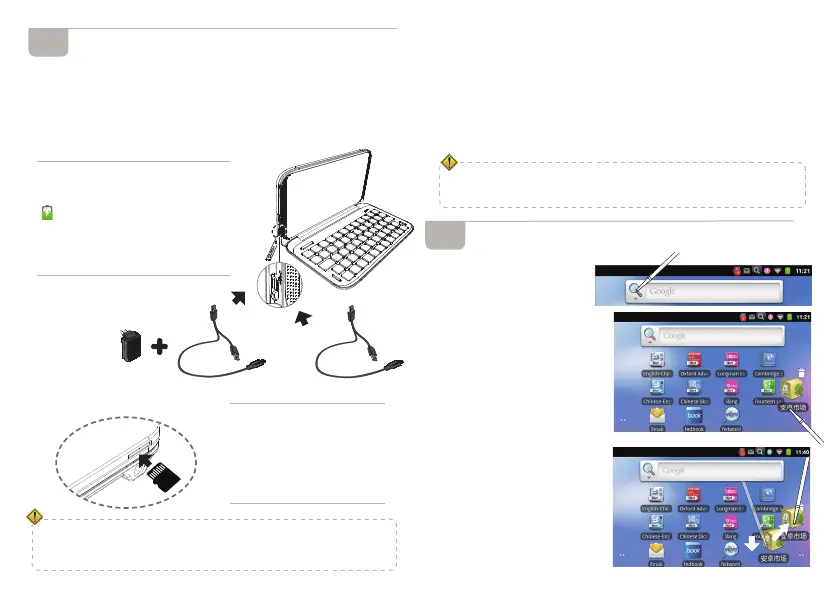
PowerSource&Charger
Rechargeable Li-batteries Inside: 2500mAh
Power Source: USB cable/USB+adaptor (It is good for the
device to use the specified adaptor of the device. It is available
to use 1A/2A adaptor of other brand. Such as Iphone, HTC
etc.)
MicroSDCard
2
a. Connect device with power source
as shown on the right
b. LED
will show the charging state
LED keep flashing: charging...
LED keep intermittently flashing:
unusual charging
LED keep lighting: charging complete
˙
Insert a card: switch off the
device first. Gently push the
card into the card jack until
you hear a sound.
˙
Remove a card: switch off
the device first. Gently press
the card until you hear a
sound.
3
˙
Foravoidingickingofthecard,pleasegentlypressthecard.
˙
WhentransferoropenlesonMicroSD,inordertoavoiddataloss
orabnormalofthedata.Pleasemakesurethepowerisoff,before
insertingandremovingcard.
Adaptor
USBCable
USBCable



 To Next Page