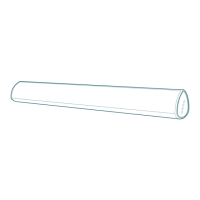
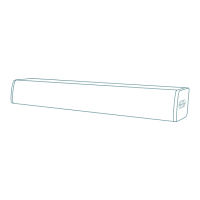
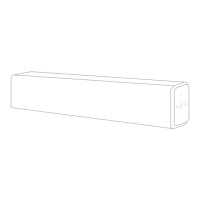
This document describes the BESTISAN Sound Bar, Model: SG08, a home audio system designed to enhance TV sound. It includes a sound bar and a separate subwoofer, along with various connectivity options and user-friendly features.
Function Description
The BESTISAN SG08 is a sound bar system with an external subwoofer, designed to provide improved audio quality for televisions and other media devices. It offers multiple input modes, including optical, coaxial, AUX, USB, and Bluetooth, allowing for versatile connection to various audio sources. The system supports different audio modes (Movie, Music, Dialog) and allows for adjustment of treble and bass. It is designed for easy setup and can be positioned on a TV cabinet or wall-mounted.
Important Technical Specifications
- Model: SG08
- Power Input: DC power port
- Connectivity:
- Wired: USB In, AUX In (Stereo 3.5mm), Optical In (Digital Optical), Coaxial In (Digital Coaxial), SUB OUT (for subwoofer)
- Wireless: Bluetooth
- Bluetooth Range: Up to 30 feet (without solid obstructions)
- Remote Control: Requires 2 AAA batteries
- Wall Mount: Mount kits sold separately; requires 9.06 inches / 230mm spacing for the wall mount template.
- LED Indicators:
- Red: Standby
- White: Optical
- Green: Coaxial
- Blue: Bluetooth
- Purple: USB In
- Orange: AUX
- Safety: Double insulation between hazardous mains voltage and user accessible parts.
- FCC Compliance: Class B digital device, Part 15 of FCC Rules.
Usage Features
Setup and Connection:
- Unboxing: The package includes the sound bar, subwoofer, remote control, user's guide, digital optical cable, stereo 3.5mm to 3.5mm audio cable, power adapter, wall mount brackets, mount screws, and a wall mount template.
- Remote Control: Insert 2 AAA batteries into the remote control before use.
- TV Connection: Choose one connection method between the sound bar and TV:
- Optical Cable: Recommended.
- Coaxial Cable: Recommended (not included).
- Stereo 3.5mm to 3.5mm Audio Cable: For AUX IN.
- PCM Setting: If there is no sound when using Optical or Coaxial connection, set the TV audio output to PCM.
- Power On: Connect the sound bar to an electrical outlet using the included power adapter.
- Positioning: Place the sound bar on a TV cabinet or mount it on the wall. Ensure at least 6.5 feet between the sound bar and the listening position (sofa), and center the sound bar relative to the listening position.
- Subwoofer Connection: Connect the subwoofer cable into the SUB OUT port on the sound bar.
Controls and Inputs:
- Back of Sound Bar: DC (Power Port), USB (USB In), AUX IN (Analog Audio In), OPTICAL (Digital Optical In), COAX IN (Digital Coaxial In), SUB OUT (Subwoofer Out).
- Top Side Panel of Soundbar:
- Power Button: Turn on or press and hold to power off.
- Mode Button (M): Select source input mode; press and hold to reset treble and bass to factory settings.
- Volume Buttons (+/-): Adjust volume up and down. LED indicator flashes until MAX or MIN volume is reached.
Remote Control Functions:
- Power Button: Turns the unit on/off.
- Mute Button: Mutes/unmutes the sound.
- Volume Up/Down (VOL+/-): Adjusts the overall volume.
- Previous/Next Track Buttons: For USB or Bluetooth playback.
- Input Mode Selection:
- OPT: Optical mode.
- USB: USB mode.
- BT: Bluetooth mode (press and hold to disconnect Bluetooth).
- COAX: Coaxial mode.
- AUX: AUX mode.
- Recommended Audio Modes:
- MOVIE: Movie audio mode.
- MUSIC: Music audio mode.
- DIALOG: Dialog audio mode.
- Tone Control:
- TREB+/TREB-: Increase/decrease treble.
- BASS+/BASS-: Increase/decrease bass.
- RESET: Press to reset treble and bass to factory settings.
Bluetooth Pairing:
- Press the Bluetooth button on the remote. The LED indicator will flash blue quickly.
- Search for "Bestisan SG08" on your Bluetooth device and connect. The LED indicator will flash blue slowly once paired.
- Play audio from your Bluetooth device. Volume and audio can be controlled by both the device and the sound bar.
- Android devices should auto-pair after the initial connection, even after rebooting the sound bar.
- Note: The sound bar is not equipped with hands-free function.
Additional Bluetooth Information:
- Signal Strength: Move closer to the sound bar if experiencing break-ups in streaming.
- Range: Bluetooth signal has a range of up to 30 feet without solid obstructions.
- Interference: Other wireless devices (video monitors, cordless phones, cameras) may interfere with Bluetooth range. Moving or turning off these devices may improve range.
- Hearing Protection: Reduce volume on your device or sound bar to prevent hearing damage from high volume.
Indicator Light Explanations:
The LED indicator on the sound bar changes color to indicate the current input mode:
- Red: Standby
- White: Optical
- Green: Coaxial
- Blue: Bluetooth
- Purple: USB In
- Orange: AUX
Advanced Connections:
The manual illustrates connections for various devices:
- USB Drive (via USB In)
- Network Player (via Optical or Coaxial cable)
- Game Console (via Optical or Coaxial cable)
- Laptop/MP3 Player/Tablet (via 3.5mm cable)
Wall Mount Installation (Mount kits sold separately):
- Insert two wall-mount screws into the wall-mount screw holes on the sound bar and tighten with a screwdriver.
- Position the wall mounting template against the wall under your TV. Mark the bracket holes with a pencil, ensuring the template is level and leaving at least 3 inches between the template and the TV.
- Remove the template. Drill a hole at each marking using an appropriately sized drill bit (ensure it's a vertical drywall).
- Push the green Hoder-Screws into each hole and screw each screw through each bracket firmly into a support Hoder-Screws hole.
- Install the sound bar by hanging the bracket on the wall.
- Caution: Consult a professional installer if unfamiliar with power tools or electrical wiring in walls.
Maintenance Features
General Care:
- Clean only with a dry cloth.
- Protect furniture: When placing the unit on a lacquered or natural finish, protect your furniture with a cloth or other protective material.
Troubleshooting:
- No Sound or Crackling Noise:
- Check all cable connections.
- Ensure the power adapter is connected to a working power source and its LED indicator is lit.
- Check if the sound bar's LED indicator is lit in the middle.
- Ensure Mute is not activated on the remote.
- Increase volume using the remote or top panel.
- Verify the correct input source is selected (LED should correspond).
- For Bluetooth, check if the device volume is not at minimum.
- For Optical/Coaxial, set TV audio output to PCM or turn off Dolby/DTS.
- For cable connections, ensure your device has an audio output port (not input).
- Remote Isn't Working:
- Check if batteries are installed correctly.
- Ensure the receiver signal is not obstructed.
- Contact retailer for assistance.
- Buzzing or Humming Sound:
- Ensure all cables and wires are securely connected.
- Test with a different source device (TV, Blu-ray player) to determine if the issue is with the original device.
- Connect your device to a different input on the sound bar.
- Bluetooth Can't Be Connected:
- Check if the sound bar is already connected to a third Bluetooth device.
- Ensure no solid obstructions are between the sound bar and the source device (within 30 feet).
- Reboot Bluetooth and try connecting again.
- Echo When Watching TV:
- Set TV audio to External Speaker.
- Mute the TV speaker.
- Loud Hum with White/Red RCA Connection:
- Ensure connections are fully inserted.
- Verify device's audio port is output (not input).
- Ensure device's audio output is turned on.
- Test with a phone or other device; if the hum persists, a higher-end TV may be needed (some TVs lack clear audio output).
- Subwoofer No Sound:
- Ensure SUB OUT cable is properly inserted.
- Press the "Bass +" button on the remote.
- Further Questions: Contact your retailer for assistance.
Important Safety Instructions:
- Read and keep instructions.
- Heed all warnings and follow all instructions.
- Do not use near water.
- Clean only with a dry cloth.
- Do not block ventilation openings. Install according to manufacturer's instructions.
- Do not install near heat sources.
- Do not defeat the safety purpose of polarized or grounding-type plugs.
- Protect the power cord from being walked on or pinched.
- Use only manufacturer-specified attachments/accessories.
- Use only with specified carts, stands, tripods, brackets, or tables. Exercise caution when moving cart/apparatus combinations to avoid tip-over.
- Unplug during lightning storms or long periods of disuse.
- Refer all servicing to qualified personnel. Servicing is required if the apparatus is damaged, exposed to rain/moisture, or not operating normally.
- The apparatus shall not be exposed to dripping or splashing liquids, and no objects filled with liquids (e.g., vases) shall be placed on it.
- Batteries shall not be exposed to excessive heat (sunshine, fire, etc.).
- Caution marking is located at the rear or bottom of the apparatus.

 Need help?
 General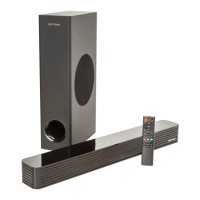

 To Next Page