Approximate setup time: 5-10 minutes, please refer to
the guide that came with your device.
METHOD I
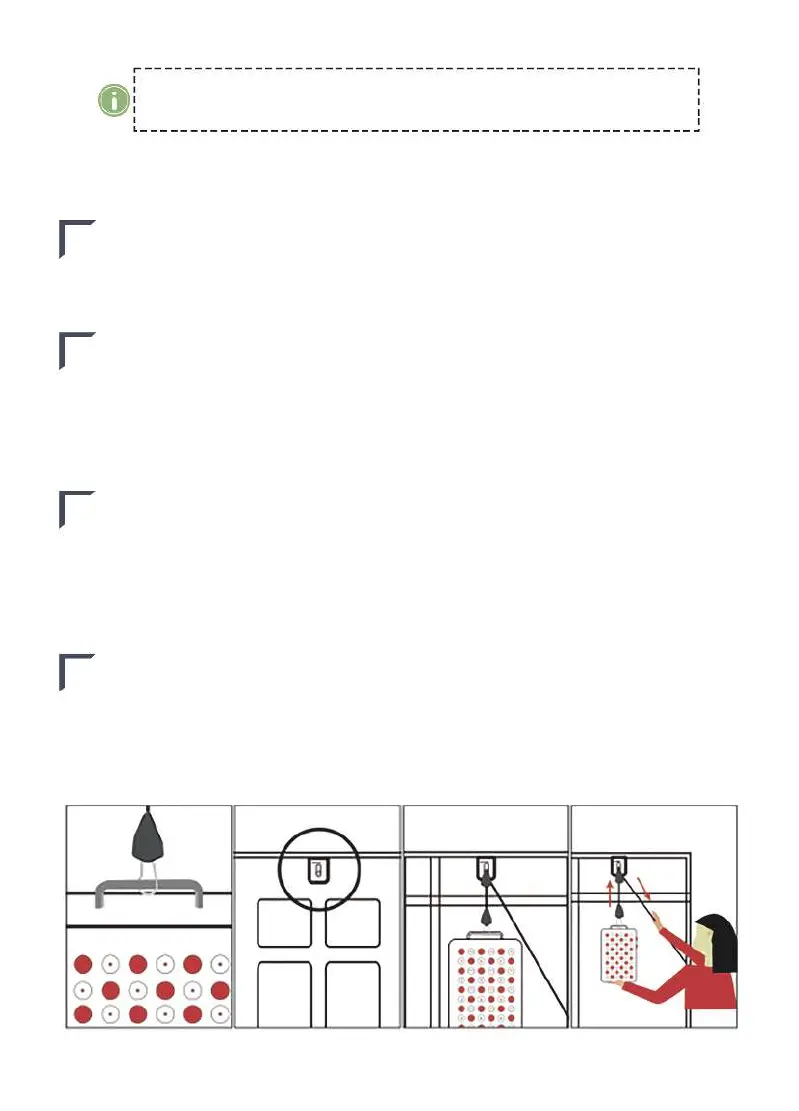
Show as Figure 1 for all devices
STEP 2
STEP 4
STEP 1
Take out all the included hardware, on a flat surface. Connect the handle
with the silver hook and then pull the black rope to adjust the position of
the device.
Raise your device to the height you need,then pull down on the loose cable
while supporting the light with your other hand. To lower your device, push
up the lever on the height adjustment system while supporting the light with
your another hand.
STEP 3
After powering on the device, you need to adjust the time.
Press the forth button on the control panel to add time in 5 minutes
increments up to 25 mintes,
The last press is to check the treatment counts history, press is short toclean
the counts history.
Plug the power cord in the socket, which is located on the side of the
device.Press the
Power(first left) button, both lights on. Press again to turn off
the device.Press the
RED button for only red light. Press the NIR button for
only near-infrared light.
FIGURE.1



 To Next Page