SETTING STEPS & DESCRIPTION
METHOD II
For BQ40 BQ60
STEP 1
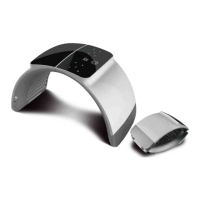
Take out all the included hardware, put the device on a flat surface,
Second, adjust the back stand appropriately.
STEP 2
Put the device on the table, plug the power cord in the socket, turn on
the power.
STEP 3
Then adjust the time. Press the forth button on the control panel to add time
in 5 minutes increments up to 25 minutes.
The last press is to check the treatment counts history, a short press to clean
the counts history.
STEP 4
After powering on the device, press the Power(first left) button, both lights
on. Press the
RED button for only red light, NIR button for only near-infrared
light.
To ensure safety, it is important to note that only red
light should be used without goggles when
illuminating the facial area. High doses of NIR can
potentially be harmful to the eyes, so goggles should
be worn when NIR is applied to the facial area.
Please notice that near infrared light is NOT visible to
the naked eye.



 To Next Page