END-OF-CHARGING
1. Once the battery is charged, unplug the power supply lead of the battery charger from the mains.
2. Disconnect the output lead with black clamp from the vehicle’s earthing or from the negative terminal (-) of the battery.
3. Disconnect the output lead with red clamp from the positive terminal (+) of the battery.
ANALYSING THE BATTERY AND ERROR INDICATORS
The BETA battery chargers are designed to analyse the state of the battery before starting to charge it and to point out any
possible connection anomalies found between the battery charger and the battery to be charged.
Error indications
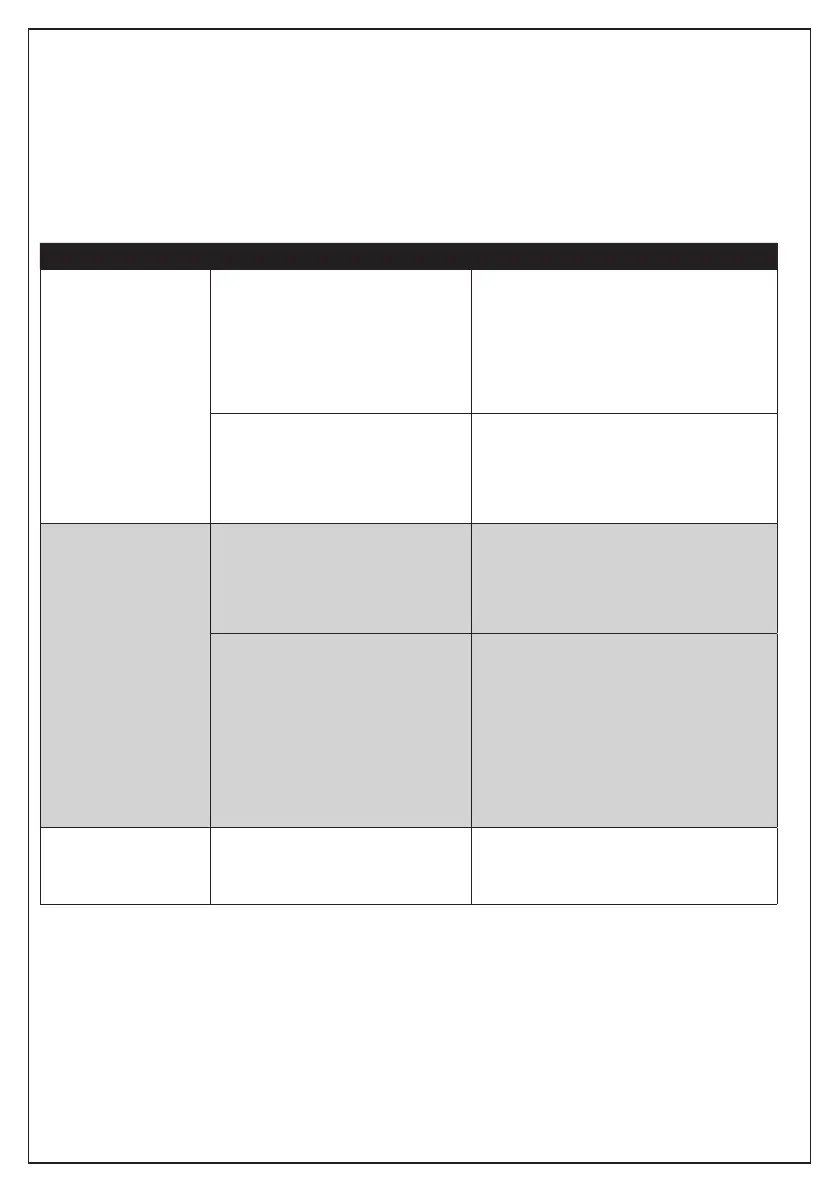
INDICATION CAUSE SOLUTION
A few seconds after you
press the START key,
the FAULT LED (G)
switches on steady and
the acoustic indicator
sounds.
The battery’s voltage is lower than 3 -
Volt.
The battery’s voltage is too high: -
higher than 15 volt (for 12 Volt
batteries) or higher than 7.5 Volt (for
6 Volt batteries)
Short-circuit in the battery or the cell -
of the battery.
The battery could be defective. Contact your
nearest battery service centre.
After pointing out the defect, the battery
charger automatically switches back to “stand-
by” mode.
You are attempting to charge a 12 Volt
battery with the battery charger set on
6 Volt.
Unplug the power supply lead from the mains
to reset the setting. Plug back into the mains
and set again the voltage corresponding to that
of the battery.
Start charging the battery again (see section:
“How to use the battery charger”).
A few seconds after
pressing the START key,
the CHARGING LED (I)
starts to blink.
You are attempting to charge a 6 Volt
battery with the battery charger set on
12 Volt.
Unplug the power supply lead from the mains
to reset the setting. Plug back into the mains
and set again the voltage corresponding to that
of the battery.
Start charging the battery again (see section:
“How to use the battery charger”).
The battery charger is attempting to
recover an exhausted battery.
Unplug the power supply lead from the mains
to reset the setting. Plug back into the mains
and set again the voltage corresponding to that
of the battery.
Press the START key. The CHARGING LED
starts to blink again to point out that the charger
is attempting to recover an exhausted battery.
Wait a few seconds, if the FAULT LED switches
on, it means that the attempt to recover the
battery has failed and the battery needs
replacing.
The REVERSE LED
(F) starts to blink and
the acoustic indicator
sounds.
The clamps of the output leads are
not connected correctly to the battery
terminals.
Unplug the power supply lead from the mains,
position the clamps correctly and plug back into
the mains (see section: “How to use the battery
charger”).
SAFETY DEVICES
The BETA battery chargers are equipped with safety devices to guarantee utmost safety during use and operation of the
appliance.
Full protection against sparks•
Protection against short-circuits•
Voltage compensation•
Temperature compensation•
Protection against overheating•
Protection against reversed polarity•
High protection rating IP65 or IP41 against external agents (based on the model purchased).•



 To Next Page