Need help?
Do you have a question about the Beurer BC 54 and is the answer not in the manual?
Details the items included in the product packaging, such as the monitor and accessories.
Explanation of important symbols for warnings, safety, disposal, and manufacturer identification.
Defines the device's purpose for automatic, non-invasive blood pressure measurement for adults.
Highlights how the device records, classifies, and aids in understanding blood pressure health.
Lists medical conditions or user groups where the device should not be used or requires medical consultation.
Crucial warnings about measurement interpretation, device usage, and potential interference.
Guidelines for device care, protection from environmental factors, and avoiding electromagnetic interference.
Safety measures for inserting, using, and storing batteries, including hazard warnings.
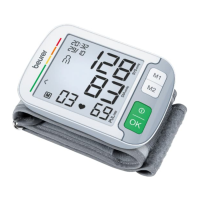
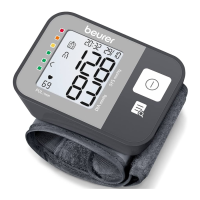
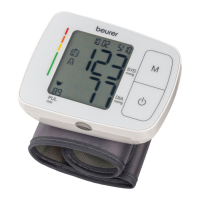
Identifies the main parts of the blood pressure monitor, including display, buttons, and cuff.
Step-by-step guide to inserting batteries and the importance of correct device settings.
Instructions for entering the settings menu to adjust hour format and date.
Recommendations for consistent measurement timing, posture, and pre-measurement rest.
Detailed steps for properly attaching the wrist cuff for accurate readings.
Guidance on body positioning and stillness to ensure accurate blood pressure measurement.
How to choose a user memory and initiate the blood pressure measurement process.
Explanation of the 'Er' error code and steps to resolve measurement issues.
Overview of blood pressure categories defined by the World Health Organization.
Guidance on how the device displays blood pressure risk levels based on WHO standards.
Fundamental information on what blood pressure is and how it is measured.
Information on the device's ability to identify potential irregular heart rhythms.
Procedures for storing, accessing, and viewing measurement history and averages.
How to access average values for overall, morning, and evening measurements.
Steps to review specific past blood pressure and pulse readings.
Instructions for clearing measurement history from a selected user memory.
Details on the necessary smartphone operating system and Bluetooth version for the health app.
Step-by-step guide to connect the device to a smartphone for data transfer.
Options for immediate or later data transfer, and requirements for app activity.
Clarification that the accompanying software is for visualization, not medical diagnosis.
Proper methods for cleaning the blood pressure monitor and its cuff to ensure longevity.
Solutions for initial error messages indicating pulse recording or movement issues.
Guidance for resolving errors related to cuff, battery, data transfer, or device malfunctions.
Instructions for environmentally responsible disposal of the device and its batteries.
Details on measurement accuracy, memory capacity, dimensions, weight, and cuff size.
Information on permissible temperature, humidity, and pressure ranges for operation and storage.
Technical details regarding Bluetooth transfer capabilities and the device's software version.
Information on the device's adherence to European medical device and EMC directives.
Details on the Beurer product warranty period, what it covers, and the terms of service.
Steps for submitting a warranty claim, including necessary documentation and contact information.
Exclusions from warranty coverage, such as normal wear and tear or improper use.
This document provides instructions for the Beurer BC 54 Blood Pressure Monitor, a device designed for the fully automatic, non-invasive measurement of arterial blood pressure and pulse values on the wrist. It is intended for self-measurement by adults in the home environment.
The Beurer BC 54 Blood Pressure Monitor allows users to quickly and easily record their blood pressure and pulse values. The device classifies recorded values according to internationally applicable guidelines and evaluates them graphically. A key feature is its ability to detect irregular heartbeats during measurement, alerting the user via a symbol on the display. The monitor saves recorded measurements and can also display average values from previous measurements. This data can support healthcare service providers in diagnosing and treating blood pressure problems, contributing to the long-term monitoring of the user's health. The device includes two user memories, each with 60 memory spaces, allowing separate storage for two different people. It also supports Bluetooth® data transfer to a smartphone via the "beurer HealthManager" app, available on Apple App Store and Google Play, provided the smartphone meets the system requirements (iOS ≥ 10.0, Android™ ≥ 5.0, Bluetooth® ≥ 4.0).
Initial Setup: Before first use or after replacing batteries, the date and time must be set. This is crucial for saving measurements correctly. The device automatically enters the setup menu when batteries are inserted. If batteries are already inserted, press and hold the START/STOP button for approximately 5 seconds when the device is switched off to access the menu. Settings include hour format, year, month, day, hour, minute, and Bluetooth® data transfer activation.
Attaching the Cuff: The cuff should be placed on an uncovered wrist, ensuring the arm's circulation is not hindered by tight clothing. Position the cuff 1.0-1.5 cm from the heel of your hand, with the palm facing upwards and the device display facing upwards. Fasten the cuff tightly but comfortably with the hook-and-loop fastener. Measurements should always be taken on the arm with the highest blood pressure values, as determined by a doctor.
Correct Posture for Measurement: For accurate readings, sit upright and comfortably, leaning back with your feet flat on the floor and legs uncrossed. Place your arm on a surface, ensuring the device is at heart level. Supporting your elbow on a table or using an object like the storage box can help maintain the correct arm position. Remain still and avoid speaking during the measurement to prevent distortions.
Performing a Measurement: To start, press the START/STOP button. All displays will briefly illuminate, and the measurement will begin automatically after 5 seconds. The cuff inflates, and the measurement is taken during the inflation phase. Once a pulse is detected, the pulse symbol will appear. The systolic pressure, diastolic pressure, and pulse rate will be displayed. If an error (Er) occurs, refer to the troubleshooting section. Press the START/STOP button again to switch off the monitor and store the measurement. If Bluetooth® is activated, data will be transferred to the app after switching off.
Evaluating Results: The device provides a risk indicator based on WHO classifications (Optimal, Normal, High normal, High blood pressure stage 1, 2, or 3). The risk indicator on the display shows the category of your blood pressure values. If values fall into different classifications, the higher category is displayed. The device can also detect cardiac arrhythmia, indicated by a symbol. If this symbol appears frequently, consult a doctor.
Saving, Displaying, and Deleting Measured Values: All successful measurements are stored with date and time. The oldest measurement is overwritten after 60 measurements. To access stored values, select a user memory (M1 or M2) when the device is off, then confirm with START/STOP. The device displays average values (overall, morning, evening) and individual measurements. To delete a user's memory, select the user, and when the average value is displayed, press and hold both M1 and M2 buttons simultaneously for 5 seconds until "CL 00" appears.
Bluetooth® Transfer: To transfer data, ensure Bluetooth® is activated in the device settings. When connecting for the first time, a six-digit PIN code will be displayed on the device and an input field will appear on your smartphone. Enter the code to connect. Data transfer occurs automatically after measurement if Bluetooth® is active. If a connection cannot be established, the Bluetooth® symbol will go out, and the device will switch off after 5 seconds.
Cleaning: Clean the device and cuff carefully using only a slightly damp cloth. Do not use any cleaning agents or solvents. Never submerge the device or cuff in water, as this can cause damage.
Storage: When storing the device and cuff, avoid placing heavy objects on them. If the device will not be used for a prolonged period, remove the batteries. Protect the device from impacts, moisture, dirt, extreme temperature fluctuations, and direct sunlight.
Troubleshooting: The manual provides error messages (Er1-Er8) with possible causes and solutions, such as repositioning the cuff, remaining still during measurement, or replacing batteries. If problems persist, contact customer service.
Disposal: Do not dispose of the device or batteries with household waste. Dispose of the unit at a suitable local collection or recycling point in accordance with EC Directive – WEEE. Batteries containing hazardous substances (lead, cadmium, mercury) are subject to special waste treatment.
Repair and Warranty: Do not attempt to repair or adjust the device yourself, as this voids the warranty and cannot guarantee proper operation. Repairs must be carried out by Customer Services or authorized suppliers. The worldwide warranty period is 5 years, commencing from the purchase date, and applies to products used exclusively for personal purposes. Warranty claims require a copy of the invoice/purchase receipt and the original product.
 General
| Type | Automatic |
|---|---|
| Cuff size | 13.5 - 21.5 cm |
| Control type | Buttons |
| Memory slots | 2 |
| Certification | CE |
| Compatibility | iOs 10.0, Android 5.0 |
| Product color | Black |
| Speaking function | No |
| Placement supported | Wrist |
| Pulse rate measuring | Yes |
| Battery type | AAA |
| Battery voltage | 1.5 V |
| Display type | - |
| Package depth | 124 mm |
| Package width | 96 mm |
| Package height | 109 mm |
| Package weight | 381.8 g |
 Weight and Dimensions
| Depth | 80 mm |
|---|---|
| Width | 69 mm |
| Height | 68 mm |
| Weight | 220 g |

 To Next Page