17
If the values between the two arms are significantly
different, please consult your doctor to determine
which arm should be used for the measurement.
CAUTION:
Only use original Beurer cuffs with this device. The
included cuff is suitable for an arm circumference of
8.6 – 17.3 inches (22 – 44 cm). For larger arm circum-
ferences, contact customer service to order a lar-
ger cuff.
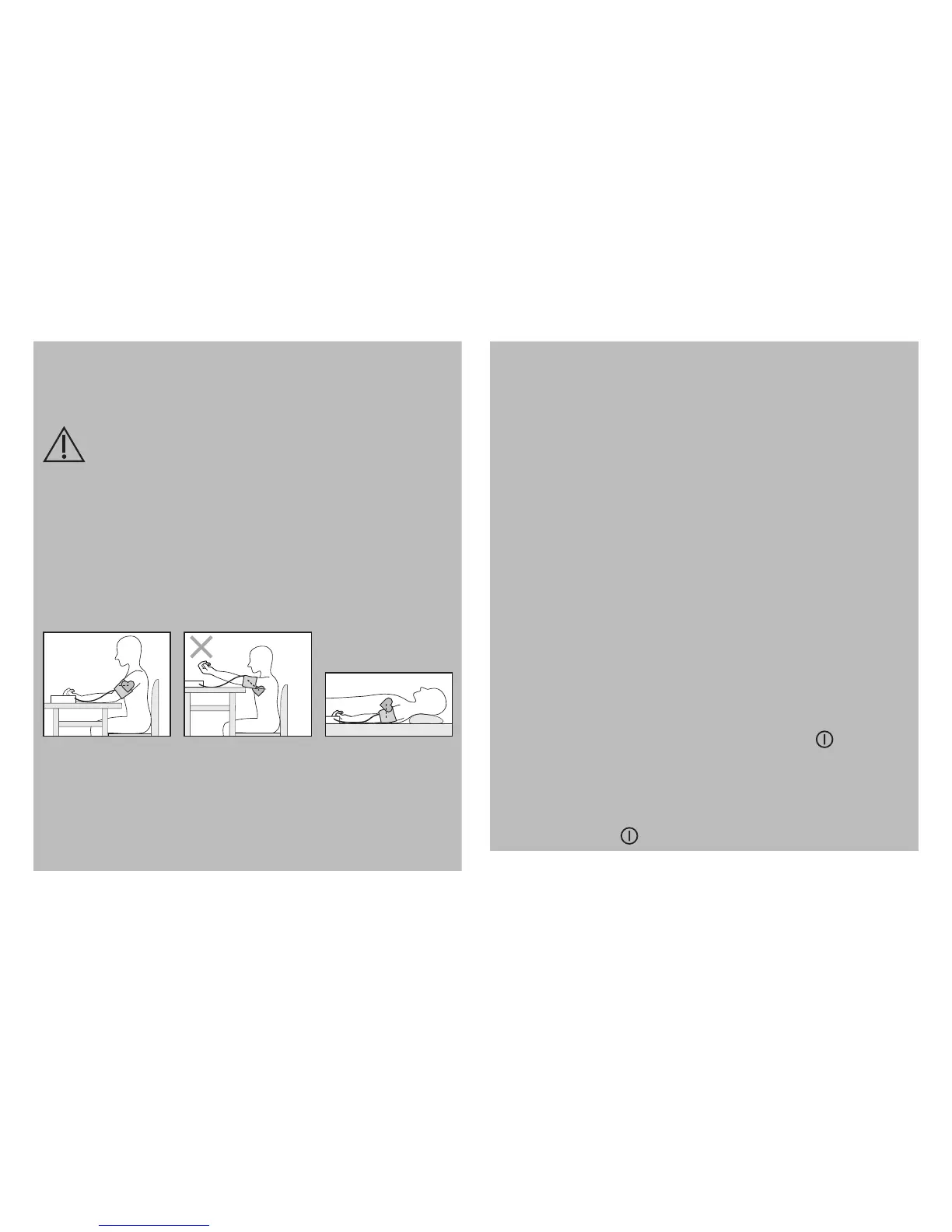
Correct Posture:
•
Rest for at least five minutes before each meas-
urement.
•
Perform the measurement either sitting or lying
down. Always make sure that the cuff is level with
your heart.
•
To perform a measurement, sit comfortably with
your arms and back supported. Do not cross your
legs and place your feet flat on the floor.
•
Keep still during the measurement and do not talk.
•
R
elax your arm and the palm of your hand.
Select a User Memory
This unit has four user numbers, each with 30 stor-
age slots each.
1. Press the SET Button and select a user memory
from 1 to 4 using the +/- Buttons.
2. Confirm by pressing the Start/Stop Button or just
wait for three seconds to set the user number.
Performing a Measurement
1. With the cuff attached properly and in a correct
posture, press the Start/Stop button . All LCD
Display elements will briefly display and measure
-
ment will begin after about three seconds. To can-
cel a measurement at any time, press the Start/
Stop Button .



 To Next Page