28
8. Usage
The thermo hygrometer has a standard mode and a timer mode.
8.1 Standard mode
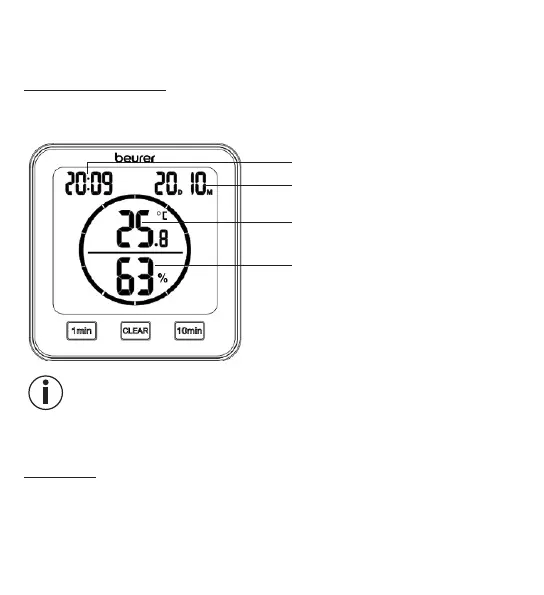
If you do not press any buttons on the thermo hygrometer, the standard mode is
automatically shown on the display.
Time
Date (D = day, M = month)
Room temperature
Relative humidity
Note
After initial use, it may take 10 minutes until the correct temperature and humidity
are displayed.
8.2 Timer
You can also set a timer of up to 99 minutes on the thermo hygrometer.
1.
In order to start the timer, set your desired timer duration using the [1 min]
button and the [10 min] button. The set timer duration appears in the centre
of the display. If you do not press any buttons for 3 seconds, the timer starts


 To Next Page