CONNECTING TO A TV
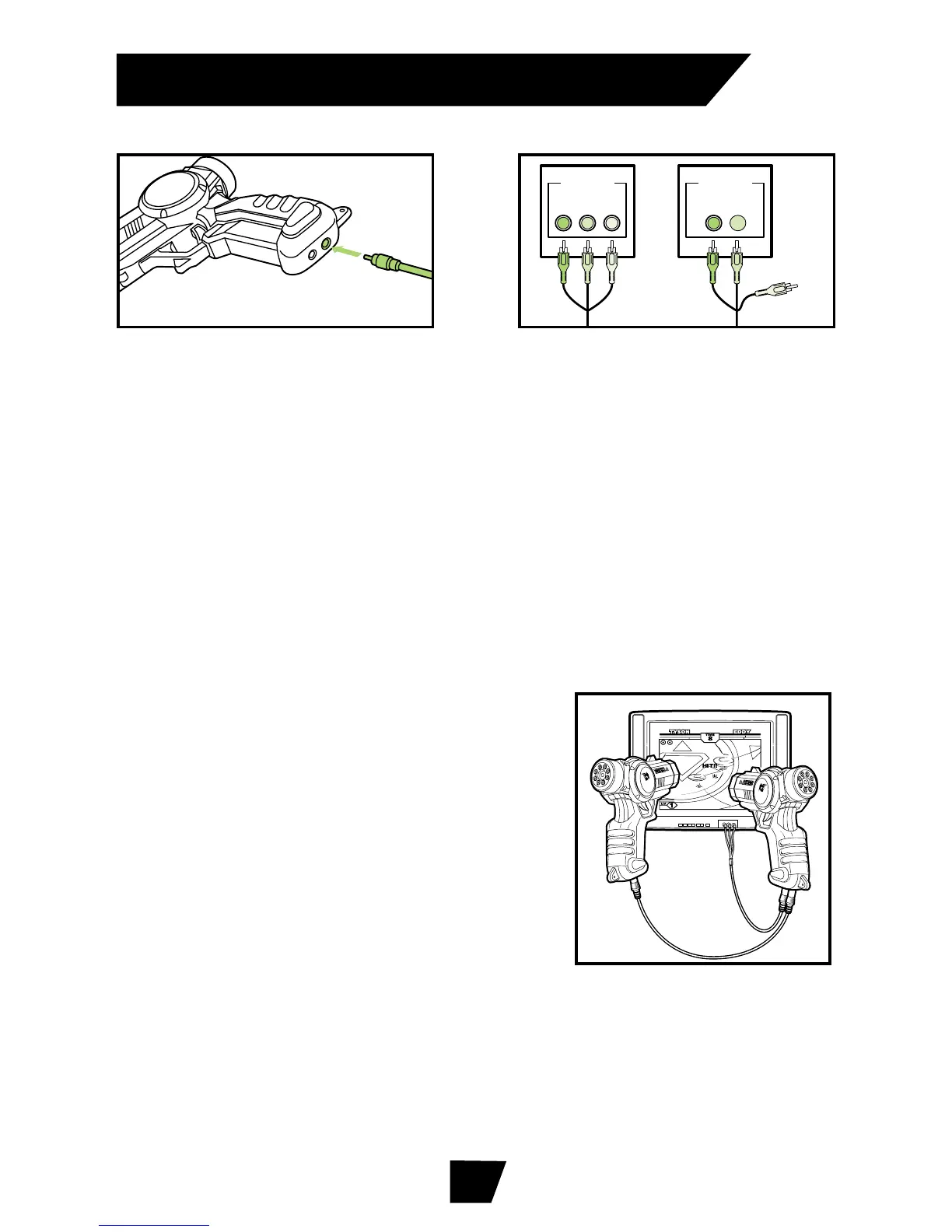
1. Insert the single connector into the base of the main unit.
2. Insert the tri-colored connectors into the TV. Make sure that
you match the colors of the connectors (white=audio left,
red=audio right and yellow=video) to the colors of the plugs
that are on your TV.
3. You can connect the main unit through a VCR that is already
attached to your TV if your TV does not have the tri-colored
plugs. Please refer to your VCR manual for proper instructions
on doing this.
Note:
2-Player Connector Cable not included. See end of
Instruction Booklet for Order Form.
(Other main units sold separately.)
After the first main unit is connected to the
TV, plug one end of the 2-Player Connector
Cable into the base of the first main unit,
and connect the other end of the 2-Player
Connector Cable into the base of the
second main unit.
Note:
Both main units must be powered
off before the 2-Player Connector Cable is
connected. You do not need to attach the AV cable on the second
unit.
Note:
Do not disconnect the 2-Player Connector Cable during play.
If it becomes disconnected, the game will freeze and your current
game will be lost. If this happens, turn both units off, reconnect the
2-Player Connector Cable, and turn the power to both main units
back on.
Connector to Main Unit Connector to TV
4
Connecting 2 Main Units for 2-Player Gaming


 To Next Page
 Loading...