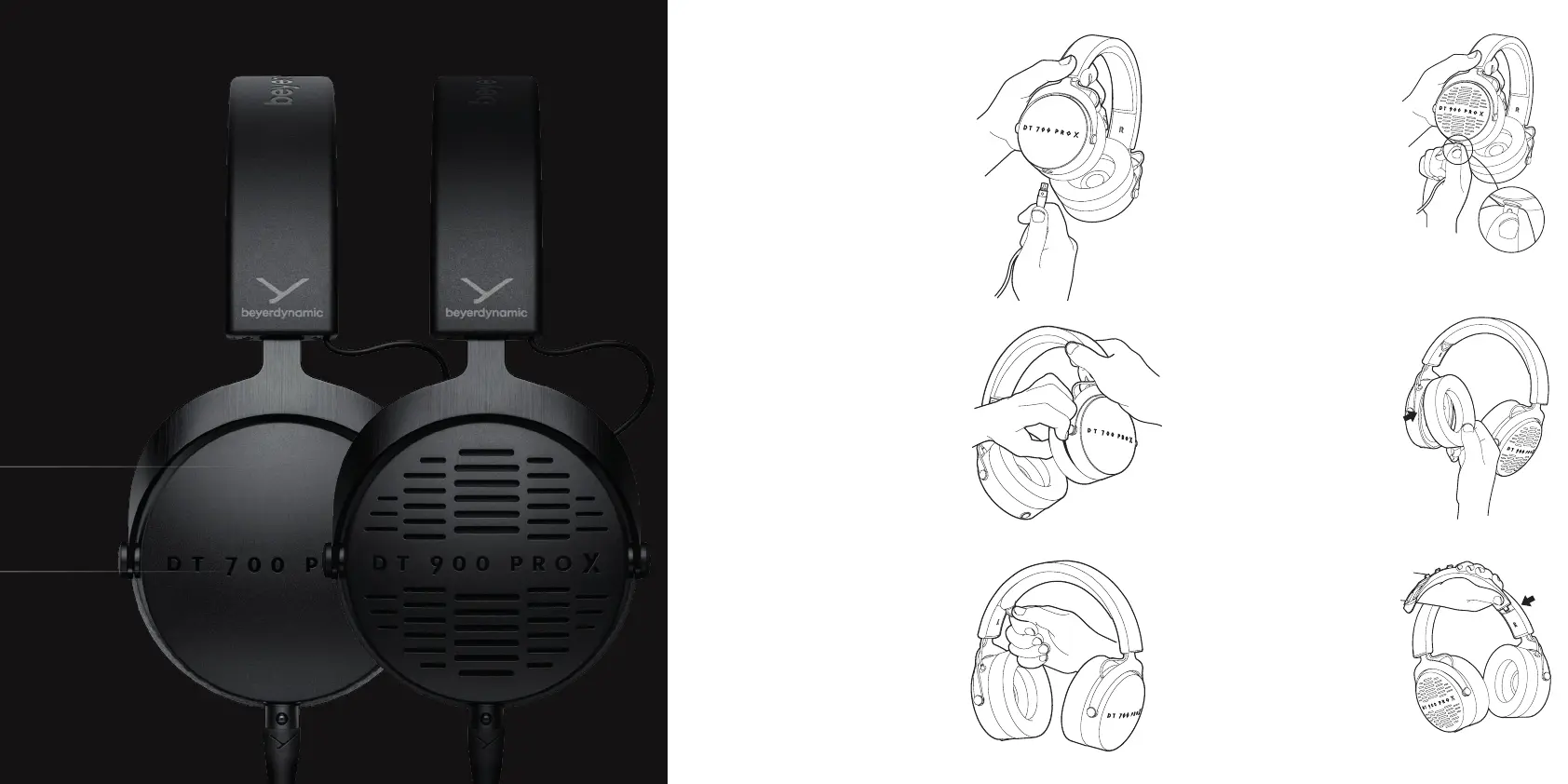
The lockable connecting cable is
fitted with a 3-pin mini XLR cable
connector to the headphones. For
correct assembly, the small release
button of the cable mu face to
the outter site of the headphones.
When connecting the cable, make
sure that the cable connector locks
in place of the ear cup.
To pull of the headband pad,
please carefully pull on the
silicon rap until all hooks
of the headband pad are
released from the headband.
HOW TO
CONNECT
THE CABLE
HOW TO
CHANGE
THE HEAD
BAND PAD
ACCESSORIES AND SPARE PARTS
Accessories and replacement
equipment can be found at:
www.beyerdynamic.com/pro-x
SUPPLIED
ACCESSORIES
1 x raight cable, 3 m
1 x raight cable, 1.8 m
1 x drawring bag
To pull of the earpad please
carefully pull apa the gap
between housing and ear
pads using your fingeips
or a narrow blunt object.
HOW TO
CHANGE
THE EAR
PADS
When you want to
change the cable,
please press the small
button for release and
simultaneously pull o
the cable connector
from the headphones.
To put on the earpad
please make sure that
the snap-in nose of
the ear pad sits in the
right place. Then
press gently with the
palm of your hand
again the ear pads until
the ring snaps into place.
To put on the head-
band pad please
make sure that the
snap-in nose on the
right side sits in the
right place. Then press
gently the pad into the
headband until the
hooks snap into place.
THANK YOU FOR
CHOOSING THE PRO X
STUDIO HEADPHONES.
Please take some time to read
carefully through this document.
If you have technical problems
while using the headphones or
need fuher guidance, please
visit our FAQ website at
suppo.beyerdynamic.com
ENJOY THE SOUND!
Your beyerdynamic
PRO X Team












 To Previous Page