ITALIANO
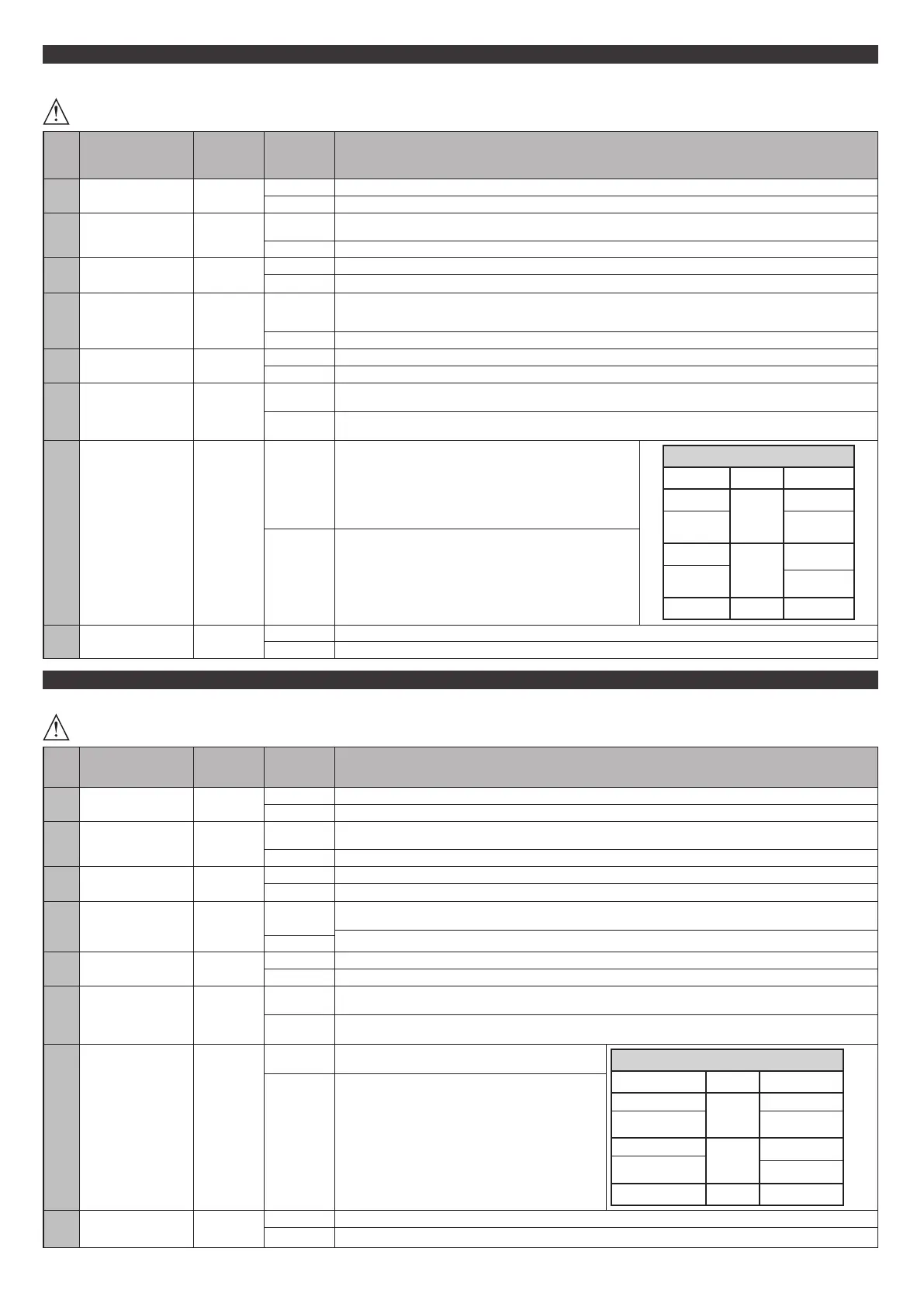
TABELLA LOGICHE
Ogni modica di parametri/logiche deve essere confermata dalla pressione del pulsante > 5s
DIP Logica Default
Barrare il
settaggio
eseguito
Descrizione
1
Tempo chiusura
automatica
OFF
ON Attiva la chiusura automatica (con DIP2=ON programmazione tempo chiusura automatica)
OFF Logica non attiva (con DIP2=ON programmazione tempo di lavoro)
2
Abilita
programmazione
parametri
OFF
ON
Programmazione parametri abilitata
(con DIP1=OFF programmazione tempo di lavoro, con DIP 1= ON programmazione tempo chisura automatica)
OFF Funzionamento normale
3
Attiva
autoapprendimento
radiotrasmettitori
OFF
ON Abilita la memorizzazione via radio dei trasmettitori REPLAY, CLONI. Fig. C
OFF Disabilita la memorizzazione via radio dei trasmettitori
4
Funzione uomo
presente
OFF
ON
Funzionamento a uomo presente: la manovra continua nchè viene mantenuta la pressione sul tasto di comando.
(OPEN U.P. / CLOSE U.P.). L’ingresso tra i morsetti 13-15 funziona com OPEN U.P. L’ingresso tra i morsetti 12-15 funziona
come CLOSE U.P.
OFF Funzionamento impulsi secondo la logica 2 o 4 passi.
5
Tipo costa OFF
ON Ingresso 12 costa vericata 8k2 (Fig. A2)
OFF Ingresso 12 costa contatto N.C. (Fig. A3)
6
Fotocellule
in chiusura
OFF
ON
In caso di oscuramento è escluso il funzionamento della fotocellula in apertura. In fase di chiusura, inver-
te immediatamente.
OFF
In caso di oscuramento, le fotocellule sono attive sia in apertura che in chiusura. Un oscuramento della fotocellula
in chiusura, inverte il moto solo dopo il disimpegno della fotocellula.
7
Logica 2 passi OFF
ON
Gli ingressi Start funzionano con la logica 2 passi. Ad ogni impul-
so inverte il movimento.
mov. passo passo
2 PASSI 4 PASSI
CHIUSA
APRE
APRE
IN
CHIUSURA
STOP
APERTA
CHIUDE
CHIUDE
IN
APERTURA
STOP + TCA
DOPO STOP
APRE APRE
OFF Gli ingressi Start funzionano con la logica 4 passi.
8
OPEN/START OFF
ON L’ingresso tra i due morsetti 14-15 funziona come OPEN.
OFF L’ingresso tra i due morsetti 14-15 funziona come START.
ENGLISH
TABLE LOGICS
All parameter/logic modications must be conrmed by pressing the > 5s button
DIP Logic Default
Cross out
setting
used
Description
1
Automatic
closure time
OFF
ON Activates the automatic closure (with DIP2=ON automatic closure time programming)
OFF Logic not active (with DIP2=ON working time programming)
2
Enables
parameter
programming
OFF
ON
Parameters programming enabled
(with DIP1=OFF working time programming, with DIP 1=ON automatic closure time programming)
OFF Normal operation
3
Activates
self-learning of
radio transmitters
OFF
ON Enables the memorisation via radio of the transmitters REPLAY, CLONI. Fig. C
OFF Disables the memorisation via radio of the transmitters
4
Person present
function
OFF
ON
Operation with person present: the manoeuvre continues as long as the control button is pressed. (OPEN U.P. / CLOSE U.P.).
The input between the 13-15 terminals operates as OPEN U.P. The input between the 12-15 terminals operates as CLOSE U.P.
Pulse operation, according to 2- or 4-step logic.
OFF
5
Edge type OFF
ON Veried edge input 12 8k2 (Fig. A2)
OFF N.C. contact edge input 12 (Fig. A3)
6
Photocells during
closing
OFF
ON
In caso di oscuramento è escluso il funzionamento della fotocellula in apertura. In fase di chiusura, inver-
te immediatamente.
OFF
In caso di oscuramento, le fotocellule sono attive sia in apertura che in chiusura. Un oscuramento della fotocellula
in chiusura, inverte il moto solo dopo il disimpegno della fotocellula.
7
2 step logic OFF
ON
The Start inputs operate with the 2 step logic. With every
impulse, the movement is reversed.
step-by-step mov.
2 STEP 4 STEP
CLOSED
OPENS
OPENS
DURING CLOSING
STOPS
OPEN
CLOSES
CLOSES
DURING OPENING
STOP + TCA
AFTER STOP
OPENS OPENS
OFF The Start inputs operate with the 4 step logic.
8
OPEN/START OFF
ON Input between terminals 14-15 works as OPEN.
OFF Input between terminals 14-15 works as START.
22 - LUNA AC B
D814145 0AA96_00


 To Next Page