16
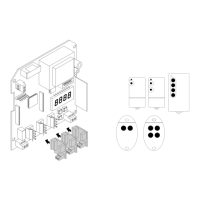
- RTD-CA - Ver. 02
D811373_02
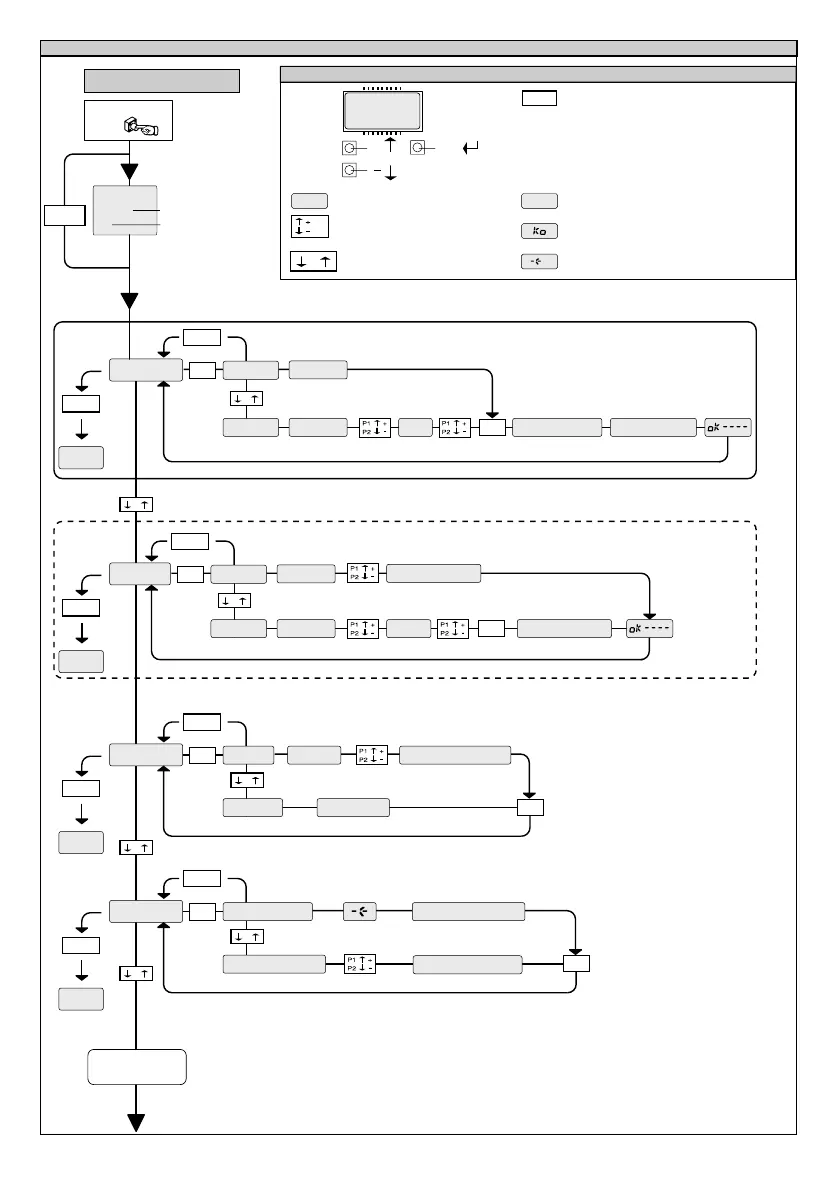
Fig. A
ADD
+/-
-
+
+/-
END
aut.
man. pos.
hidden button
OK
out1 . .4
out1 . .4
delete
+/-
-
+
-
+
-
+
+/-
END
code
POS. r0001 . . . t618
database confirm
OK
OK
OK
verifiy
+/-
-
+
-
+
+/-
END
read code
01 t1 . . . 2048 t4
01 t1 . . . 2048 t4
scroll archive
OK
OK
FOLLOWING
MENUS FIG. B
desired button
add
+/-
-
+
+/-
END
aut.
man. pos.
activate code
attiva codice
OK
out1 . .4
out1 . .4
OK
2 -ACCESS CONTROL OUT
1 - RADIO RECEIVER OUT
OK
Press the OK key
BFT
RTD1.0
00
OK
ACCESS TO MENUS
Software version
No. radio control devices
memorised
LEGENDA
[ 00 ]
Preset value
Parameter increment/reduction
or ON/OFF commutation
Menu scrolling
(+ = preceding - = following)
Message: Programming in progress
PRG
+/-
-
+
/ON
/OFF
Message: KO! (value or function error)
Simultaneously press the + and - keys.
Simultaneous pressure of the + and – keys
allows you to exit the active menu and return
to the preceding menu; if this takes place at
the main menu level, programming is exited
and the display switched off.
The modifications made are only confirmed if
the OK key is subsequently pressed.
Message: “Wait” (enter value or function)
+
OK
8888


 To Next Page