EN
USER MANUAL ATOM
40
4.2.3 Turning the Bicycle Lights On and Off.
Holding down the (-) button for 3 seconds will turn the backlighting of the display panel on and off. The lights
will also be switched on and off in those models equipped with a battery-powered light system. At this moment,
the lights on indicator will appear on the screen:
3 sec
4.2.4 Viewing Secondary Information on the Screen.
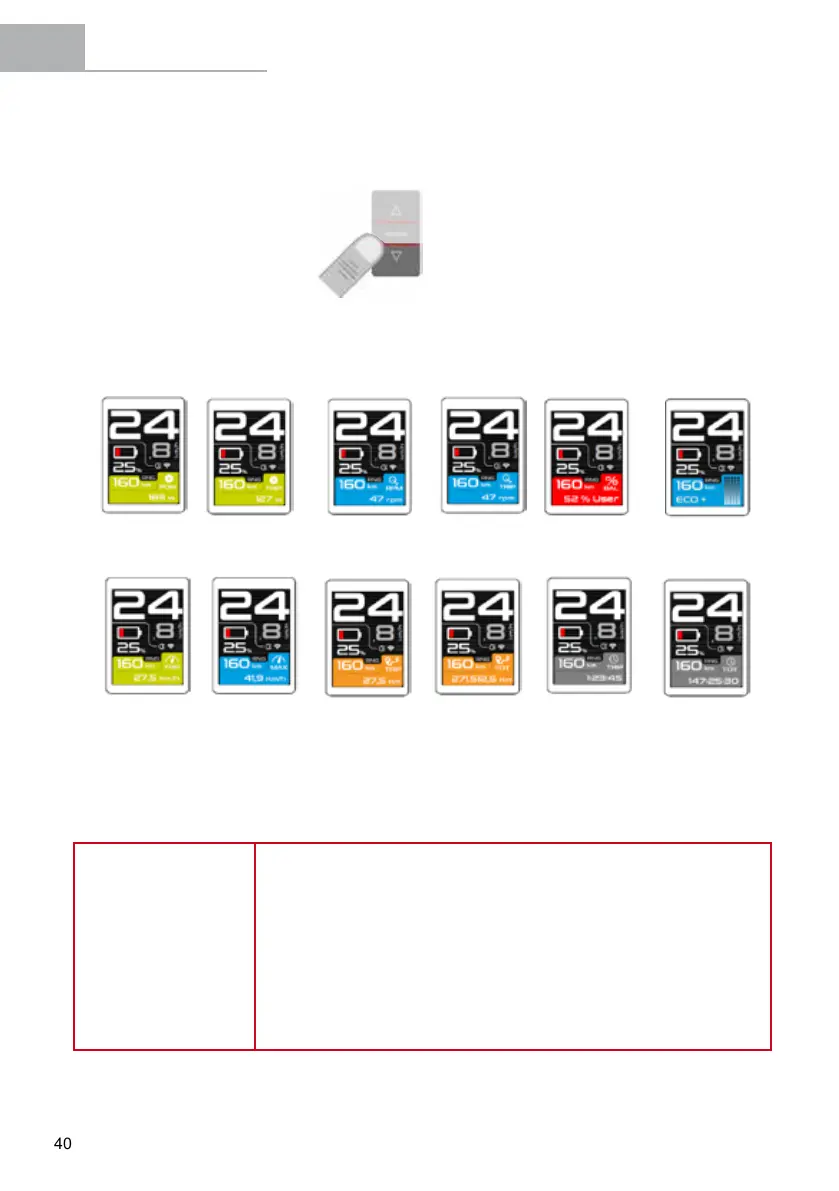
The display panel's screen allows the user to view various useful information. The information on the screen
changes when you press the POWER button according to the previous selection made in the "Settings" menu:
4.2.5 Battery Level Indicator.
The battery level indicator shows the estimated remaining battery capacity.
NOTE
In order to increase the life of the battery and prevent a full discharge which
may damage it, the assistance modes are limited based on the state of
charge of the battery:
• Battery with charge above 20%: All assistance modes are available.
• Battery with charge of 10-20%: 100%/BOOST assistance mode is
not available.
• Battery with charge of 5-10%: Only 30% (ECO) and 0% (NO ASSIST)
assistance modes are available.
• Battery with charge of 1-5%: No pedal assistance mode is available
(0%/NO ASSIST). Only the lights can be turned on.
Instantaneous
power (W)
Trip power (W)
Instantaneous
cadence (rpm)
Trip cadence
(rpm)
Instantaneous motor-
user power balance
(%)
Instantaneous
consumption
assistance mode
Average trip speed
(km/h)
Maximum speed
(km/h)
Trip distance
(km)
Total distance
(km)
Trip time
(hh:mm:ss)
Total time
(hh:mm:ss)


 To Next Page