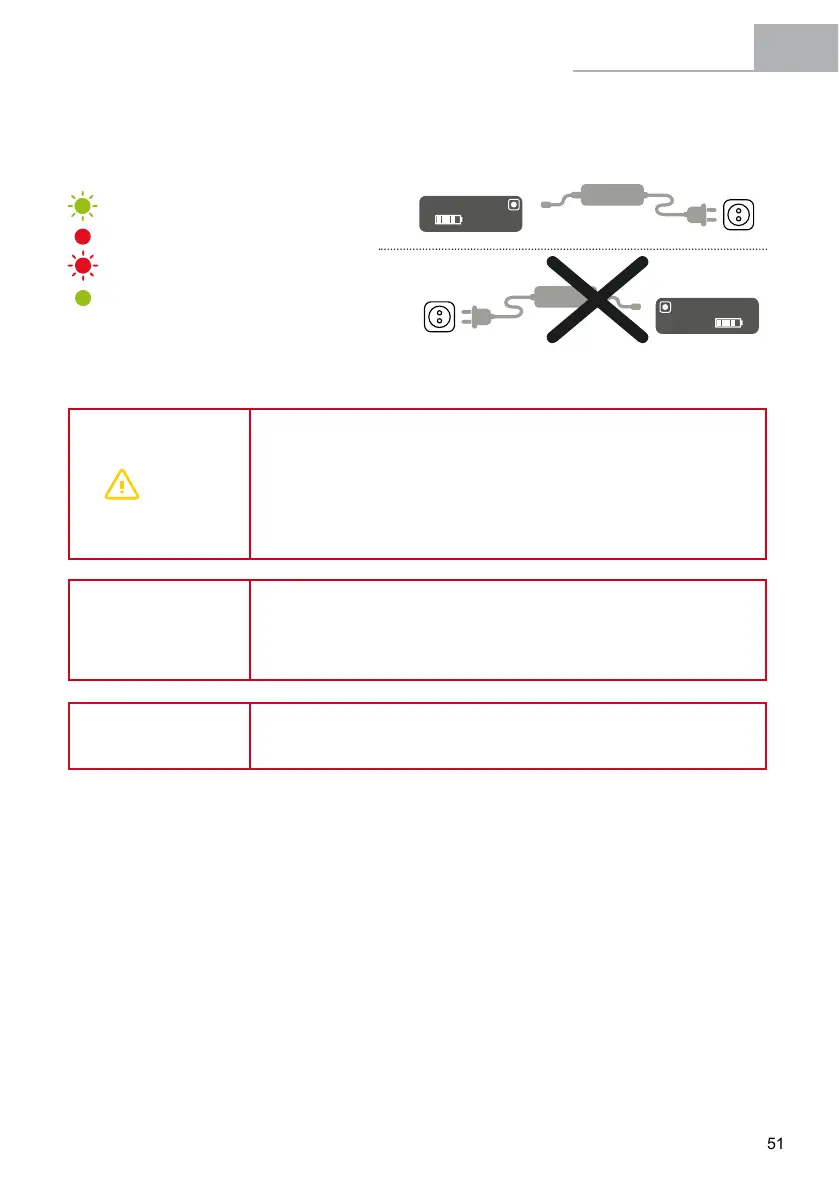
Charger
Charger
Battery port
External port
External port
Battery port
1º
1º
2º
2º
STANDBY
CHARGING
CHARGING PROBLEM
100% CHARGED
WARNING
• Never charge or use a damaged battery.
• Be careful not to touch the charger during the charging process. It may
be hot, especially in high ambient temperatures.
• If a fault occurs while the battery is being charged, remove the charger's
power plug from the socket and wait for the battery to cool down.
• Never touch the power plug, charging plug or contacts with wet hands.
• Make sure that there is no foreign matter on the battery's contacts
before placing it on the bicycle.
ATTENTION
• Do not connect the charger's power plug to the battery or bicycle's
charging port if it is wet or damp. Make sure that you only connect the
power plug when the battery or bicycle's charging port is completely dry.
• Do not apply excessive force on the power plug or pull the cable with
the power plug connected to the battery.
NOTE
• Stopping the battery charging process does not damage the battery.
• The battery achieves its maximum service life in ambient conditions
of 15-25 °C.
5.7 Checking the Charge Level of the Battery
ThebatteryhasanSOCbatterywithascalewith5LEDlightsindicatingthestateofcharge.Ifyoubriey
press the SOC button, the LEDs that are lit will give you an accurate reading of the current charge level.
This information supplements the reading obtained on the display panel.
A) 5 LEDs lit | Charge is 91-100% of capacity
B) 4 LEDs lit | Charge is 71-90% of capacity
C) 3 LEDs lit | Charge is 51-70% of capacity
D) 2 LEDs lit | Charge is 31-50% of capacity
E) 1 LED lit | Charge is 11-30% of capacity
F) 0 LEDs lit
| Charge is 0-10% of capacity


 To Next Page